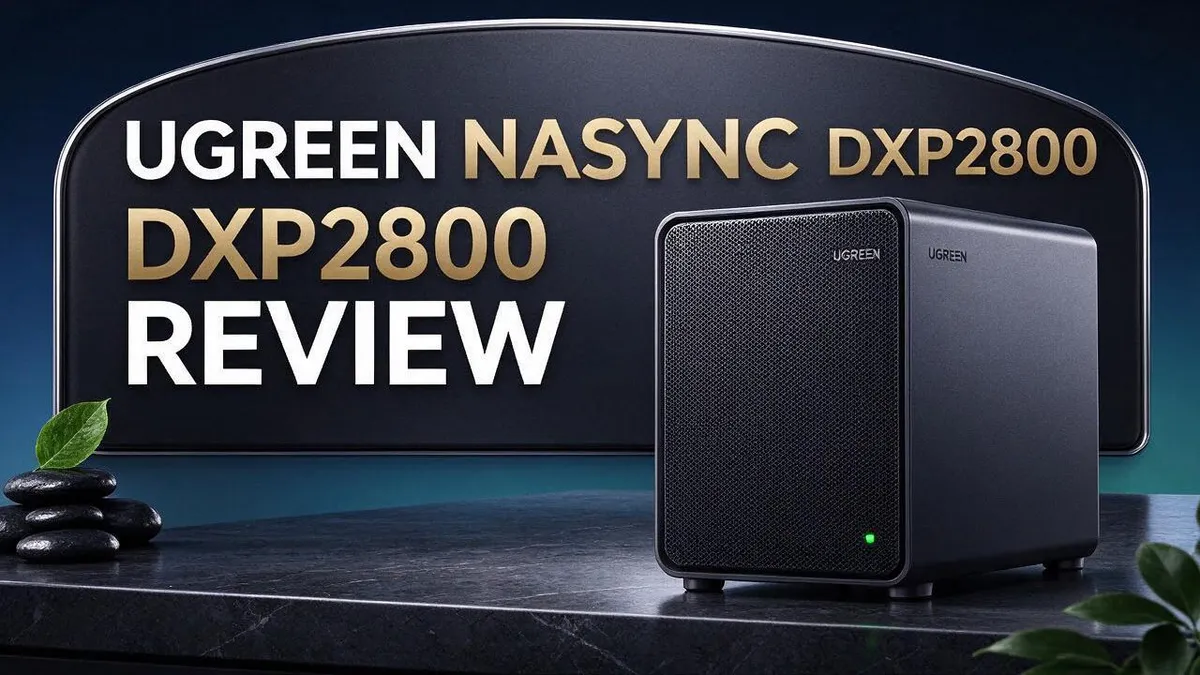
Ugreen NASync DXP2800 Review: Specs, Performance, Software and Verdict
Need a home for your photos, videos, and backups? The UGREEN NASync DXP2800 could be the smart pick you need. This compact network storage device keeps your files in one place.
Under the hood, it runs an Intel N100 processor with four cores. It starts with 8GB of DDR5 memory, and you can expand that to 16GB. Two bays fit 3.5 inch or 2.5 inch drives.
The unit ships diskless, so you add your own drives. A 2.5GbE port keeps transfers quick.
Many owners like the extras. The vendor promises no monthly fees, 4K media streaming, and AI powered photo albums. One reviewer reported smooth performance after two months of daily use.
Still, it helps to know the downsides. Synology offers more mature software, more apps, and Active Backup, which this model lacks. In this review, we explore how the DXP2800 performs and who it suits best.
In a Nutshell
Here is a quick look at what this NAS brings to your home or office.
- Two flexible drive bays: You can fit 3.5 inch or 2.5 inch drives, so you can choose the mix that suits your storage goals.
- Fast network speeds: The 2.5GbE port moves large video and photo files much quicker than standard gigabit networks. Your backups finish in less time.
- Extra speed options: Two M.2 NVMe slots let you add fast SSD storage for apps, cache, or files you use every day.
- Memory upgrade path: The 8GB of DDR5 RAM can expand to 16GB, which helps when you run more tasks at once.
- Test drive time: The vendor offers a 14-day trial, so you can check the unit with your own files first.
- Software gap: Synology offers more mature software, more apps, and Active Backup, which this model lacks. If app variety matters most to you, compare both options before you decide.
Overall, this NAS suits people who want solid hardware and a simple setup at home.
Hardware and Build Quality

- 【Advanced Home Data & Media Hub】For advanced home users who need phone backup, file storage, and...
- 【Built for Creators, Media Servers & Advanced Apps】Powered by the Intel N100 Quad-Core CPU, 8GB DDR5 RAM...
Last update on 2026-11-21 / Affiliate links / Images from Amazon Product Advertising API
Build quality matters a lot for a device that runs day and night. The DXP2800 takes a practical approach, so it fits neatly on a desk or shelf. Its size suits most homes and small offices.
Your final build depends partly on the drives you install. Since the unit ships without drives, you control the parts that do the real work. Choose drives made for constant use.
Drive type shapes your experience. SATA hard drives give you large space for photo libraries and video archives. SATA SSDs bring quicker access for files you open often.
Heat and noise deserve a close look. Small storage units can warm up under heavy loads, especially with fast drives inside. Place the unit where air can flow freely around the vents.
Noise matters too, especially in a bedroom or open office. Test the fan sound during your trial period. Listen closely during large file transfers, since that is when the drives work hardest.
Power protection is another piece of the build puzzle. Power dips can damage drives or corrupt files. A small uninterruptible power supply keeps the unit running long enough to shut down safely.
Cable layout also affects long term care. Leave room at the back for network and power cables. A tidy setup makes it easier to reach the drive bays later.
Setup takes some time, so set aside an afternoon for the first install. Read the included guide first. Keep screws and small parts in one safe spot. Work on a clean, flat surface.
Good hardware habits pay off over time. Check drive health every few months through the system tools. Replace aging drives before they fail, not after. That simple habit keeps your files safe.
Drive Bays and Storage Expansion
Your storage needs will likely grow over time. Start with one drive, then add a second when your files pile up.
Think about the job each bay will do. Many owners keep their main library in one bay. They use the other bay for a copy of key folders.
A copy inside the same box does not protect you from fire or theft. Save a second copy somewhere else too.
Mixing drive sizes needs some thought. Check how the system uses space before you combine a large drive with a small one.
Look for CMR on the drive spec sheet. Some hard drives use a recording method that slows down during heavy writes. Choose drives that list CMR recording.
Drive warranties differ from brand to brand. Keep a note of the warranty length for each drive. This helps you act fast if one fails.
Label each drive with its bay number. Clear labels make swaps simple. You will thank yourself during a late night repair.
Consider how fast you plan to fill space. Family photos and home videos take up room quickly. A short list of your biggest files helps you pick the right size.
Look for drive health checks in the system settings. Regular checks catch problems early. Schedule them once a month.
Keep spare space free on each drive. A drive that stays nearly full can slow down over time. Aim to leave some room for new files.
Set a yearly reminder to review your storage. Drive sizes and models change often, so a yearly check helps you choose wisely next time.
Power down before you open the bays. This simple habit protects your drives and your data.
Test your files after each change. Open a few photos and videos from each drive. This quick check confirms that everything reads well.
Smart planning in the bays saves time later. Start small, label everything, and keep a second copy elsewhere.
Network Speed and Performance
Speed on paper is only half the story. Your real transfer rate depends on the whole chain, from the cable to the device on the other end.
Cable quality matters more than many people expect. A 2.5GbE port needs Cat5e or better cable to run at full speed. An older cable may quietly drop the connection to gigabit.
Check your switch or router too. If your network switch only supports gigabit, the NAS will fall back to 1GbE. Look for a 2.5GbE switch if you want the full benefit.
Your computer also sets the limit. A laptop with a gigabit adapter will never reach 2.5GbE speeds, no matter what the NAS can do. Wireless connections usually run slower than wired ones, so use a cable for big copies when you can.
The Intel N100 processor handles several users at once. Light file sharing and media streaming usually stay smooth when two or three people connect together. Heavy jobs like encrypted folders or large background tasks may slow response times a bit.
Think about what you copy most. Many small files move slower than one large file because each file adds a short delay. Photo libraries full of tiny thumbnails or project folders with thousands of documents may feel slower than a single big video.
Background tasks change speed. Backups, indexing, or antivirus scans on the NAS can slow down file access. Schedule heavy jobs for night time so your daytime copies stay quick.
Plan for busy moments. When several devices stream at once, the shared bandwidth gets split between them. Editing a large video on one laptop while someone else streams a movie may cause small stutters.
Test your own setup. Copy a large folder, then copy a folder of small files. Compare the results with your daily workflow. The numbers tell you more than any spec sheet.
Top 3 Alternatives
Synology DS224+

- Your Personal Streaming Server - Build your own Netflix-style media library and stream 4K movies, shows and...
- Create Your Own Cloud - Store your entire photo, video and music collection; access from anywhere with fast...

Last update on 2026-11-21 / Affiliate links / Images from Amazon Product Advertising API
The Synology DS224+ is a great pick for home users who want simple setup. Its clean interface guides you through each step.
Most people finish setup in under an hour. The unit also offers strong backup tools for family photos, videos, and important documents.
Hardware transcoding helps you stream movies smoothly on TVs and phones.
QNAP TS-233

- ARM Cortex-A55 quad-core 2.0GHz processor with 2 GB DDR4 RAM
- Budget-friendly Home NAS for file storage and multimedia streaming
Last update on 2026-11-21 / Affiliate links / Images from Amazon Product Advertising API
The QNAP TS-233 suits people who want more apps and features. It includes a friendly web dashboard that makes daily tasks easy to manage.
You can add many tools from the app center. This flexibility fits small offices and home studios well.
Expect good speeds for file sharing and media storage.
TerraMaster F2-223

- High-Speed Data Transmission: The D4-320 hard drive enclosure (a DAS, NOT a NAS) utilizes the USB 3.2 Gen...
- Plug-and-Play Compatibility: The D4-320 USB storage supports 4 individual disks (NO RAID function), and is...
Last update on 2026-11-21 / Affiliate links / Images from Amazon Product Advertising API
The TerraMaster F2-223 is a budget-friendly choice for beginners. It has a compact body with two drive bays that save desk space.
Setup takes only a few steps. It supports common file sharing protocols, so your computers and phones connect without fuss.
Pick this model when you need basic storage without extra complexity.
Software, Apps and Backup
Software decides how much you enjoy a NAS every day. The DXP2800 runs UGREEN’s own system, so the menus may feel new. Spend time clicking through each screen before you move your files.
Apps matter as much as storage. A Reddit user notes that Synology has more mature software and a bigger app library. If you want one box for many jobs, check the app list first.
Make a short list of the apps you need most. Confirm each one runs on the system before you rely on it. This step saves time later.
Create separate user accounts for each family member or coworker. Give each person access only to the folders they need. This keeps shared files tidy and private.
The vendor promotes AI-powered photo albums. These can help you browse large photo libraries. Use the 14-day trial to test them and see if they fit your habits.
Backup needs more planning. The DXP2800 lacks Active Backup, a tool that Synology users often count on. You can still protect your data, but you will need to build the plan yourself.
Follow a simple rule. Keep three copies of important files. Store them on two different types of media. Keep one copy in another location.
Look for sync or copy tools in the system settings. Send key folders to an external drive or another computer on a schedule. Check the logs now and then, because a backup that never runs does not help you.
Remote access needs care. Phone apps let you reach your files when you travel. Use strong passwords and a second login step if the system offers one. Only open the access points you truly need.
Updates keep things safe. Firmware updates fix bugs and close security gaps. Set a monthly reminder to check for new versions. Read the release notes before you install each one.
Plan a test restore too. Pick one small folder, delete a copy on purpose, and restore it. This quick drill proves your backup works before you need it most.
Media Streaming and AI Photo Features
Movie nights get easier when your files sit in one place. The UGREEN NASync DXP2800 can serve as a home media hub. Everyone in the house can watch from a phone, tablet, or television.
Media server software does the heavy lifting. Many owners install a tool such as Plex or Jellyfin. These apps scan your folders and build a clean library with posters and show details.
File format matters more than many people think. Standard formats like MP4 and MKV play directly on most devices. Direct playback skips conversion, so the processor stays calm and the picture stays sharp.
Light conversion works well on the Intel N100. Some devices need a file changed on the fly. This process is called transcoding. The N100 handles a few light conversions with ease. Heavy jobs, however, can slow down during busy evenings.
A single 4K movie can take many gigabytes. Plan your library with this size in mind. Keep a separate folder for each type of content. This keeps browsing quick for everyone.
Photo organization is where the DXP2800 gets interesting. The vendor says its artificial intelligence features can group photos by faces, places, and events. That means you spend less time scrolling through thousands of images to find one picture from a birthday party.
Your phone can send photos automatically. Turn on automatic upload in the phone app. New pictures then move to the device without manual copying. This works well for busy parents who take many photos each week.
Keeping photos at home brings privacy benefits. Your pictures stay on hardware you own rather than on a distant cloud server. Many families value this control over personal memories.
Test the features before you commit. The vendor offers a 14-day trial. Use that time to stream a movie to your main television. Upload a few hundred photos and check how well the face grouping works.
Results depend on your own setup. Your network speed, your phone, and your favorite viewing apps all shape the experience. Try a short test first, then decide how much you rely on the system.
Pros and Cons
Pros
– The vendor says there are no monthly fees.
– Two M.2 NVMe slots let you add fast storage.
– The unit supports both SATA hard drives and SATA SSDs.
– You can upgrade the memory from 8GB to 16GB.
– A reviewer found smooth daily performance after two months of use.
Cons
– The drives are not included, so you buy them separately.
– Only two bays limit how much storage you can add.
– The 80TB capacity figure comes from the vendor’s own claims.
– The base 8GB of memory can feel tight for heavy multitasking.
Who Should Buy It
This unit suits people who want their first network storage box. Many buyers only use one external drive today. A network box can feel like a big step, but this model keeps the setup simple.
Freelancers and small home offices make a strong match. Two or three people can share client folders from different laptops. Each person can open the same files without sending large attachments by email.
Tinkerers will enjoy testing different drive mixes. Pairing fast SSDs with large hard drives lets you balance speed and space. Try one setup, measure the results, and then adjust. Learning by doing turns a simple box into a fun project.
Students and families with spare drives can reuse them. An old drive from a retired laptop can store backups or old school projects. Reusing hardware keeps unused gear out of a drawer and puts it to work.
Skip this model if you need heavy business backups. Teams that rely on scheduled server backups often prefer more mature tools. A small office with strict recovery rules may need a different platform.
Owners with very large video libraries may need more room. A sibling model such as the DXP4800 offers four bays for more drives. Compare the layouts before you decide.
Anyone who wants a simple home hub will feel at ease. You plug it in, add drives, and start sharing files. Set the box near your router and begin with one shared folder.
Think about your drive plan before you start. Choose drives that match your storage needs and your comfort level with setup. Write down what you want to store first, then pick the drives to match.
Your ideal buyer values control over their files. This box rewards people who like to manage their own data. If that describes you, the DXP2800 is a strong candidate. Read the rest of this guide before you decide.
Final Verdict
The UGREEN NASync DXP2800 earns a strong place on your shortlist. It pairs an Intel N100 processor with 2.5GbE networking. That mix handles everyday sharing well.
The 14 day trial gives you a safe way to test the unit. Use that window to copy a large folder across your network. Watch how fast the transfers finish and how the interface feels.
Network speed matters more than many buyers expect. Faster links cut the waiting time when you move big files. Wired devices will notice the gain most.
Compare this unit with Synology before you decide. Synology offers a wider app library and more mature software. The DXP2800 still covers the basics well for most homes.
Look at the sibling models if you need more room. The DXP4800 offers four bays. The DXP6800 Pro and DXP8800 Plus step up further. Pick the model that matches your storage plans.
Our overall view is clear. The DXP2800 is a good choice for a first network storage box. It runs smoothly for daily tasks. Most people will find it easy to start. Owners who need a deep app ecosystem should test rivals first.
The DXP2800 also suits a shared household setup. Several people can open files at once. Each person gets a clean folder structure with clear permissions.
Set up user accounts early. Give each family member their own space. This habit keeps files organized and avoids clutter later.
Think about backups too. Keep a second copy of important photos somewhere else. A single box can still fail, so an extra copy brings peace of mind.
Start with a simple plan. List your files, devices, and storage needs. Then run the trial and see how the box fits your routine. Take notes during the trial so you remember what worked. A clear plan leads to a happy setup.
Frequently Asked Questions
Can I use the DXP2800 to stream 4K movies?
Yes, the vendor says it supports 4K media streaming for home use. Your TV or streaming device must also support 4K to show the full picture quality.
Does it have software as mature as Synology?
Not quite. A Reddit user notes that Synology has more mature software and more apps. The DXP2800 also lacks Active Backup, so plan your backups with a separate method.
Can I store and sort my photos on it?
Yes, the vendor highlights AI photo albums that help organize your pictures. This feature suits families with large photo collections who want an easy way to browse memories.
Should I compare it with other UGREEN models?
Yes, it is smart to look at the sibling lineup. The DXP6800 Pro and DXP8800 Plus are other UGREEN models to check. Compare their features with your needs before you choose.

Dillip is the founder and editor of DillipWeb.com, where he simplifies the world of AI software, tech gadgets, and accessories through honest reviews, detailed comparisons, and easy-to-follow guides. With a deep passion for emerging technology, he helps everyday users make smarter, more informed tech decisions.