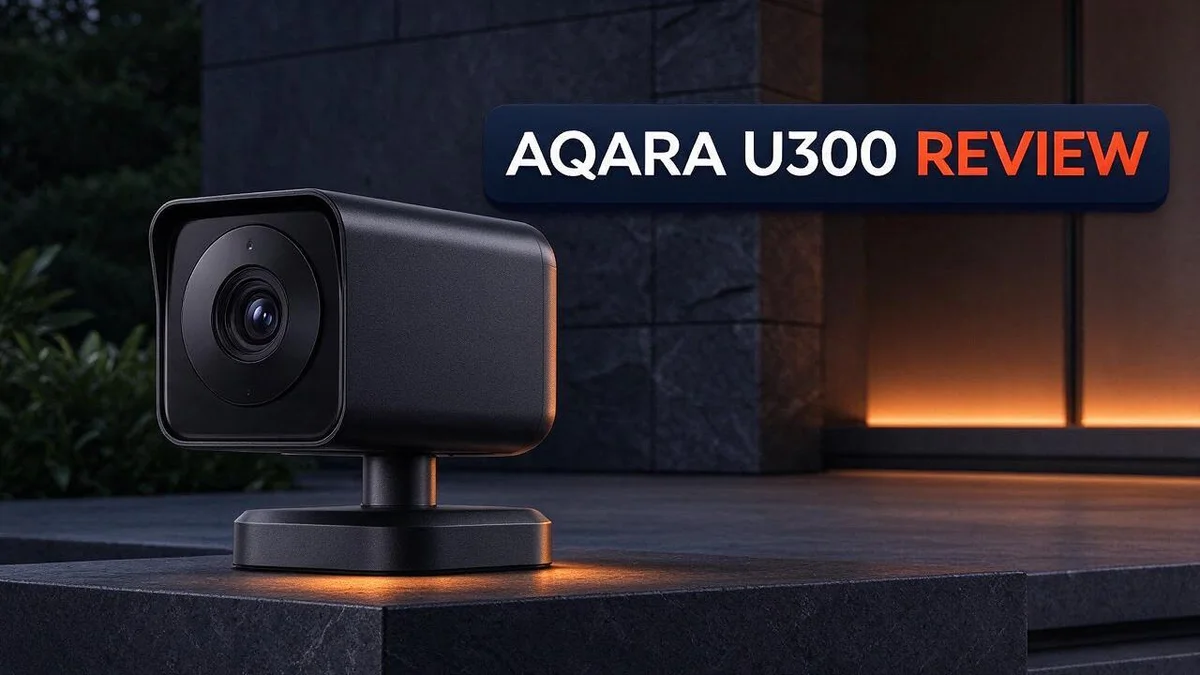
Aqara U300 Review: Fingerprint, Apple Home Key, Matter and Doorbell Smart Lock Tested
Tired of fumbling for keys at the front door? The Aqara U300 could be the upgrade your home needs. It gives you several ways to get inside, all in one smart lock.
Fingerprint recognition, Apple Home Key support, and UWB auto unlock work together for quick entry. It also includes a built in doorbell, so you can see who is waiting outside.
This lock is designed for handle style locks, which many homes already use. It supports Matter over Thread and works with Apple HomeKit, Amazon Alexa, and Google Assistant.
In this review, you will learn how the U300 performs and who it suits best. Keep reading to see if it deserves a spot on your door.
In a Nutshell
-
Works with major smart home systems: The U300 supports Apple HomeKit, Amazon Alexa, and Google Assistant. Your lock can join the same setup as your lights and speakers.
-
Built in doorbell: Visitors can ring right at the door. You can answer from anywhere without rushing to the entrance.
-
Good for mixed households: Families with different phones and habits can all use the lock. Each person picks the access method that works best for them.
-
Passage mode needs approval: Passage mode keeps the door open for set times. Changing it requires an admin password or fingerprint approval, which adds a helpful safety check.
-
Compare with the U100: The Aqara U100 uses an internal gyroscope for auto lock. Shoppers who want a different auto lock style can compare both models.
-
Who should consider it: Owners who want smart entry without changing their daily routine may like this lock most.
Installation and Door Compatibility

- Seamless Apple Home Key Experience: Tap your iPhone or Apple Watch to unlock, or use Siri for effortless...
- High-Resolution Fingerprint Sensor for Faster, More Accurate Unlocking: Equipped with a 160×160 pixel sensor...
Last update on 2026-11-26 / Affiliate links / Images from Amazon Product Advertising API
Before you install any smart lock, take a close look at your door. A good fit saves time and prevents frustration later.
Start with the handle. The Aqara U300 works with handle style locks, so confirm your current hardware follows that design. One source describes it as a replacement for a door knob, so check your latch type carefully.
Next, measure the door thickness. Compare that number with the spec sheet from Aqara. Write down your measurements before you order anything.
Check the backset as well. Backset is the distance from the edge of the door to the center of the latch hole. A mismatch can stop the lock from sliding in cleanly.
Look at the door direction too. Doors open either left or right, so confirm your handing. This keeps the handle and inside controls facing the correct way.
Plan the installation steps in advance. Remove the old hardware, mount the interior unit, and attach the exterior part. Keep your old screws nearby in case you need them.
Power matters too. Most smart locks run on batteries, so keep a fresh set on hand. Check the battery level in the app every few weeks.
Connectivity deserves attention. The U300 uses Matter over Thread, so a Thread border router should reach the door. A weak signal can cause delays when you unlock from outside.
Inspect the door frame next. A warped frame can make the bolt bind or the door hard to close. Smooth doors help the lock work reliably every day.
If your entrance faces rain or snow, review the weather rating in the spec sheet. Seal gaps around the exterior unit to keep moisture out.
Finally, test everything before you close the door. Operate the handle, run the lock from the app, and confirm each access method works. Early testing saves a second trip to the door.
Access Methods and Security
Good access options matter most on busy days. The Aqara U300 offers several ways to enter. Each method backs up the others.
Fingerprint unlocking feels quick and personal. Each family member can save their own finger. No phone or key needed.
Apple Home Key adds a phone tap option. Hold your iPhone or Apple Watch near the lock. This choice suits people who already use Apple devices every day.
UWB auto unlock reacts as you walk up. The lock senses your phone nearby. Keep your phone powered on so this feature stays reliable.
Security starts with smart habits. Review your access list in the app every few months. Remove fingerprints from anyone who no longer needs entry.
Choose a unique admin password. Never share it with guests. Store it in a password manager.
Give visitors access only when needed. Share temporary access with cleaners, dog walkers, or friends. Revoke it once their visit ends.
Strong hardware still matters. A smart lock works best with a solid strike plate and sturdy screws.
Mix methods to fit each person. Children may prefer fingerprints. Older relatives may find a phone tap easier.
Test every method before you rely on it. Try fingerprint, phone tap, and auto unlock from outside. Confirm each one works in rain or cold.
Keep a backup plan ready. Store a spare key with a trusted neighbor. Power loss or a dead phone can happen to anyone.
Watch for unusual activity. Check any activity history your app shows. Look for entries you do not recognize.
Think about daily routines. Pick the methods you use most. Keep those ready at all times.
Share the setup with a trusted adult. Two people should know how to add and remove users. This helps when one person is away.
Plan ahead for long trips. Add visitors before they arrive. Remove them as soon as they leave.
Enjoy the convenience with confidence. Good habits turn this lock into a daily helper.
Smart Home Integration
The Aqara U300 fits well into a smart home that already runs on Matter. Matter is a shared standard, so the lock can talk with many brands. This makes future upgrades much simpler for you.
The U300 uses Thread for its wireless connection. Thread creates a mesh network, so signals can hop between devices. You need a border router nearby, such as an Apple TV or HomePod mini. Without one, Matter control may stop working.
Voice control becomes more useful with routines. Say a short phrase, and the system can lock the door, dim the lights, and adjust the thermostat. Routines run in one step, so you save time each evening.
Automations open up even more options. For example, the porch light can switch on when the door unlocks at night. You can also send a notification when the lock stays unlocked for too long.
Shared access works across platforms. An Android user and an iPhone user can both get entry from the same lock. Everyone keeps their own preferred app without confusion.
Plan your setup before you connect everything. Choose one main app for device sharing and access settings. Then add other platforms one at a time so troubleshooting stays simple.
Test each connection once setup finishes. Lock the door by voice, then unlock it from your phone. Check that every routine fires as expected. Early testing prevents frustration later.
A strong home network near the door keeps commands fast. Weak coverage can delay unlocking, which feels frustrating when your hands are full. Consider a mesh router or extender if needed.
Keep an eye on compatibility updates. Smart home platforms release updates often, and features can shift over time. Read the release notes and confirm your hub runs the latest version. This habit keeps your lock working smoothly for years.
Good integration also means fewer gadgets. One lock can replace several separate tools, such as a keypad and a spare key. Your home feels simpler and more organized.
Top 3 Alternatives
These three smart locks offer strong options for your front door. Each one brings something a little different to the table.
Eufy Smart Lock

- Palm Vein Unlocking: Unlock with advanced security and ultra-fast recognition in just 0.6 seconds...
- This all-in-one device: A 2K HD camera with an f/1.8 lens for sharp, clear visibility—even at night. A video...
Last update on 2026-11-26 / Affiliate links / Images from Amazon Product Advertising API
Eufy Smart Lock is a popular pick for easy setup. It uses Bluetooth and a keypad, so you can unlock with a code, the app, or a fingerprint on select models. Most people finish installation in about fifteen minutes. The app shows lock activity, so you can check who came and went. Automatic unlock opens the door when your phone is nearby. Battery life often lasts several months on a single set.
August Smart Lock
No products found.
August Smart Lock works well if you want to keep your current deadbolt. It fits over the existing hardware, so you do not need to replace the whole door set. Add a bridge when you want remote access from anywhere. Guests can receive virtual keys by text or email. The lock works with popular voice assistants, so you can ask for a door status update. Installation usually takes under an hour with basic tools. Always keep your original key as a backup.
Schlage Encode Smart

- ANYWHERE ACCESS: With built-in WiFi compatibility, you can easily and securely connect your Schlage Encode...
- ADVANCED SECURITY: Secure, encrypted connection; built-in, customizable alarm for door movement and forced...

Last update on 2026-11-26 / Affiliate links / Images from Amazon Product Advertising API
Schlage Encode Smart includes built-in connectivity, so you do not need a separate hub. It has a keypad and supports digital keys on compatible phones. Setup uses the Schlage Home app, which guides you step by step. You can create temporary codes for cleaners or dog walkers. Homeowners who value a sturdy metal build often choose this model for busy front doors.
Built-In Doorbell and Visitor Alerts
The Aqara U300 puts a doorbell right on the lock. Guests do not need to find a separate button by the porch. They press the bell on the lock itself, and the ring reaches you. This keeps your entry point simple and tidy.
Visitor alerts matter most when life gets busy. Many people miss a knock while cooking, working, or walking the dog. A clear ring on your phone lets you respond fast. You can then decide whether to open the door or wait a moment.
The idea is simple. A ring should reach you no matter which room you are in. Households with many members can benefit too, since more than one person can receive the ring.
Who receives the alert matters. Decide which family members should get every ring. Some people may only need alerts during certain hours. Look over the alert options in the app so the right people hear the bell.
Delivery drivers and neighbors use doorbells too. A bell saves them from knocking loudly or calling out. It also tells you that someone arrived, even if you missed the moment.
Good alerts start with clear habits. Teach visitors to press the bell once and wait. Repeated pressing can cause confusion for the people inside.
Think about placement too. A bell that sits within easy reach of the door feels natural to use. Guests usually press the first button they see.
Doorbell rings also help with daily life. A dog walker can announce arrival. A cleaner can signal when the job is done. Keep a short list of who uses the bell so you know who to expect.
Try a family ring test on a quiet afternoon. Ask one person to ring from outside while another checks the phone inside. This shows how alerts behave in your home before a real guest arrives.
Visitor alerts work best when everyone knows how they function. Share the basics with your household so nobody misses an important ring.
Pros and Cons
Pros
– Fingerprint recognition opens the door without a phone.
– Passage mode lets you keep a door open for a while.
– Multiple unlock options keep one method ready as a backup.
– It is designed for handle style locks, which many homes already use.
Cons
– Passage mode needs an admin password or fingerprint approval.
– Apple Home Key unlocking only works with Apple devices.
– Phone based unlocks do not help guests who arrive without a phone.
– It is designed for handle locks, so it may not suit every door.
Who Should Buy It
This lock suits many homes, but some owners will get more value than others. Read through these groups to see where you fit.
Families with kids often need a simple way in. School bags hide keys, and phones run out of battery. A fingerprint profile for each child gives them a dependable route inside.
Homes with several generations often have many people using one door. Grandparents, parents, and adult children may need entry at different times. Sorting out who gets which access keeps daily life smooth.
Older relatives may find the lock easier to use. They can rely on a touch instead of memorizing app steps. Setup still needs a helper, so plan a short walkthrough.
Existing smart home owners get the most from this model. If you already use Alexa, Google Assistant, or Apple Home, the lock fits right in. You keep one familiar app and one set of habits.
Busy professionals who leave early may appreciate the UWB automatic unlock feature. It can help when your hands are full with groceries or a laptop bag. Results depend on your phone and home setup.
Hosts who welcome visitors often should also consider this lock. Family, friends, and house sitters can each receive a suitable access method. Clear access rules keep the home secure.
Tech newcomers can start simple. Begin with the fingerprint, then add voice control later. Small steps help new users feel confident.
Homeowners with a standard door setup should check fit first. Measure the current hardware and confirm it matches the lock design. A quick check saves time and frustration.
In short, the Aqara U300 fits busy families, tech-friendly households, and anyone who shares a door. Ask who uses the door daily, which voice assistant you use, and whether your door fits. Honest answers point you to the right choice.
Final Verdict
The Aqara U300 earns a strong spot on any smart lock shortlist. It packs several ways to enter, a built in doorbell, and wide platform support into one device. Few locks offer that mix.
The biggest win is flexibility. Each person in the home can choose the entry method that feels easiest. Over time, that choice matters more than any single feature on the spec sheet.
The lock also fits well into an existing setup. It works with Apple HomeKit, Amazon Alexa, and Google Assistant, so you can keep the voice assistant you already use. Matter over Thread support gives it a better chance to work with future devices too.
The main limit is the door itself. The U300 targets handle style locks, so check your current hardware before you commit. A quick measurement and a photo of your door can save time and frustration later.
Passage mode needs extra care. It requires an admin password or fingerprint approval. That safety step protects the door, but it means you should decide in advance who can use it and when.
The sources do not list any clear cons. That makes the verdict depend more on fit than on flaws. Still, test the basics during setup, such as fingerprint enrollment and the doorbell alert, before you rely on them every day.
Plan the setup before the lock arrives. Decide who gets admin rights and who gets standard access. Write down a backup unlock method for each user, so nobody gets locked out on a busy morning.
Our verdict: the Aqara U300 is a smart pick for most busy, connected homes. If your door suits a handle lock and you already use Apple, Alexa, or Google devices, it deserves a close look. Start with a door check, then build your access setup one method at a time. That steady approach helps the lock deliver real value from day one.
Frequently Asked Questions
Does the Aqara U300 work with Alexa and Google Assistant?
Yes. The lock works with Apple HomeKit, Amazon Alexa, and Google Assistant. You can use voice commands from many rooms once it joins your setup.
What does Matter over Thread support mean?
Matter is a shared smart home standard. Thread is a low power mesh network. Together, they help the lock connect with many compatible devices. This makes future upgrades easier.
How does UWB auto unlock work?
UWB stands for ultra wideband. It measures how close your paired phone is to the door. When you approach, the lock can open without a tap. This feature suits people who come and go often.
What does the built-in doorbell do?
The doorbell lets visitors signal that they are outside. It adds a simple way to get attention without a separate device. It works well for homes with a busy front door.
How is the Aqara U300 different from the Aqara U100?
The Aqara U100 is a related Aqara model. It uses an internal gyroscope for auto lock. Compare the lock style and door fit before you choose between them.

Dillip is the founder and editor of DillipWeb.com, where he simplifies the world of AI software, tech gadgets, and accessories through honest reviews, detailed comparisons, and easy-to-follow guides. With a deep passion for emerging technology, he helps everyday users make smarter, more informed tech decisions.