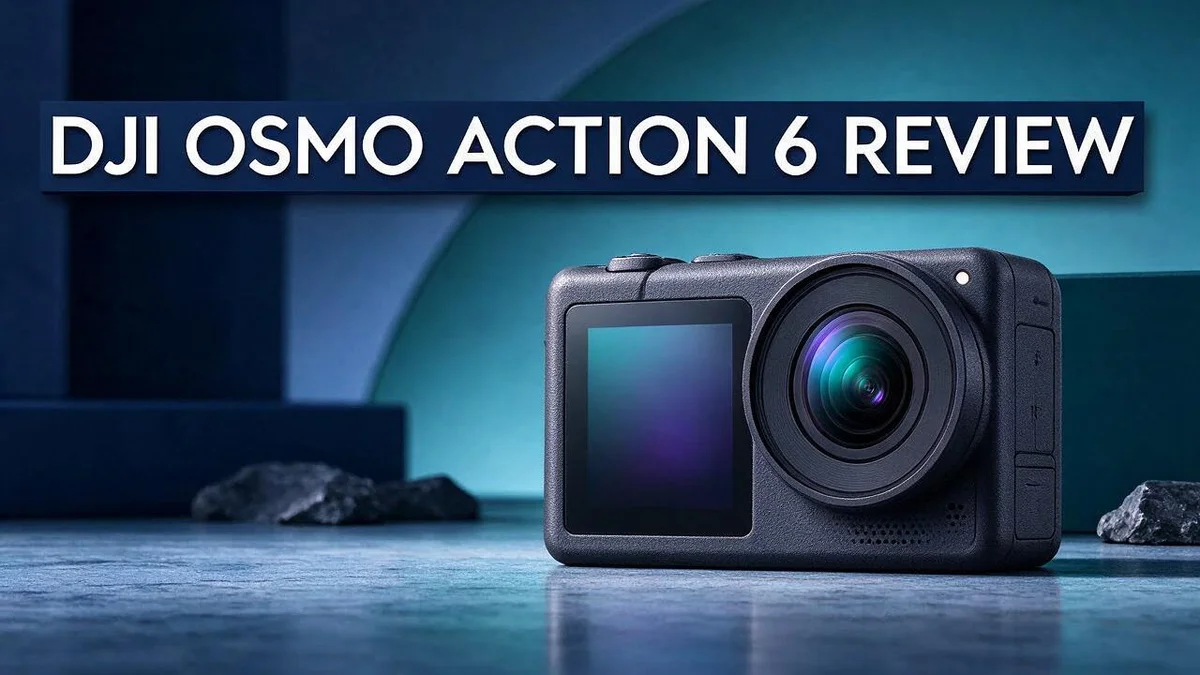
DJI Osmo Action 6 Review: Low-Light Video, Battery Life, and Real-World Performance
Action cameras keep getting better, and the DJI Osmo Action 6 is one of the most talked about models right now. Is it the right pick for your adventures? Let’s find out.
The Osmo Action 6 brings a variable aperture and a larger sensor. This mix helps it capture clean footage in dim scenes, which many creators care about most.
Video fans will also notice 8K recording, which arrives through a firmware update. Stabilization gets a boost too, with RockSteady 4.0 reported to smooth out shaky clips.
Battery life stands out as a major strength. Swappable batteries, built-in storage, and a magnetic mount add real flexibility on the go.
The camera does face tough competition. The GoPro Hero 13 Black and Insta360 Ace Pro 2 offer strong video resolution, so this review breaks down where the Action 6 wins and where it falls short.
In a Nutshell
- The touchscreen responds quickly. Taps and swipes feel smooth, so menu changes take less time.
- Tactile buttons help in tough conditions. You can adjust settings by feel, even with cold hands or while you move fast.
- Automatic uploads save time. Footage can move to cloud storage or a NAS. You do not need a computer for the transfer.
- Flexible formats suit many projects. You can choose the file type that works best with your editing software.
- Stabilization needs a closer look. RockSteady 4.0 comes from leaks before launch, so check final tests before you fully trust it.
- Resolution trails some rivals. Competitors such as the GoPro Hero 13 Black and Insta360 Ace Pro 2 can record sharper video. Other strong options include the Insta360 X6 and Insta360 GO Ultra.
Image Quality and Low-Light Performance

- Capture Every Scene, Day or Night - Variable aperture f/2.0 [1]-f/4.0 adapts for crystal-clear 8K video[23] in...
- Detailed Action in Every Frame - The all-new 1/1.1″ square sensor boosts this action camera's image quality...
Last update on 2026-11-26 / Affiliate links / Images from Amazon Product Advertising API
The Osmo Action 6 shows its best image quality in good daylight. Colors look natural, and skin tones stay warm without turning orange.
Shadows and bright skies both keep useful detail. This helps when you film a sunny beach, a snowy trail, or a busy street.
Dynamic range decides how much detail survives in the brightest and darkest parts of a frame. Strong dynamic range means fewer overexposed patches.
Noise control matters just as much. Grain stays fairly low as light drops, so faces and walls look smooth.
Night scenes ask more from any camera. Expect some softness in fine textures when the light gets very weak.
Exposure settings also change the final look. A slightly darker exposure often keeps highlights intact, while a brighter one lifts shadows but risks washed out whites.
Frame rate affects motion clarity too. Higher frame rates give smoother slow motion, but they need more light for clean results.
If the camera offers a flat color profile, editors gain extra room. You can lift shadows and pull back highlights during color grading.
Auto white balance handles many lighting setups well. Indoor lamps and window light can still shift colors, so check a test clip first.
A clean lens makes a bigger difference than many people expect. Fingerprints and water spots can soften footage and reduce contrast.
Stabilization also shapes how sharp a frame looks. Shaky motion can blur details even when the sensor performs well.
Rivals such as the GoPro Hero 13 Black and Insta360 X6 also handle dim scenes well. Side by side tests reveal which look suits your style.
Run your own test before a big trip. Record the same scene at dawn, noon, and dusk. Then review the clips on a large screen.
Watch for color shifts, noise, and blown highlights in each clip. Small problems often show up only on a bigger display.
Good footage starts with good light, even on a great camera.
Stabilization and Mounting System
Stabilization matters most when you move. Walking, running, or riding a bike can shake any camera. The Osmo Action 6 works hard to keep those shakes under control.
Horizon leveling can help too. A level shot looks calmer, even when the camera tilts during a fast turn. Viewers notice this more than they expect.
Mounting options shape the final look. A small camera on a helmet or chest mount sees the scene at eye level. Each angle changes how much motion reaches the sensor.
The magnetic mount makes quick changes simple. You can snap the camera onto a compatible base in seconds. Aim the lens, then start recording without fuss.
Stiff mounts reduce wobble. Use a short arm or a sturdy grip when you film handheld. Long poles or loose clamps invite extra vibration. Check every connection before you start.
Balance matters as much as the mount. A heavy accessory on one side can tilt the camera and strain the setup. Keep the rig light and centered.
Cold weather changes how gear behaves. Stiff gloves and frozen fingers make small clips harder to lock. Test the mount at home first.
Cable routing helps too. A dangling mic cable can tap the housing with every step. Tuck the cable close to the frame or use a short lead.
Pan speed affects smoothness. Slow, steady pans look cleaner than quick flicks. Quick moves can blur details, even with strong stabilization. Plan each move before you press record.
Stabilization also works with your shooting style. Walk with soft knees and keep your elbows close. Your body acts like a shock absorber. Small habits can improve every clip you make.
Practice a few test walks before a big shoot. Watch the clips on a large screen. Look for jitter in corners and pans. Small fixes now save hours of editing later.
Check the final footage in bright sun and in shade. Each light condition shows different shake and blur. Adjust your mount or movement after each test.
Power, Storage, and Upload Workflow
Power decides how long you can keep filming. The Osmo Action 6 offers excellent battery life, which helps on long days outdoors.
Swappable batteries keep you rolling. Pop in a fresh pack when the first one runs low. You never need to wait for a charge in the middle of a scene.
Label each battery so you know which ones are ready. Mark charged packs and used packs with a simple tag. This habit stops mix-ups when you shoot in a hurry.
Cold weather drains batteries faster than usual. Keep spare packs in an inner pocket close to your body. Warmth helps them hold charge for longer.
Charging on the go takes a little planning. A small power bank can top up packs at camp or in the car. Pack a cable that matches your power bank.
Storage starts with the right card. Choose a fast card with enough room for your planned shoot. A full card in the middle of a great scene wastes good light.
Plan storage by shoot length. Estimate your total minutes of recording, then check how much space those minutes use at your settings. Add a safety margin so you never run short.
Built-in storage gives you a useful backup option. It can save a clip when a card fails or when you forget to pack one. Still, treat it as a safety net, not a main archive.
Build an upload routine that you will follow. Offload footage at the end of each day, not weeks later. Fresh files stay organized and easy to find.
Automatic uploads work best on a home or office network. Save mobile data for small clips and quick previews. Large batches can slow down a phone plan.
Name folders by date and location. A clear system saves time during editing. Your future self will thank you for the extra minute today.
Keep at least two copies of important clips. Store one copy on a drive and another in cloud storage. This simple rule protects your best moments from loss.
Top 3 Alternatives
Looking for a different camera? These three options work well for action fans.
GoPro HERO13 Black

- HB-Series Lenses With Auto Detection: HERO13 Black is compatible with the HB-Series Lenses that let you...
- Best-in-Class 5.3K Video: 5.3K video delivers breathtaking image quality with 91% more resolution than 4K and...
Last update on 2026-11-26 / Affiliate links / Images from Amazon Product Advertising API
The GoPro HERO13 Black is a strong all-round choice. It records 5.3K video and handles bright and dark scenes well. It is waterproof without a case, so it suits surfing and snorkeling trips.
Its modular design makes accessories easy to add. Mounts and lenses click on quickly. Beginners will find the controls simple to learn.
Insta360 Ace Pro 2

- NEW 1/1.3" 8K SENSOR & LEICA SUMMARIT LENS: Unparalleled imaging with 13.5 stops of dynamic range and 2.4μm...
- DUAL AI CHIP: The first action camera with a dedicated Pro Imaging Chip for noise reduction and image...
Last update on 2026-11-26 / Affiliate links / Images from Amazon Product Advertising API
The Insta360 Ace Pro 2 shines in low light. Its larger 1-inch sensor captures more detail after sunset. Leica-engineered lenses add crisp, natural colors to your footage.
It also works well for vloggers. The front screen helps you frame yourself. Good audio pickup keeps talking videos clear and easy to follow.
Insta360 X4

- LIGHTWEIGHT & PORTABLE (165G) Our lightest 360 camera ever. At just 165g1, this is 360, fun-sized.
Last update on 2026-11-26 / Affiliate links / Images from Amazon Product Advertising API
The Insta360 X4 shoots 360-degree video in 8K. You can reframe shots later in the editing app. One camera captures the whole scene, so you never miss the moment.
It supports invisible selfie stick effects. Swappable lens guards protect the glass during rough rides. It is a great pick for travel and creative storytelling.
Each option offers something different, so pick the one that fits your style.
Video Formats and Resolution
Resolution sets how sharp each clip looks. The Osmo Action 6 offers several recording modes. Higher settings capture more fine detail for your viewers.
The camera can also record in 8K after a firmware update. That extra pixel count gives you room to crop. You can zoom into a wide shot and keep it looking clean.
Still, the research shows a clear tradeoff. Some rivals record at a higher top resolution. Buyers who need the sharpest possible frame should compare specs first.
Frame rate shapes how motion feels. Higher frame rates create smooth slow motion. Lower frame rates give footage a classic film feel. Choose the setting that matches your subject.
Resolution and frame rate work together. A high resolution paired with a high frame rate uses more storage and battery. Plan both settings around the length of your shoot.
Match the format to the final destination. Social platforms compress uploads heavily. A very high setting may look nearly the same on a phone screen. Save top settings for editing projects and large displays.
Bitrate also matters for detail. A higher bitrate keeps more texture in leaves, fabric, and water. Low bitrate clips can look blocky during fast action.
Upload sizes also grow with resolution. Large files take longer to move to cloud storage or a home NAS. Plan your upload time around the file sizes you create.
Editing software handles large files more slowly on older computers. Proxy files can speed up the edit. Create smaller copies for the timeline and keep the originals for export.
Test before a big trip. Record a short clip in each mode you plan to use. Watch it on a large screen and on a phone. Then pick the setting that balances quality and file size.
The right choice depends on your goals. Vloggers may prefer a steady mode that saves space. Action fans may want high frame rates for fast scenes.
Pros and Cons
Pros
- Clean video in dim light keeps footage usable at dusk.
- A responsive touchscreen makes menu changes quick.
- Tactile buttons let you adjust settings without looking at the screen.
- A simple microphone connection helps you capture clearer sound.
Cons
- Sensor size reports vary, so image quality is hard to confirm.
- Some key specs came from leaks before launch.
- Rival models from GoPro and Insta360 may suit some shooters better.
Who Should Buy It
This camera fits people who record life as it happens. Travelers, hikers, and parents who chase kids around the yard all find it useful.
Solo creators get the most from it. One person can mount the camera, press record, and step into the scene. The compact body keeps setup simple when no one else is around.
Action fans who ride, ski, or surf can rely on it. Fast sports demand a camera that keeps up when the ground gets bumpy.
Families with active kids will find it practical. Parents can hand the camera to older children and trust the controls to stay simple. Family trips create many clips, so a clear workflow keeps memories sorted.
Travel lovers who pack light will appreciate the size. A small kit fits into a daypack and leaves room for snacks. Long days on the road feel easier with fewer bags.
Pixel hunters should compare the field first. Shoppers who chase the sharpest possible detail should test several models. A side by side look at each option makes the choice clearer.
Beginners can grow into the camera over time. New filmmakers often start with simple settings and then explore more options later.
Social posters need quick turnaround. Short clips for busy feeds need fast capture. A camera you can grab and use right away helps you catch moments before they pass.
Weekend explorers can use it as a second camera. Some people already own a phone or drone for everyday shots. A dedicated action camera adds a different angle without much extra effort.
Gift buyers should check the recipient’s routine first. A camera makes a fun present for someone who loves adventure. Match the features to their habits so the gift gets used.
Think about your daily shooting style before you decide. Ask yourself how often you film, where you go, and who will use the camera. Clear answers make the choice easier.
Use the right tool for your story. The camera works best when it matches how you live and film. Choose it for active days and compare rivals for projects that need extra detail.
Final Verdict
The DJI Osmo Action 6 is a capable camera for active life. It handles dim scenes well and lasts a long time on one charge.
The camera gives you clean low light video and excellent battery life. Interchangeable batteries let you keep shooting all day.
Built-in storage adds a useful backup option. Automatic upload to cloud or NAS storage helps you protect clips after a long trip.
The touchscreen responds quickly. Tactile buttons let you change settings without looking at the screen.
The camera does have limits. Its video resolution trails some rivals, so pixel hunters should compare the field first.
Some key specs came from leaks before launch. Sensor size reports vary, so image quality is hard to confirm fully.
Rival models from GoPro and Insta360 may suit some shooters better. The GoPro Hero 13 Black and Insta360 Ace Pro 2 are strong options.
Who should buy it? Solo creators get the most from it. One person can mount the camera, press record, and step into the scene.
Action fans who ride, ski, or surf can rely on it. Fast sports demand a camera that keeps up on rough ground.
Families with active kids will find it practical too. Parents can hand the camera to older children and trust the controls.
Travel lovers who pack light will appreciate the small size. A compact kit fits into a daypack and leaves room for snacks.
Think about your daily routine before you buy. Ask whether you need sharp detail or simple, quick shooting.
Overall, the Osmo Action 6 suits people who record life as it happens. It rewards those who value low light performance and simple controls.
The camera fits best when life moves fast and gear must stay simple. Clean video, long battery life, and quick controls make it a smart pick. If you want a camera that feels easy from the first clip, this model deserves a close look.
Frequently Asked Questions
Can the DJI Osmo Action 6 shoot 8K video?
Yes, it records 8K video. DJI added this mode through a firmware update, so update your camera software first. Also, 8K files are large, so a fast memory card makes recording smoother.
Can I send my footage to the cloud or a NAS?
Yes, the camera can upload clips automatically. You can send footage to cloud storage or a network attached storage drive. This keeps a backup safe without moving files by hand.
Do I need spare batteries?
Spare batteries are worth packing. The batteries are interchangeable, so you can swap in a fresh one in seconds. Long filming days can drain even a strong battery.
How does the magnetic mount help?
The magnetic mount snaps the camera onto a compatible base. You can attach or remove it quickly between shots. This saves time when the light changes or the action moves fast.

Dillip is the founder and editor of DillipWeb.com, where he simplifies the world of AI software, tech gadgets, and accessories through honest reviews, detailed comparisons, and easy-to-follow guides. With a deep passion for emerging technology, he helps everyday users make smarter, more informed tech decisions.