Nuphy Air75 V3 Review: Slim Wireless 75% Mechanical Keyboard Tested
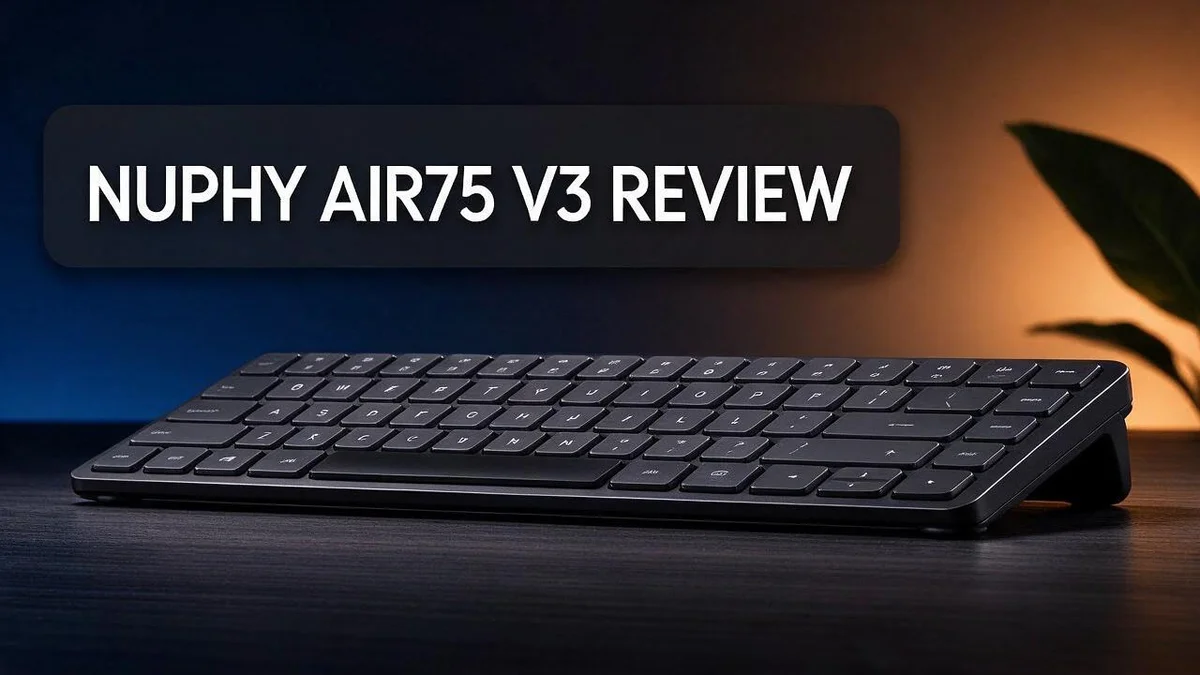
Want a keyboard that looks sleek and types like a dream? The Nuphy Air75 V3 could be your match. This compact 75% board saves desk space without dropping the keys you use most.
Many people love how it feels. The gasket mount design gives smooth, soft typing, and the sound is a clear upgrade. The ultra slim aluminum body feels premium too.
Connectivity is another big win. You can switch between 2.4GHz, USB-C, and Bluetooth, and pair up to three devices. It also works well with Mac computers.
Still, know the full story before you buy. Some users report 2.4GHz dropouts, and a few doubt the battery claims. Let us look at what works, what does not, and how it compares.
In a Nutshell
-
Strong owner rating: NuPhy’s site shows a 4.7 out of 5 score from 626 reviews. That gives you a clear sign that most owners feel happy with their purchase.
-
Swappable switches: You can change the switches without soldering. This lets you customize the sound and feel later on.
-
Long battery claims: NuPhy lists about 1,200 hours of battery life. Some buyers question that number, so test it in your own daily use.
-
Possible wireless hiccups: One user reported an unstable 2.4GHz link. Check the signal in your own space before you commit.
-
Gaming delay concerns: Some reviewers question its latency next to full-size gaming boards. Gamers should weigh this point carefully.
-
Close rivals to compare: The Keychron K8 Pro and Vissles LP85 offer similar designs. Compare them side by side before you decide.
Design and Build Quality
No products found.
Pick up the Nuphy Air75 V3 and the solid frame stands out right away. Its aluminum body feels sturdy in your hands.
The case does not flex when you press down on the corners. That stiffness helps the board feel steady during fast typing.
Think about where you will use it. A slim keyboard fits easily on a small desk or a lap tray.
The 75% layout keeps the arrow keys and function row. You lose very little space without giving up useful keys.
Next, look at the gasket mount design. This setup places a soft layer between the plate and the case.
The cushioning helps absorb the force of each keystroke. Many typists find their fingers feel less tired after long sessions.
Weight matters too. The board is light enough to carry between a desk, a couch, and a travel bag.
Frequent travelers will appreciate that easy movement. A light board also works well in a shared office or a café.
Metal surfaces often resist scratches better than plastic. Still, results depend on how you store and handle the board.
The low profile also changes your wrist position. Many typists rest their hands at a flatter, more natural angle.
Some users may need a wrist rest to match that height. Test the angle before you commit to a new setup.
Check the feet on the base too. Non slip pads keep the board in place on smooth desk surfaces.
The compact body also leaves more room for a mouse. Your desk stays open for notes, a mug, or a tablet.
Keep the charging port easy to reach so you can plug in without moving the board. A well built board tends to last longer with regular use, but your own habits will shape how it ages.
Overall, the design feels thoughtful and practical. It suits people who want a clean look and a steady feel.
Typing Feel and Sound
Sound often decides whether a keyboard feels fun or annoying. The Nuphy Air75 V3 has a deep, muted tone. Many typists describe it as a soft thock rather than a sharp click.
That tone comes from the mix of materials inside the case. Each layer soaks up small vibrations. The result feels settled rather than hollow.
Switch feel matters just as much as sound. The nano switches feel smooth from top to bottom. Your fingers rest on each key without much wobble.
Your typing style changes what feels right. Fast typists often prefer light, quick presses. Slower typists may enjoy a firmer press that confirms each letter.
Stabilizers play a quiet role too. Wide keys like the spacebar can rattle on weak setups. A well tuned board keeps those keys calm and steady.
Shared spaces need a softer sound. Office workers and roommates may want a quiet hush. Test the feel with a demo video or a store visit first.
Try a quick test at home. Type a full paragraph and listen for hollow echoes. Notice whether your fingers feel tired after ten minutes. Keep notes on what you like.
Preferences differ from person to person. Some people crave a crisp snap. Others want a muted sound that stays easy on the ears. The Nuphy Air75 V3 suits the second group.
Long sessions reveal the real difference. A keyboard may sound great for five minutes. Good typing feel shows its value after an hour of notes.
Pay attention to your hands at the end of the day. Sore wrists signal a poor match. Comfort is the best sign of a good board.
Your own ears are the final judge. Record a short typing clip on your phone. Play it back and listen closely to the tone.
Compare that clip with another board if you can.
Wireless Performance and Battery Life
Wireless performance decides how often you reach for a cable. The Nuphy Air75 V3 gives you several options, so you can pick the link that fits your day.
Use wired mode when you need certainty. Plugging in the cable skips the wireless link entirely. This works well during a big deadline or a recorded meeting.
Think about your desk layout first. Metal furniture and crowded USB ports can weaken a wireless signal. A short extension cable for the receiver often helps.
Backlight drains more than you expect. Bright lighting uses more power than the keys themselves. Lower the brightness or turn the light off when you work in a well lit room.
Battery habits matter as much as the number listed on the box. Frequent short charges keep the battery comfortable over time. Deep drains every few days can shorten its life.
Set a sleep timer that suits you. An idle keyboard rests quickly, which saves power between tasks. Check the software settings to choose how long it waits before sleeping.
Watch the indicator light before long trips. Most keyboards show a warning color when power runs low. Carry a short cable in your bag so you can keep typing without a pause.
Pair your devices in a clear order. Give each device slot a name in your notes, such as work laptop or home tablet. This stops you from pressing the wrong key during a busy morning.
Reconnecting after sleep feels different on each device. Give the board a moment to wake, then press any key. Your own machine tells you more than any chart.
Test the connection during your normal routine. Spend a full workday on one device and note any delays. Your results will show whether the wireless setup fits your habits.
Top 3 Alternatives
Keychron K3 Pro

- Keychron K3, a compact 75% layout ultra-slim wireless mechanical keyboard built for peak productivity and a...
- Be ready to multitask without missing a beat by connecting the K3 with up to 3 devices via the stable Broadcom...
Last update on 2026-11-27 / Affiliate links / Images from Amazon Product Advertising API
This compact keyboard fits well on a small desk. It has a slim, low profile design that feels light and modern.
You can pair it with several devices and switch between them quickly. It works well for people who want a tidy setup on the go.
Keychron Q1 Pro

- Full Metal Wireless Custom Keyboard: The Keychron Q1 Pro is a 75% layout wireless custom mechanical keyboard...
- Wireless & Wired Connectivity: Connect the Q1 Pro to up to three devices via stable Bluetooth 5.1 and switch...

Last update on 2026-11-27 / Affiliate links / Images from Amazon Product Advertising API
Choose this option if you want a sturdy build with a solid feel. The aluminum body gives each keystroke a deep, satisfying sound.
You also get hot swappable switches and fully customizable keys. It suits writers and gamers who care about comfort and control.
Logitech MX Mechanical Mini
No products found.
This keyboard brings a clean, minimal look to any workspace. Its mechanical switches offer crisp feedback with every press.
A wireless connection keeps your desk free of extra cables. It pairs nicely with a laptop or tablet. You can also adjust your settings with Logitech software.
Software and Customization
Software turns a good keyboard into your keyboard. Many people skip this step. Spend a few minutes in the settings, and the Air75 V3 starts to fit your habits.
Key remapping is the best place to start. You can move any key to a new spot.
Many people swap Caps Lock for Escape. That change saves a lot of reaching.
Mac users can also change the modifier keys. Shortcuts then feel familiar from the first day.
Next, try macros for repeated tasks. A macro lets one press trigger a short sequence of keys.
You could type a standard email sign off or open a favorite app. Keep macros simple at first so you can track what they do.
Layers add even more room. A layer uses a function key to unlock a second set of controls.
Place media buttons, volume control, or sleep commands there. Your main typing keys stay clean and simple.
Gamers and writers often need different setups. Create one profile for editing shortcuts and another for play.
Switch between them with one key press. You never need to dig through menus during busy moments.
Firmware updates matter too. Updates can fix bugs, improve stability, and add new options.
Check the official NuPhy website now and then. Follow each step shown on screen to finish the update safely.
Profiles help when you move between computers. Store your favorite layout in the keyboard memory so it works anywhere.
This way, you avoid installing the software on every machine. Your setup travels with you.
Finally, back up your settings before big changes. Write down your current layout so you can return to it quickly.
Test each change for a day. Small tweaks often feel better than dramatic overhauls.
Gaming Performance and Latency
Gaming asks more from a keyboard than typing does. Fast inputs need a steady link and a quick response. This section looks at how the Air75 V3 handles play.
Latency is the first question most gamers ask. Some reviewers question how this board compares with full size gaming keyboards. Your results depend on the connection you choose and the games you play.
The 2.4GHz mode offers the best chance for a quick response. One user reported an unstable link on this mode, so test it before ranked matches. Start with a short session in a game you know well.
Watch for dropped inputs during fast moves. Hold a movement key, then switch direction quickly. Missed or delayed presses show a weak link right away.
Bluetooth suits casual play and slower games. Strategy titles and story games feel fine on this mode. Fast shooters and racing games usually feel better on the 2.4GHz path.
Key rollover matters in busy moments. Press several keys at once and check that each one registers. Ghosting can cause missed actions during combos or chained shortcuts.
Hot swappable switches add a fun twist for players who like to tune their setup. Changing switches mainly affects feel and sound. Focus on connection quality first when you chase faster response.
Choose the mode that fits your game. Keep 2.4GHz for competitive play and Bluetooth for everyday tasks. Switching modes takes only a moment, so you can adjust fast.
Your game settings matter too. Low frame rates can make any keyboard feel slow, so check performance inside the game as well.
Test your setup before a big session. Play a few rounds, then check for lag, missed inputs, or odd delays. Keep the board close to the receiver for a cleaner signal. A short test reveals most issues early.
Pros and Cons
Pros
- Sound and feel get a clear upgrade over many budget-minded boards.
- Gasket-mount construction makes typing smooth and quiet.
- The solid aluminum body feels premium in your hands.
- Thin, light frame fits easily into a bag for travel.
- Connect to up to 3 devices and switch with one key.
- Owners rate it 4.7 out of 5 across 626 reviews.
Cons
- Battery life claims leave some users doubtful.
- One user reports the 2.4GHz connection drops at times.
- The compact layout has no number pad for spreadsheet work.
- Keychron K8 Pro and Vissles LP85 offer similar choices for shoppers to compare.
Who Should Buy It
The Air75 V3 suits people who want a clean desk. Its compact frame leaves room for a mouse, a notebook, and a coffee mug. Small desks feel calmer with less clutter.
Students who study in cafes and libraries will benefit. The light frame slips into a backpack beside a laptop. Charging stays simple with one cable, so packing feels easy.
Remote workers who switch between a laptop and a tablet fit well. Long typing sessions feel comfortable for hours of writing. The soft tone also suits shared rooms where others work or sleep nearby.
Hobbyists who enjoy tinkering will find a fun starting point. They can explore a first custom build and learn the basics. Each step builds confidence for future projects.
Shoppers who type with both hands on a full layout may struggle at first. Arrow keys and symbols sit in new spots. Muscle memory takes time to rebuild.
Competitive players should test their favorite games first. Every person feels timing differently. A short trial session shows whether the board fits your play style.
Anyone who wants a neat, portable setup will feel right at home. Pair it with a small mouse and a slim stand. This keyboard suits people who value style, comfort, and a tidy desk.
Gift shoppers often choose this board for a tech lover. The clean look feels special when unboxed. It also gives the recipient a fresh start for their desk setup.
Creative professionals who work on the move may enjoy this setup. The board fits a studio bag and travels well. Your desk looks tidy at home or in a café.
Readers who dislike wireless setups may prefer a wired board. Some people simply prefer a cable for peace of mind. Wired models skip charging altogether.
In short, this board fits people who want style, mobility, and a calm workspace. It rewards those who type often and move between desks. Test it in person when possible before you decide.
Final Verdict
The Nuphy Air75 V3 earns a solid place on a modern desk. It combines a premium feel, smooth typing, and easy switching between devices. Most people will enjoy using it every day.
Bring a clear goal to your decision. Write down the three tasks you do most. Then check whether the keyboard supports them well.
Start with your daily routine. Ask yourself how often you move between a laptop, a tablet, and a phone. If the answer is often, the one key device switch will save real time.
Read the feature list as a set of tools. Each feature matters only when it solves a problem you face.
The software feature set adds lasting benefit. You can adjust settings to match your style. This flexibility helps the board stay useful as your habits change.
Treat the battery claims with care. The listed 1,200 hours sounds impressive. Some owners still feel doubtful, so track your own usage for a week.
Run a short connection test too. Try each mode where you normally work. Your own experience matters more than any single review.
Expect a short adjustment period. The compact layout asks for patience. Most users adapt quickly once their fingers learn the new positions.
Typing comfort tends to show its true value over months. Long sessions reveal whether the gasket mount feel suits you.
Our final verdict is positive. The Air75 V3 offers a quiet, premium, and portable typing experience. It suits people who value a clean setup and strong build quality.
Finally, keep your expectations balanced. No single board fits every person, and that is fine. The right choice depends on your habits, your desk, and your goals.
Frequently Asked Questions
Does the Air75 V3 work well with a Mac?
Yes, it is optimized for Mac users. You can pair it over Bluetooth or USB-C in a few simple steps. Common Mac shortcuts feel natural on this compact layout. If you switch between a Mac and other devices, the one-key switching makes daily work smoother.
Can I change the switches later?
Yes. The hot swap nano switches pop out and snap in without any soldering. This lets you try a new feel whenever you want. Start with the switches that come installed, then change them later as your taste grows.
Does the software help me customize the keyboard?
Yes, the software offers a strong feature set for setting up your keys. You can adjust settings to match how you type and work. Spend a few minutes in the app before your first session so the setup feels right from the start.
Will the sound bother people nearby?
The gasket mount helps soften key noise. Many people find the sound deeper and less sharp than typical keyboards. This makes the Air75 V3 a good fit for shared offices, libraries, or late night writing sessions.

Dillip is the founder and editor of DillipWeb.com, where he simplifies the world of AI software, tech gadgets, and accessories through honest reviews, detailed comparisons, and easy-to-follow guides. With a deep passion for emerging technology, he helps everyday users make smarter, more informed tech decisions.