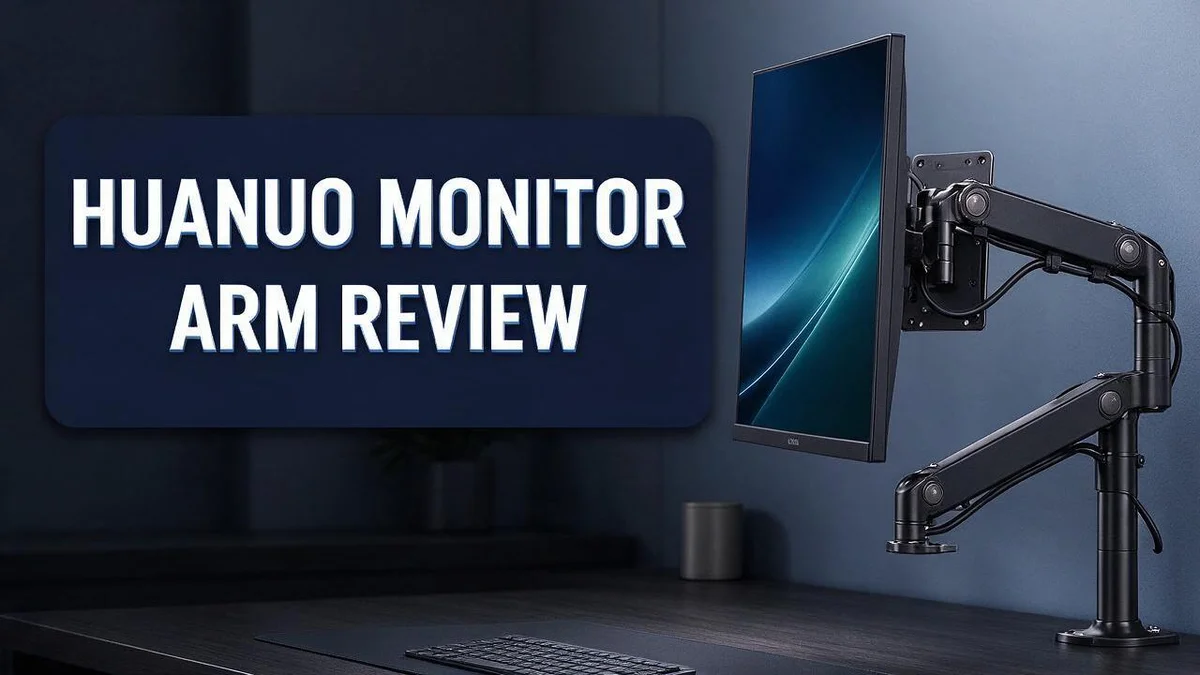
Huanuo Monitor Arm Review: Single and Dual Gas-Spring Desk Mounts Compared
Tired of sore necks and cluttered desks? Your monitor setup could be the problem. A quality monitor arm can fix both issues fast.
Huanuo has earned a loyal following among home office users. Over 16,000 people have rated its monitor arms, and the average score sits at 4.6 stars. That kind of feedback speaks for itself.
The single arm model uses a gas spring that lets you adjust screen height with ease. Move it with one hand. Your eyes and neck will feel the difference during long workdays. The HDNS8 dual model gives each screen its own fully adjustable arm, so you can position both monitors exactly how you like.
Both models also free up valuable desk space. Let’s see what makes these arms stand out.
In a Nutshell
- Smooth one hand moves: You can adjust the arm with just one hand. Changes feel quick and easy during a busy workday.
- Gentle relief for your eyes: Proper screen placement helps you sit more comfortably. It may also ease eye strain during long work sessions.
- Two screens, two directions: The HDNS8 dual model lets you place each monitor separately. Fully adjustable arms make it simple to find the right angle for both screens.
- Built to last: The arms feel sturdy and well made. Solid construction handles daily use with ease. You can trust them to stay put once they are set.
- Ergonomic flexibility: You can change your setup as your needs change. This flexibility supports better posture throughout the day.
- Clear picture so far: Current research lists no drawbacks for these arms. Readers who want flexibility, comfort, and durability will find a strong option here. It stands out for its practical design.
Build and Load Stability

- Great Adaptability: This HUANUO single monitor arm fits 13-32 inch monitors, holds 4.4-19.8 lbs, suitable for...
- Full Adjustable: This PC monitor stand can remain completely stable at any angle without any extra work...

Last update on 2026-11-26 / Affiliate links / Images from Amazon Product Advertising API
Load stability matters more than most people think. A monitor arm must hold the screen steady, even after you bump the desk or lean on it. Good stability keeps your view clear all day.
Think about the weight first. Check your monitor weight on the box or the maker’s site. Then compare it with the arm’s rated limit before you mount it.
The research does not list a weight capacity for Huanuo arms. That gap means you should read the product manual or packaging closely. Look for the maximum load number before you mount a screen.
If you plan to use two screens, add up both weights. Check the total against the limit for the dual model. Each arm should handle its own screen comfortably.
Next, check the desk. Measure the desk thickness with a ruler before you start. The clamp needs a solid edge that is at least a few centimeters thick. A thin laptop table or glass top may need a grommet mount instead.
Tighten the clamp slowly. Turn the screws until the arm feels firm, then stop. Over tightening can crack a desk edge, while loose screws let the arm drift.
Test the arm after setup. Move the monitor up, down, and side to side. A stable setup stays put and does not sag or wobble.
Try a quick shake test too. Give the desk a light tap while the screen is raised. A well mounted screen should barely move.
Cable management also helps. Run cords along the arm and tie them loosely. Heavy cable bundles can pull on the screen and change its balance.
Watch for drift over time. Gas springs can lose tension after months of heavy use. If the screen slowly sinks, adjust the tension according to the manual. Recheck the clamp every few months. A quick look can prevent slow loosening.
Stable mounting makes daily use easier. A steady screen means less time fixing your posture and more time working. Take your time with the setup and enjoy the steady result.
Range of Motion and Positioning
Range of motion decides how well your screen fits your body. A monitor arm works only if it reaches the spots you need. Think about where your eyes land most of the day.
Start by imagining your ideal viewing spot. Sit up straight and look at the center of the screen. Your arm should move the display to that exact place.
Next, consider the arm’s reach. A longer reach lets you push the screen farther from the wall or pull it closer for reading. Your hands should still reach your keyboard with ease.
Swivel and tilt add another layer of control. You can turn the screen to share content with a colleague. You can also tilt it slightly to cut glare from a window.
Keep the screen centered in front of you. Many people place the monitor off to one side. That habit twists the neck over time. Lining up the arm with your chair helps.
Dual setups need extra care. Each screen needs its own space. Move both monitors so the edges meet in the middle. Then check that neither one blocks the other.
Test every position before you settle. Move the arm through its full path. Stop at each point and look for glare, blocked views, or cables pulling tight.
Measure your desk too. Check how far the clamp can reach from the edge. A deep desk gives the arm more room to swing. A shallow desk may limit how far the screen travels.
Think about your daily routine. Do you stand, sit, or switch between tasks? A wide range helps you change positions without hassle. Save your favorite angles in your mind so you can return to them quickly.
Give your body time to adapt. Your muscles may need a few days to adjust. Small changes in height or distance often feel better after a short break.
Good positioning supports every task. Reading, video calls, and spreadsheets all need different views. A flexible arm makes these shifts simple.
Desk Mounting and Setup
Sit down before you pick a spot. Your chair sets your eye level, so start there. Adjust your chair until your feet rest flat on the floor. Then look straight ahead at the wall.
Choose a clamp spot that leaves room for your keyboard and mouse. Keep the mount near the rear edge of the desk. This keeps the arm from pulling on the front lip.
Protect your desk surface. A soft pad under the clamp stops scratches. It also spreads pressure across the wood or laminate. Place the pad before you tighten anything.
Check the space behind the desk too. Make sure the arm will not hit a wall, window frame, or shelf when it swings. Look for outlets and power strips that may block movement.
Plan your lighting early. A desk lamp placed near the monitor can cause glare on the screen. Point the light at your keyboard instead. Your eyes will thank you.
Confirm your screen fits the arm. Check the back panel for four mounting holes in a square pattern. This simple check saves a lot of frustration later.
Assemble on a flat surface. Lay out every screw and bracket before you start. Sort them into small bowls so nothing gets lost during the build.
Ask a friend for help during the first lift. A second pair of hands keeps the arm steady while you line it up with the mount. This step prevents slips and scratches.
Set the gas spring height roughly where you want it. Fine tune the position after the screen is attached. This saves time and keeps your hands free.
Take notes on your first setup. Write down the height and angle that feel right. You can return to these settings later, especially after a desk change.
Good planning makes the whole process smoother. Your setup will feel natural from day one.
Top 3 Alternatives
Ergotron LX Desk Mount

- Broad compatibility: Fits single screens up to 34 inches diagonal and 7 to 25 pounds; compatible with VESA...
- Versatile mounting options: Includes two-piece desk clamp and grommet mount to fit a variety of desk types...
Last update on 2026-11-26 / Affiliate links / Images from Amazon Product Advertising API
The Ergotron LX Desk Mount suits people who want a smooth and sturdy setup. Its spring system lets you move your screen up, down, and side to side with one hand. It supports many screen sizes and handles heavier monitors well.
Many users like its clean look. Built-in cable paths keep your desk tidy. The arm holds its position well after every adjustment.
VIVO Single Monitor Arm

- Screen Compatibility: This single-arm mount fits screens that weigh up to 22 lbs with backside mounting (VESA...
- Articulation and Height Adjustment: Adjustable arm offers +90° to -90° tilt, 360° swivel, 360° rotation...
Last update on 2026-11-26 / Affiliate links / Images from Amazon Product Advertising API
The VIVO Single Monitor Arm gives you a simple way to lift your screen off the desk. A gas spring makes height changes quick and easy. It fits most standard monitors and clamps onto a desk edge or fits through a grommet hole.
Setup usually takes about fifteen minutes with basic tools. People with small desks often choose this arm. It frees up space for keyboards, notebooks, and coffee mugs.
Fully Jarvis Monitor Arm

- Ultrawide Compatibility: Fits most 17” to 40” ultra wide monitors on the market (both flat and curved...
- Premium Aluminum Construction: Provides excellent support for one ultra-wide flat screen weighing up to...
Last update on 2026-11-26 / Affiliate links / Images from Amazon Product Advertising API
The Fully Jarvis Monitor Arm works well for home offices and creative studios. It uses a gas spring and offers a wide range of motion. Its clean design fits modern workspaces and blends into most desk setups.
Users often mention how smoothly the arm moves. It supports several monitor sizes and keeps your screen steady. If you want a stylish option that feels solid, this arm is worth a look.
Single vs. Dual Arm Models
Choosing between a single arm and a dual arm starts with one simple question. How many screens do you use each day? Your answer shapes everything else about your setup.
The Huanuo lineup gives you two clear paths. The single gas spring arm supports one screen and adjusts vertically. The HDNS8 dual monitor arm holds two screens on one clamp.
Start with the single arm if your work lives on one display. It suits writers, designers, and anyone who needs a clear view of one main screen.
A single arm keeps your desk simple. It also leaves more open surface for notebooks, a keyboard, or a coffee mug. Many people value that calm feeling.
The dual model fits people who juggle tasks across two displays. You might keep email on one screen and a spreadsheet on the other. Side by side viewing saves time.
The HDNS8 stands out because each arm moves on its own. You can angle one screen toward you and push the second screen farther back. This independent positioning helps when two screens serve different purposes.
Think about how you switch between tasks. If you often compare documents, dual arms let you place them at matching heights. If you mostly focus on one file, a single arm may feel more natural.
Consider your future setup too. Many people add a second screen later. Buying a dual arm now may save you from a second install. Still, a single arm works well if you plan to stay with one monitor.
Desk space plays a role as well. A dual arm uses more clamp area and creates a wider footprint. Measure the width of your desk too, since two screens take up more room.
Research lists no drawbacks for either model, so your daily habits should guide the choice. Pick the model that matches your work, not just the one that looks busiest.
Quick answer: choose a single arm for one main screen. Choose the dual arm for side by side work.
Pros and Cons
Pros
- Reduces neck and eye strain during long days at the desk.
- Frees up desk space for keyboards, notes, and other tools.
- Sturdy build keeps your screen steady.
- Smooth one hand adjustment makes changes quick.
- Over 16,000 ratings average 4.6 stars.
Cons
- Weight limits are not listed, so check your screen weight first.
- The research does not include full size or mounting specs.
- Long term wear is not covered in the available information.
- No direct competitor comparison is available yet.
Who Should Buy It
The Huanuo arm fits people who spend long hours at a desk. Office workers, writers, coders, and students often sit for most of the day. A flexible arm helps them change their view without hunting for the right angle.
Remote workers gain the most from a clear setup. Many people work from a spare room or kitchen table. A monitor arm lifts the screen off the surface and makes a small workspace feel more organized. Even a small desk can feel open with this setup.
Gamers and creators may like the stable feel. Fast movement and detailed editing both demand a steady display. The arm keeps the screen in place while you work or play.
Shared desk owners should think about space. Couples or roommates who share one desk often fight over room. An arm lifts the display up, so the surface stays open for other things.
Renters and frequent movers may appreciate the setup. Many people who move often want gear that feels easy to handle. A lightweight routine for setup and takedown suits them well.
Single arm buyers want simple daily use. If you use one main screen, the single model fits well. Its smooth movement suits people who adjust height several times a day.
Dual screen users can look at the HDNS8 model. Traders, analysts, and multitaskers often need two displays side by side. Each arm moves on its own, so each screen can sit at its own angle.
Who might want to skip it? People who rarely sit at a desk may not need an arm. Those with very heavy or unusual monitors should check the weight limit before buying, since the research does not list it.
Quick check for your decision: Ask yourself three questions. Do you sit for long stretches? Do you want more desk space? Do you plan to add a second screen later? If you answer yes to most, this arm is a strong match. If you answer no to most, a simpler stand may work better for you.
Final Verdict
Here is the bottom line on the Huanuo Monitor Arm. It offers a practical way to lift and position your screens. Most buyers will find it a solid match for daily desk work.
The right pick depends on your routine. Think about the way you sit, stand, and shift your focus during a normal day. A setup that fits those habits will feel natural from the first morning.
Before you order, take two quick steps. First, look at the back of your monitor for the mounting holes. Second, write down how many screens you plan to use in the next year. This small check saves time and avoids surprises at setup.
Some readers may feel unsure about the stand style. That worry is normal for new gear. Before you buy, read the return policy on the store page so you know your options.
Overall, the Huanuo Monitor Arm makes a strong case for anyone who wants a cleaner desk. Its strong rating history and clear product lineup give buyers confidence. Pick the single arm for simplicity or the dual arm for flexibility, and your workspace will thank you.
Try a simple posture check before you commit. Sit in your normal chair and picture your screen height. Your eyes should land near the top third of the display. A good setup keeps your shoulders relaxed and your wrists flat.
Your comfort matters more than any spec sheet. Watch how your arm feels after a week of use. Small tweaks can make a big difference, so adjust the height and angle until the view feels natural. Then you can focus on the work in front of you.
Pick the arm that matches your daily habits, measure your screen, and enjoy a cleaner workspace. Take your time, compare your needs, and make the call with confidence. A good desk setup pays off every single day you sit down to work.
Frequently Asked Questions
Which model should I choose?
Pick the single arm if you use one main screen. The HDNS8 dual arm fits better if you run two monitors. Each screen can move on its own, so you can set both displays at the right angle.
Can the arm help with neck and eye strain?
Yes, the arm is built to reduce neck and eye strain. Raising or lowering your screen to eye level helps your head sit in a more natural position. Your back and shoulders also relax when your posture improves.
How easy is it to adjust during the workday?
Adjustments feel smooth and light. You can move the screen with one hand. Small changes take only a moment, so you can shift position whenever you feel tired.
Does it work well for a shared desk?
It can. Measure your desk first and decide where each person sits. Because the arm lifts the screen off the surface, both people gain room for keyboards, notes, and other tools.

Dillip is the founder and editor of DillipWeb.com, where he simplifies the world of AI software, tech gadgets, and accessories through honest reviews, detailed comparisons, and easy-to-follow guides. With a deep passion for emerging technology, he helps everyday users make smarter, more informed tech decisions.