Dangbei Atom Review: Picture Quality, Brightness, Software, and Verdict
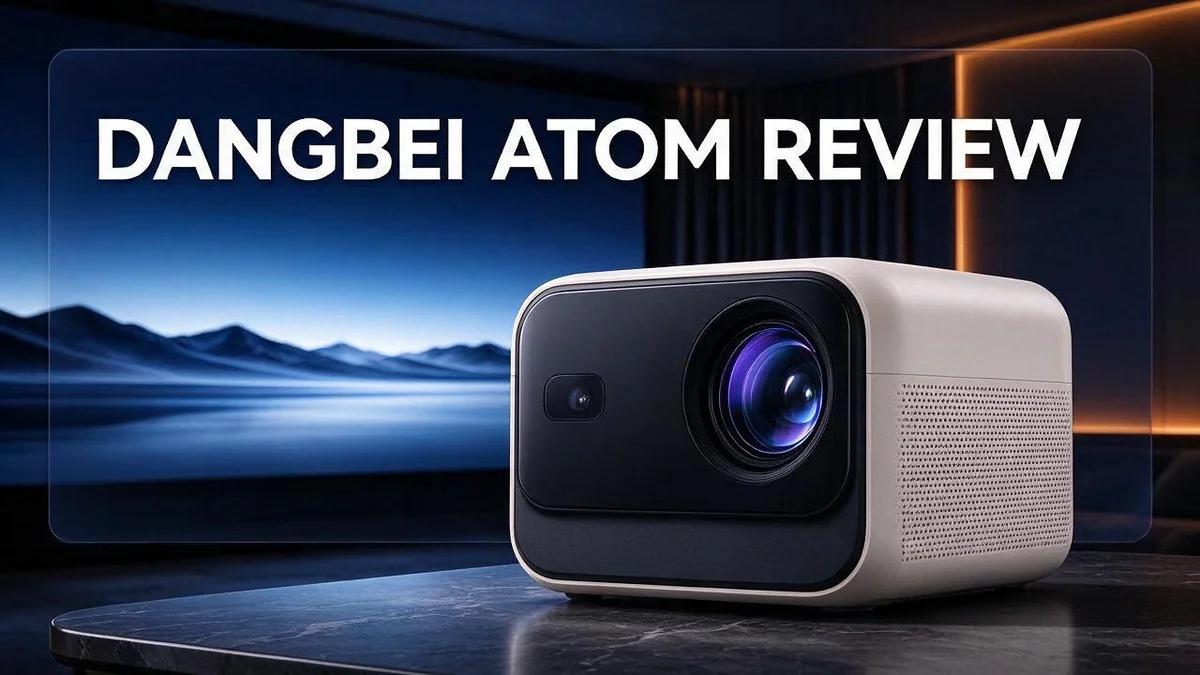
Looking for a projector that fits in a small room? The Dangbei Atom could be a great match. It is a compact 1080p laser projector that packs a lot into a small body.
It produces up to 1200 ISO lumens and projects a screen as large as 180 inches. The picture looks sharp and colorful, and HDR10 support adds extra depth. Many reviewers also praise its autofocus.
Built-in Google TV and Chromecast make streaming simple. Wi-Fi, Bluetooth, and speakers with Dolby sound let you enjoy movies without extra gear.
Still, it has some downsides. The built-in software can feel slow. It is also not very bright, so daytime outdoor viewing is a challenge.
In this review, we cover everything you need to know. We also compare it with the XGIMI MoGo 3 Pro and the Wimius P64.
In a Nutshell
-
Sharp picture from edge to edge: The Dangbei Atom shows a crisp 1080p image. Reviewers often praise how clear the picture stays across the whole screen.
-
Quick and easy focus: The autofocus works smoothly. You can place the projector and start watching with very little fuss.
-
Good colors for everyday viewing: Owners say the colors look natural and pleasing. Support for HDR10, HLG, and SDR helps bright scenes stand out.
-
Sound without extra speakers: The built in speakers offer Dolby sound. Many people enjoy casual movie nights without adding a soundbar.
-
Sturdy build with a stand included: The all metal body feels solid. A stand comes in the box, so setup takes less time.
-
Slow software and weak daylight performance: Some users find Google TV sluggish, so a separate streaming stick may help. The Atom struggles in bright rooms, so dim your lights for the best results.
Picture Quality and Color

- Built-in Netflix: Access 10,000+ apps from Google Play and enjoy a vast library of 700,000+ movies and shows...
- Laser-Powered Brilliance: Elevate your viewing experience with unparalleled brightness, thanks to the 1200 ISO...
Last update on 2026-11-27 / Affiliate links / Images from Amazon Product Advertising API
Picture quality shines most in a dim room. The Dangbei Atom needs darkness to show its best side. Dark scenes look rich and deep.
The projector supports HDR10, HLG, and SDR formats. HDR content adds brighter highlights and deeper shadows. Movies and shows can look more lifelike when the source supports it.
Contrast decides how a scene feels from start to finish. A laser light source helps the image stay steady over time. Your movie nights should look consistent from the first scene to the last.
Viewing distance also changes what you see. Sit at a comfortable distance so the fine detail looks natural. Sitting too close to a large screen can make the pixels more visible.
The Atom adds 3D viewing for fans of that format. You need compatible 3D glasses to enjoy it. Check your glasses first.
An eye protection feature comes built in as well. It helps make long viewing sessions more comfortable. Comfort matters when you watch a full film.
Source quality matters too. A strong streaming service or a good disc player sends a clean signal. Low quality files may look soft on a big wall.
Wall color changes the picture. A white or light gray wall reflects light best. Bright patterned walls can distort colors and reduce contrast.
Room lighting needs some planning. Blackout curtains work well for night viewing. Warm lamps placed near the screen can wash out dark areas.
Tip: Pick a plain wall in a dark corner. Close the curtains and turn off the lamps. Your colors will look their best.
Picture quality is a strong point for this compact projector. Dim light, HDR content, and smart placement bring out its best qualities.
Brightness and Viewing Environment
The Dangbei Atom is rated at 1200 ISO lumens. That number sets the brightness ceiling for every picture it throws onto the wall. Think of it as the total light available for your viewing.
Brightness is not the same as sharpness. A projector can look crisp yet still seem dim when light fills the room. RTINGS described the Atom as not very bright, which makes it a weak choice for outdoor nights.
Screen size changes how bright the image feels. A 180 inch picture spreads the same light over a much larger area. Smaller images look punchier, so pick a size that fits your wall and your seating.
Daylight is the biggest challenge here. Sunlight from windows washes out the image fast. Even a small gap in the curtains can lighten the picture enough to lose shadow detail. This is the main reason the projector can feel disappointing during the day.
Plan your viewing for evening hours. Close blinds before the sun sets. Turn off overhead lights, or switch on a dim lamp behind the seating area.
Light from other devices counts too. A bright phone or a glowing TV can reduce the contrast in dark scenes. Keep those devices off during movies for the cleanest result.
Furniture colors can also reflect light back toward the screen. Light gray and white surfaces bounce extra glow that softens the image. Dark rugs and curtains help absorb that stray light.
Do a quick test before you settle in. Play a bright scene at dusk and a dark scene at night. Move the projector or adjust the room until both look clear. That simple check saves frustration later.
With the right setup, the Atom can deliver a pleasing picture in a dark room. Just keep your expectations realistic for bright daytime viewing. Plan the space first, and the image will reward you.
Screen Size and Throw Distance
Screen size and throw distance work as a team. The Dangbei Atom uses a 1.2:1 throw ratio, so the projector must sit about 1.2 feet away for every foot of image width. Simple math makes planning easy.
For a 100 inch picture, the projector needs roughly 8.5 to 9 feet of open space. A 120 inch picture needs about 10.5 feet. Measure from the wall where the screen will hang to the spot where the projector will rest.
A full 180 inch picture needs about 16 feet of room. Many living rooms cannot give that much depth. A smaller picture still looks great, so choose the size that fits your space.
Room depth matters more than wall width. Long rooms often suit this projector because the lens can sit at the back. Short rooms may need a smaller image or a different spot for the projector.
Placement also changes the shape of the picture. Try to set the projector straight in front of the screen and at a similar height. A level setup keeps the edges even and helps the image stay square.
The compact body fits well on a shelf, a table, or the included stand. A stable surface keeps the lens steady. Avoid soft or wobbly surfaces, because even small movements can blur the picture over time.
Try this quick test. Place the projector where you think it should go and turn on a bright test image. Move it closer or farther in small steps until the picture fills the wall neatly. Then mark the spot with tape so you can return to it later.
Seating distance matters too. Sitting too close to a huge image can make the pixels easier to notice. Sitting farther back gives a more immersive view and a smoother look for 1080p content.
Plan the space first. Measure your room, check the throw distance, and then pick the screen size that feels right for your home.
Top 3 Alternatives
Looking for a different projector? These three options bring big screen fun to your room. Each one offers something a little different.
Anker Nebula Capsule 3

- Super-Sized Screen, Portable Design: Capsule 3 is an all-new ultra-portable Google TV projector licensed by...
- Take the Big Screen Anywhere: With a max screen size of 120 inches, Capsule 3 delivers a cinema-level...
Last update on 2026-11-27 / Affiliate links / Images from Amazon Product Advertising API
This small projector fits in your hand. It runs on Android TV, so you can stream apps without a laptop. The sharp picture works well even in rooms with some light. Its built-in speaker delivers clear sound for movies and shows. Pack it in a bag and set it up at a friend’s house in minutes.
XGIMI MoGo 2 Pro

- Multi-angle Rotation: 120° Adjustable Angle. Easily switch your projected image from the wall to the ceiling.
Last update on 2026-11-27 / Affiliate links / Images from Amazon Product Advertising API
This model suits people who want a portable projector with strong brightness. It has a built-in battery, so you can watch outdoors or away from a wall outlet. The auto keystone correction straightens the image fast. Gamers will enjoy the low input lag. Plan a backyard movie night with this one.
Samsung Freestyle
This compact projector works like a smart home hub. It rotates to project on walls, ceilings, or floors. The built-in Samsung apps make streaming simple. You can also control other smart devices from the same screen. Use it in the kitchen for recipes or in the bedroom for your favorite shows.
Software and Streaming Experience
The Dangbei Atom runs on Google TV. This gives you a familiar home screen with easy access to popular apps. You can open your favorite service in just a few clicks.
Chromecast support adds another route. You can send videos from your phone or tablet straight to the big screen. This works well when a friend shares a clip.
Some owners say the built in software feels slow. Menus can lag when you jump between apps. Be patient during the first setup.
Give the system time to settle. Install updates before movie night. A fresh start often improves the speed.
Wireless connections make setup simpler. The projector connects to wireless internet and Bluetooth devices. You can pair headphones or a controller without messy cables.
Dolby sound supports richer audio from the built in speakers. Dialogue usually comes through clearly in most rooms.
Tip: Pair a Bluetooth soundbar for louder audio. Late night viewing feels great with headphones.
Streaming needs a steady connection. Place your router near the projector. This helps reduce buffering during HD movies.
Voice search can save time. Speak the title you want and let the system find it. Typing with a remote feels slow for long names.
Screen mirroring works for photos too. Share holiday pictures with family in the room. Keep your phone on the same network for the best results.
Keep your apps tidy. Remove apps you never use. Clear old downloads now and then to keep things moving.
Connection issues sometimes need a restart. Turn the projector off for a minute. Then reconnect your phone and try again.
Sign in with your Google account to sync watch lists. Your favorite shows then follow you across devices. This saves time when you switch rooms.
Overall, the software suits casual streaming nights. Heavy gamers may want a faster device. Simple tasks run smoothly after the first setup.
Sound and Portability
Sound matters just as much as the picture. Many viewers forget about audio until a movie starts. The Dangbei Atom has built-in speakers, so you can start watching right away.
The speakers handle dialogue well in small and medium rooms. Talk-heavy shows and news clips sound clear. Bass stays light, though, because compact speakers cannot push deep low notes.
Think about where you sit. Speakers sound best when nothing blocks the path to your seat. Soft couches absorb sound. Bare walls bounce it back. Rugs and curtains can soften echo in a hard room.
Speaker placement changes the sound. Keep the area around the unit open. A closed cabinet traps sound and makes voices muffled.
Volume needs a gentle touch. Raise the volume slowly during your first movie. Stop when the sound starts to crackle or feel harsh. Your ears will thank you later.
The body feels solid and easy to carry. The all-metal shell gives the unit a sturdy feel. Lift it with both hands and hold the base, not the lens area. This keeps the unit steady during a move.
Travel takes only a few minutes. Wrap the power cord and remote in a soft pouch before you leave. Wipe the lens with a dry cloth so dust does not show on screen. A small padded bag protects the unit from bumps on the road.
Headphones help with late-night viewing. Pair a set of Bluetooth headphones when others are sleeping nearby. You can enjoy the film without waking the house. Check your headphone battery before each session.
Pros and Cons
Pros
- Sharp picture from edge to edge
- Autofocus works well, so setup takes less effort
- Good color makes movies look lively and rich
- HDR10, HLG, and SDR support for better contrast
- 3D viewing and eye protection add extra options
Cons
- Outdoor use is weak because the image lacks brightness
- Daylight rooms wash out the picture quickly
- Rivals such as the XGIMI MoGo 3 Pro and Wimius P64 offer another option to compare
Who Should Buy It
The Dangbei Atom suits people who want a simple way to watch movies at home. It works best for viewers who want a big picture from a compact body. It also fits people who like to try a projector before they commit to a larger home theater setup.
Renters often cannot drill holes for a permanent setup. This projector stands on its own, so the walls stay untouched. Moving it to a new room takes only a few minutes, and the lease stays safe.
Students in shared dorms or tight apartments can benefit too. The small frame fits easily on a desk, a dresser, or a low shelf. Study breaks feel more fun when a favorite show fills the wall.
First-time projector owners may feel at ease with it. The device handles most of the work, so beginners avoid complicated settings. They can focus on the movie instead of the menus.
Parents often want a flexible screen for children. This model can light up a playroom or bedroom for cartoons and story nights. Kids enjoy a big image, and adults enjoy a quiet evening.
Fans of 3D films get a fresh way to enjoy their favorite titles. They can test the format at home without a trip to the cinema. Movie lovers who like to experiment will appreciate that option.
Couples who enjoy quiet nights in can create a cozy theater. They can dim the lights, pull up a sofa, and press play. A shared movie night feels special without leaving the house.
Viewers who need a brighter option for busy, sunny rooms should compare models before they decide. A darker room gives this projector the best chance to shine. Planning the room layout first saves time and frustration later.
Shoppers who want one device for almost everything may like the streamlined approach. Streaming apps, 3D playback, and projection all live in one unit. That simplicity appeals to people who dislike juggling several gadgets.
The best fit depends on the room, the daily habits, and the viewing goals. Take a moment to picture the space and the people who will use it. A clear picture of your needs makes the final decision much easier.
Final Verdict
The Dangbei Atom earns a spot on the shortlist for home movie fans. It pairs a sharp 1080p picture with a compact frame that fits many spaces.
Its biggest win is simple use. Wireless links and a built in speaker system mean fewer cables on the floor. Many households want that clean setup.
Light control matters more than any spec on paper. Draw the curtains and dim the lamps before each movie. The picture looks far richer in a dark room.
The software is the weak spot. Built in Google TV can feel slow at times. A separate streaming stick may offer a faster menu and a wider app choice.
Brightness sets the limit for this projector. It suits evening viewing far better than a sunny living room. If daylight viewing matters most, look at other models first.
Measure your wall first. Check the space between the unit and the screen. A clear wall and a dark corner give the best view. Plan this step before you order.
Test your Wi-Fi. Streaming depends on a steady connection. A weak signal can cause buffering in the middle of a film. Move the router closer if needed.
Think about your daily routine. Some viewers want one device for news, games, and films. Others only want movie nights on weekends. Match the Atom to the habit you already have.
Compare before you buy. The XGIMI MoGo 3 Pro and Wimius P64 are the main rivals. Check brightness, software, and speaker output side by side. Then choose the model that fits your viewing habits.
Who should skip it? Viewers who plan to watch in bright rooms should skip it. People who want a fast, polished menu may also prefer another model.
In short, the Dangbei Atom suits people who want an easy way to watch films at home. It rewards those who control their light and accept its software quirks. Its image quality and flexibility make it a strong contender.
Frequently Asked Questions
How big a picture can the Dangbei Atom make?
The Dangbei Atom can project a screen up to 180 inches. Its 1.2:1 throw ratio lets it sit close to the wall and still fill a large space.
Does the Dangbei Atom come with a stand?
Yes, it ships with a stand. You can place it on a table, a shelf, or a sideboard. No ceiling mount is needed for the basic setup.
Is the Dangbei Atom sturdy enough to move around?
The body is all metal, so it feels solid in your hands. That helps when you carry it between rooms or pack it for a trip.
Can the Dangbei Atom fit in a compact space?
Yes, the unit is compact. It works well in a small bedroom or a dorm corner. Measure the distance from the wall before you set it up so the picture fills the screen the way you want.

Dillip is the founder and editor of DillipWeb.com, where he simplifies the world of AI software, tech gadgets, and accessories through honest reviews, detailed comparisons, and easy-to-follow guides. With a deep passion for emerging technology, he helps everyday users make smarter, more informed tech decisions.