Insta360 X5 Review: 8K 360 Video, Low-Light Performance, Pros and Cons
Want to capture every angle without missing a moment? The Insta360 X5 might be the camera you need.
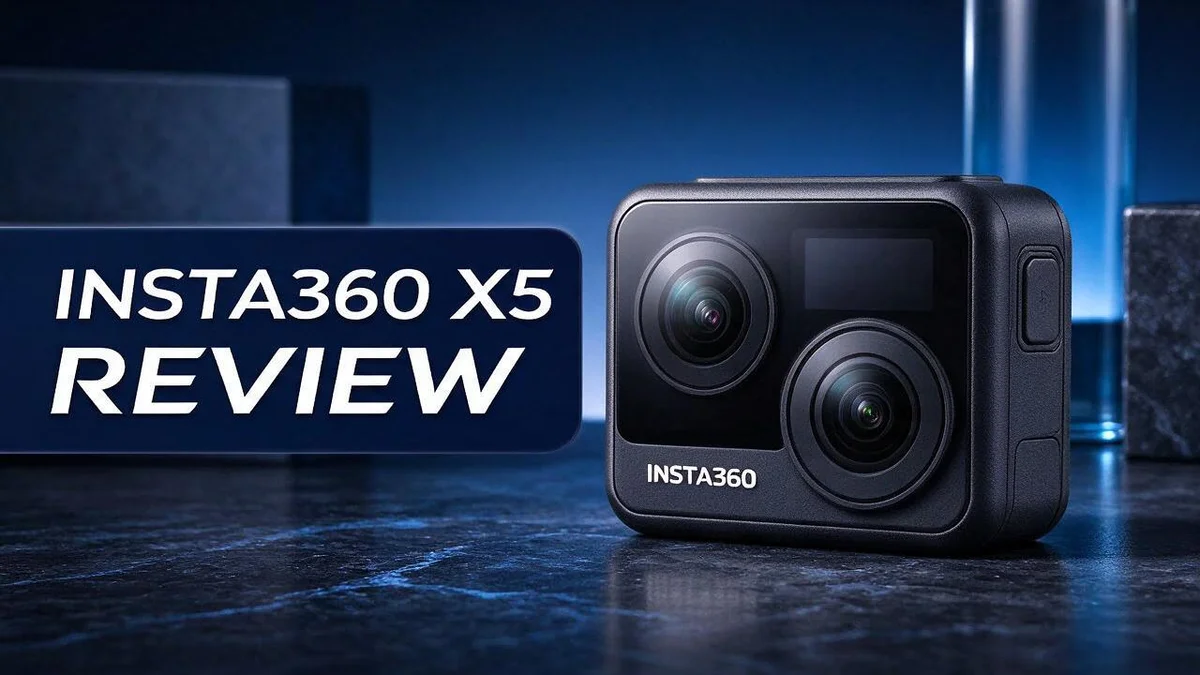
This camera builds on the popular Insta360 X3. It packs dual 1/1.28″ sensors and a triple AI chip into one compact body.
It records 8K30 360° video with HDR and PureVideo low light enhancement. Footage stays stable and clear, even in dim spaces.
You also get 72MP photos, a 2.7 inch touchscreen, and four physical buttons. Replaceable lens guards help protect the lenses when they take a knock.
Is it the right pick for you? Let’s find out. In this review, we cover what works well, where it falls short, and who should choose it.
In a Nutshell
- Two large sensors team up to capture the full 360° view in every frame, so the footage stays sharp from edge to edge. This helps when you review clips later on a bigger screen.
- A triple AI chip handles the heavy processing work, which keeps the camera responsive while you shoot. It also helps during fast action scenes where every second counts.
- A 2400mAh battery powers the camera through longer outings, so you spend less time hunting for a charger. Pack a power bank for even more freedom on long days.
- Lens guards swap out easily, so you can replace a scratched cover yourself instead of waiting for a repair. Keep a spare set nearby for peace of mind.
- Stitch lines can appear if you angle the camera incorrectly, so plan your framing before you hit record. Users also say the desktop editing suite feels clunky, though the mobile app is excellent.
- Video comes first in this design, so photos take a back seat. The camera also feels heavy for ultralight travel, which matters if you like to pack light.
Design, Build and Portability

- WHAT’S INCLUDED – Unleash Stunning 8K 360° Capture with the Insta360 X5 Camera featuring Dual...
- SUPERIOR STABILIZATION - Integrated 6-Axis Gyroscope ensures incredibly smooth, shake-free footage, even in...
Last update on 2026-11-27 / Affiliate links / Images from Amazon Product Advertising API
The Insta360 X5 feels solid in your hand. Its clean shape does not draw much attention. Many users call it discreet.
The weight is the main trade off. This camera is heavy for ultralight travel. After a full day of walking, you may feel the extra grams on your shoulder.
Think about your bag before you pack. A heavier camera adds up fast. Plan your gear list early so you do not overload your bag.
The four physical buttons sit in easy reach. Your thumb can find them without looking. You can start recording quickly.
The touchscreen works best for quick checks. You can review a clip or change a setting with a tap. Wet or cold fingers may make taps less accurate, so the buttons help in those moments.
Many creators add a selfie stick or grip for new angles. An extension pole lifts the camera above a crowd. It also lowers the camera close to the ground.
Keep the lens area clean and dry during every shoot. Fingerprints and water drops can show up in your footage. A soft cloth fixes most issues in seconds.
Portability depends on how you travel. Hikers and solo travelers may want a lighter option. Vloggers and family trip makers often enjoy the compact feel on short walks.
Store the camera in a padded case when you move it. A soft pouch protects the lenses from bumps inside a backpack. Simple habits keep the device in great shape for years.
Overall, the build suits people who want a camera that stays out of the way. It works best when you carry it on purpose. It is less ideal as a light backup for everyday use.
Video Quality and Low-Light Performance
Light changes fast when you shoot outdoors. The X5 handles those shifts well.
Dim scenes are where many 360 cameras struggle. The X5 keeps shadows open and readable.
Indoor shoots gain the most from this strength. Cafes, party rooms, and dim hallways all benefit.
Grain appears as tiny specks in very dark areas. Expect some noise when light runs low. Good lighting still gives the cleanest results.
Bright windows and dark corners can share one frame. This is a common challenge with 360 video. Position yourself so strong light does not hit the lens directly.
Night skies and sunsets need a steady setup. Place the camera on a tripod or flat surface. Slow shutter speeds in dim light can show movement, so stability matters more.
Moving subjects in dim light can blur or smear slightly. Slow walking works better than fast running. Keep movements smooth for the cleanest look.
Colors look natural in most daylight shots. Skin tones and greenery appear true to life.
Shoot during golden hour for warm, soft light. This tip works well for both wide scenes and close subjects.
Sunlight from the side often gives the best depth. Front light can flatten the scene.
Editing can lift shadows and pull back bright spots. Even if the desktop suite feels clunky, the basic controls help a lot.
Reframing is one of the best perks of this footage. You capture the full sphere, so you can pick the view later.
Each clip gives you fresh angles from the same moment. Creators often export flat videos for social feeds.
Your final result depends on light, position, and patience. Small changes in setup can make a big difference.
Try a short test clip before a big event. Watch it on a larger screen to judge the shadows.
Overall, the video quality impresses for a 360 camera. Low light scenes look usable, and daylight footage looks crisp.
Some limits remain in very dark spaces. Most everyday shoots still turn out well.
Photo Capabilities
The Insta360 X5 can shoot 72MP photos, which gives you plenty of detail. High resolution helps when you want to crop a shot or print a large image.
Each 360 photo captures the full scene in one press. You do not need to pan around or turn in circles. The camera records everything around you at once.
Reframing turns one capture into many shots. Choose any angle after you shoot. Then export a flat view for your feed or blog post.
This approach saves time at the scene. You can focus on the moment instead of perfect framing. Later, you decide the final composition at home.
The touchscreen helps you check a still before you move on. A quick tap shows the scene so you can confirm the shot. Simple previews keep your workflow moving.
The physical buttons make it easy to snap a photo. You can take a still without opening a menu. That speed helps with fleeting moments, like a passing bird or a laughing friend.
Editing photos takes some patience. The mobile app handles quick edits well. The desktop software feels clunky, so bigger batches may slow you down.
Good light still matters for stills. Bright, even light gives crisp colors and clean detail. Overcast days can also produce soft, flattering results for people in your shots.
Open spaces give you the best sense of scale. Include people or landmarks so viewers understand the size of the scene. Repeated patterns, such as trees or buildings, also make the sphere look interesting.
Think of photos as a helpful bonus. Video remains the main strength, yet the stills give you more ways to share your trip.
Top 3 Alternatives
Insta360 X4

- LIGHTWEIGHT & PORTABLE (165G) Our lightest 360 camera ever. At just 165g1, this is 360, fun-sized.
Last update on 2026-11-27 / Affiliate links / Images from Amazon Product Advertising API
Insta360 X4 is a strong choice for sharp footage. It records 8K video, so your clips look crisp on large screens.
Its FlowState stabilization keeps shaky moments smooth. Many travelers and action sports fans rely on it.
You can also use its waterproof design for swims and outdoor rides. Battery life and editing tools make daily use simple.
If you shoot a lot of adventure content, this camera deserves a close look.
DJI Osmo 360

- Big Views, Brilliant Quality - Groundbreaking 1-inch 360° imaging [1] delivers excellent low-light for...
- Stunning, Day or Night - Capture every detail with 8K 360° videos and store them effortlessly with 105GB...
Last update on 2026-11-27 / Affiliate links / Images from Amazon Product Advertising API
The DJI Osmo 360 takes a different approach. It has a handy touchscreen that helps you frame shots fast.
Its large sensors handle low light well. Evening scenes still look clean and bright.
Creators who edit on their phones will love the easy app workflow. You can share clips quickly without a computer.
Its compact body feels comfortable during long shoots. This option suits people who want speed and simple control.
Ricoh Theta X

- 360 CAMERA FOR REAL ESTATE, CONSTRUCTION & SITE DOCUMENTATION - Capture entire spaces in seconds to reduce...
- 11K HIGH-RESOLUTION 360 PHOTOS & 5.7K VIDEO - Capture 60MP 360-degree images and 5.7K video with image...

Last update on 2026-11-27 / Affiliate links / Images from Amazon Product Advertising API
Ricoh Theta X focuses on simple, quick shooting. It uses a large one inch sensor for crisp photos.
One tap captures stills, and video is just as easy. Real estate agents and event planners often pick it for fast tours.
It also fits neatly in a pocket. Its clean design makes it easy to carry on trips.
Choose it if you value ease over extra features.
Stitching and Shooting Modes
Stitching joins two wide views into one seamless 360 sphere. The Insta360 X5 uses dual 1/1.28″ sensors to capture both sides at once. Its triple AI chip handles most of the heavy lifting behind the scenes.
Subject placement matters a lot for clean seams. Faces and objects near the seams can look split or warped.
Stitch lines can still show when the camera tilts the wrong way. Hold the X5 level and steady during recording. This small habit keeps the seam clean.
Stitching also affects how far you can move. Motion close to the lens can cause ghosting in the seams. Stand a few steps back when people walk past.
Check the seam in playback after each take. Look at horizon lines and handrails. These shapes reveal small gaps fast.
Shooting modes shape how your final clip looks. The X5 records 8K30 360 video. That resolution leaves room to crop in later.
HDR helps when bright skies and dark shadows share one scene. It balances both areas for a more even look. Turn it on for sunny days with strong contrast.
Photo mode records 72MP stills with full 360 coverage. Switch between video and photo depending on your plan. Many people shoot both during one outing.
Video mode suits longer walks and events. Photo mode suits quick stops and sights. Both modes share the same lens setup, so you never swap parts.
Pick your mode before you press record. A busy market suits continuous video. A single landmark shot suits a quick photo.
Test each mode at home first. Short clips show how seams and colors behave. This practice saves time on location.
Settings can feel confusing at first. Spend ten minutes with the app before a trip. Small practice makes each shot feel easier.
Editing Software and Workflow
Editing is where Insta360 X5 footage starts to shine. Raw 360 files need a few extra steps before you share them.
Most creators start in the mobile app. It lets you trim clips, add music, and post quickly. Mobile edits also help when you need a fast clip for a friend.
Then you can move to desktop for deeper projects. The desktop editing software gives you more control over each frame. Users describe it as clunky, so set aside extra time for your first projects.
Start with a clear file plan. Copy your clips to a computer before you begin editing. Keep the original files in a backup folder.
Name each folder by location and date. This habit saves time when you search for a clip later. Tidy folders also keep projects calm.
Work in a simple order. Sort your clips first, then cut the weak parts. Build your main story before you add effects or titles.
Color changes should come near the end. Small shifts in brightness and contrast often look best. Heavy edits can make grain in dark scenes stand out more.
Export settings shape the final result. A phone clip may need different settings than a clip for a large screen.
Preview before you share. Watch the export on a phone and on a computer. Small screens reveal exposure problems fast, so catch them early.
Save drafts often. Project files can grow large, so save progress after each big change. This keeps your work safe if the program closes unexpectedly.
Expect a short learning curve. Your first few projects may feel slow. Each edit gets faster as you practice the same steps.
Keep a simple checklist for every trip. Import, sort, edit, export, and back up. A repeat routine keeps your workflow calm from start to finish.
Pros and Cons
Pros
- Image quality stands out for a 360 camera.
- Low light footage stays clean after dark.
- Lens guards can be swapped when they get scratched.
- The compact body blends in during street shots.
- Stable footage holds up while you walk.
Cons
- Desktop editing software feels clunky to use.
- Photo results trail behind the video features.
- The weight slows down ultralight travel days.
- The battery may run short on long shoots.
Who Should Buy It
If you want to capture a whole scene in one take, the Insta360 X5 fits your style well. It suits people who hate missing a moment because the framing was off.
Video creators who shoot walk and talk content are a strong match. They can film themselves moving through a place, then choose the best angle later. This saves time on set and cuts down on retakes.
Solo vloggers who want to appear in every shot may find it helpful. The camera records everything around it, so you do not need a second person behind the lens.
Families and event filmers also get plenty of use from it. A parent can record a birthday party from the center of the room. Kids run fast, yet the camera still keeps up with the action.
Travel fans who explore busy places may enjoy it too. Think of a market walk or a long city day with friends. You can film the whole crowd at once instead of chasing each moment.
Real estate and tour makers can use it for quick walkthroughs. One smooth pass through a room shows viewers every corner. Clients get a clear feel for the space without a long visit.
New creators who enjoy learning will grow into the camera over time. Early clips may look rough, yet each test teaches something new about angles and light.
Who should skip it? People who care most about still photos may prefer a standard camera. Anyone who wants a simple point and shoot with no editing at all may find this model more than they need.
Final tip: Try a short rental or borrow a unit from a friend first. Shoot a few test clips in your daily spots. Then decide if this camera matches your plans and comfort level.
Final Verdict
The Insta360 X5 earns a strong place in this review. It captures wide scenes with clear detail and smooth motion. Most people will feel happy with the video results.
Its flaws are real, though. Seams can show up when you hold the camera at the wrong angle. Photos also trail behind the video, so still shooters should look elsewhere.
Think of this camera as a tool for moving stories. It rewards people who plan each shot and keep the lens angle in mind. Careless framing costs you clean seams, so take a few test shots first.
Our overall verdict is simple. The X5 delivers excellent video in a 360 body. It works best for creators who want freedom in post production. The camera turns one take into many possible edits, which saves time on location.
Patience matters most with this camera. Each new shoot teaches you where the seams fall and how light behaves. Within a few weeks, you will shoot with more confidence and fewer retakes.
The predecessor, the X3, still matters for comparison. Upgrading makes sense if you shoot a lot after sunset or indoors. Owners of older models may notice the gains most in dim streets and event halls.
Keep your expectations realistic. This camera will not replace a dedicated photo camera or a compact action cam for every trip. Pack it for scenes that need full coverage, not for every day out.
Finally, judge the camera by your own goals. If your work lives in motion and immersion, the X5 deserves a spot on your shortlist. If still photos drive your work, look at other options first.
Bottom line: the X5 is a confident choice for immersive video. Its clean footage and flexible lens design make it stand out in its category. Accept the weight and the learning curve, and you will get great results.
Frequently Asked Questions
Does the mobile app make editing easy?
Yes, the mobile app is a real strength. You can trim clips and share them right from your phone. Many users say it feels smooth and quick, so it works well for same-day posts.
How can I avoid visible stitch lines?
Stitch lines show up when the camera tilts or when subjects sit right on a seam. Keep the camera level and place key subjects away from the seam lines. Check the preview before you record a long take.
Can I control the camera without the app?
Yes, you can. The 2.7 inch touchscreen and four physical buttons let you start, stop, and switch modes on the spot. This helps when you need to act fast.
Is the camera easy for beginners to learn?
Beginners can pick up the basics without much trouble. Start with a simple scene and a steady spot. Then try moving shots once you feel comfortable with how the lenses see the world around you.

Dillip is the founder and editor of DillipWeb.com, where he simplifies the world of AI software, tech gadgets, and accessories through honest reviews, detailed comparisons, and easy-to-follow guides. With a deep passion for emerging technology, he helps everyday users make smarter, more informed tech decisions.