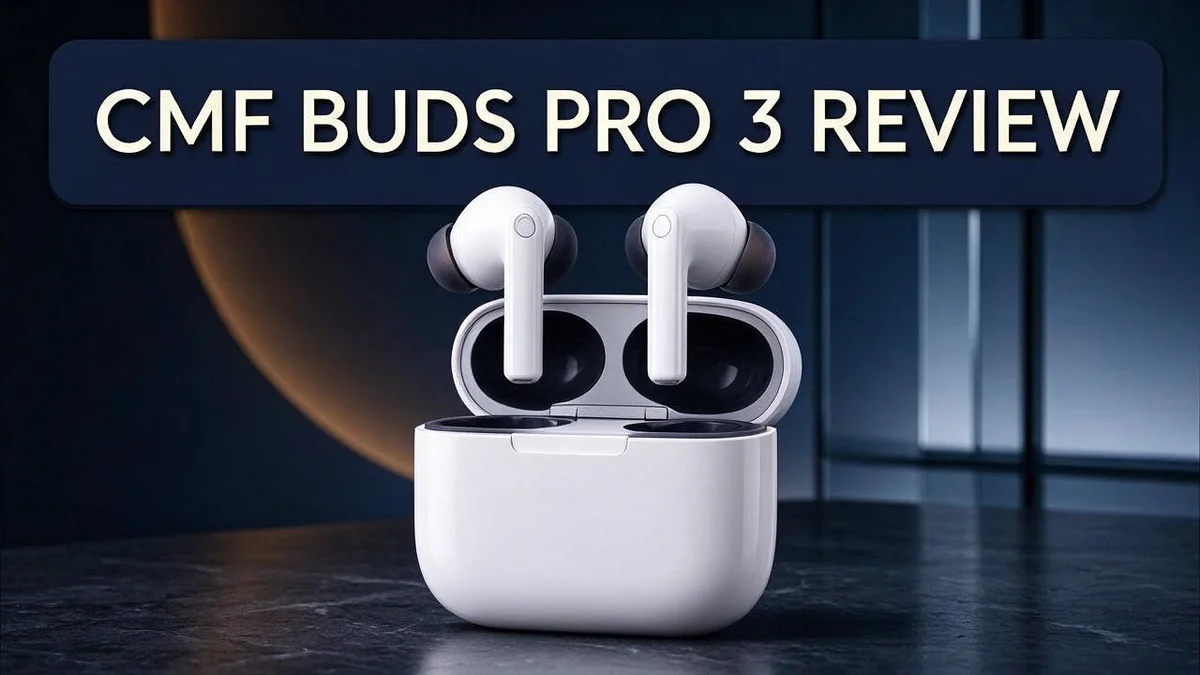
CMF Buds Pro 3 Review: Sound, Noise Cancellation, Battery and Verdict
Are you hunting for earbuds that sound clean and energetic? You are in the right place. This CMF Buds Pro 3 review gives you a clear look at what to expect.
Right now, verified details for the Pro 3 are hard to find. Most available information covers the CMF Buds Pro 2, the closest model. So this article uses that model as a guide and points out where the facts may differ.
The Buds Pro 2 offers a Customisable Smart Dial, a long 43 hour battery, and active noise cancelling. Its sound feels lively, and its call quality works well with an iPhone. Still, it does not match AirPods Pro in every way.
Keep reading to see how these earbuds compare with rivals and whether they fit your daily routine.
In a Nutshell
- Lively sound: The earbuds deliver a clean and energetic tune. Pop and dance tracks feel bright and fun.
- Solid noise blocking: The noise cancelling blocks much of the background noise. Commuters can enjoy calmer rides.
- Clear calls on iPhone: The microphone performs well during calls. iPhone users often notice crisp voices on their end.
- Stand-out case: The case design feels clever and easy to use. It makes the earbuds a joy to carry every day.
- Not quite top tier: Reviewers describe the sound as good, not great. Some testers say the OnePlus Nord Buds 3 Pro sounds richer.
- Strong pick for most listeners: You get reliable features for everyday listening. Compare them with the Samsung Galaxy Buds 3 Pro and Anker Soundcore P31i before you decide.
Sound Quality and Tuning

- 50dB Adaptive Hybrid ANC: CMF Buds Pro 2 ANC earbuds automatically detect noise leakage between the earbuds...
- Smart Dial & Dual Connection: Customize volume, tracks, and noise modes directly via the smart case dial...

Last update on 2026-11-26 / Affiliate links / Images from Amazon Product Advertising API
Verified tuning details for the Buds Pro 3 are not available yet. The sound notes below come from the Buds Pro 2, the closest documented model. Pro 3 tuning could differ, so treat these notes as a guide.
The Buds Pro 2 use dual high resolution drivers. Dual driver setups can share the workload, which may help separate instruments in busy tracks. This matters most for layered pop, rock, and orchestral recordings.
High resolution audio needs a good source. Stream high quality files or lossless tracks to hear what the drivers can do. A stable Bluetooth connection also keeps the audio clear.
Bass lovers should test before deciding. Fans of heavy low end may want more punch than this tuning delivers. Play a favorite bass heavy track at home before you commit.
Fit changes everything. Noise cancelling and bass depend on a good seal in the ear. Try different ear tips until the earbuds sit snug. A loose fit can thin out the sound.
Rival comparisons show the gap. Reviewers rated the OnePlus Nord Buds 3 Pro as sounding better. Buyers who care most about audio detail should compare it with that model.
Test with your own music. Play tracks you know well at the same volume on each pair. Listen closely to vocals, cymbals, and bass lines. This shows real differences faster than any spec sheet.
Who will enjoy this tuning? Casual listeners who want an upbeat sound will likely feel at home. Serious audio fans may want more refinement and detail.
Overall, the tuning suits everyday listening well. It works best for people who value a fun sound over a perfectly neutral one.
Active Noise Cancellation
Active noise cancelling is one of the first features many listeners check. It helps you focus on music or podcasts when the world gets loud. Commuters, travelers, and office workers often rely on it every day.
We do not yet have verified noise cancelling data for the CMF Buds Pro 3. The closest documented model is the Buds Pro 2, so the notes in this section come from that earbud. Treat them as a helpful starting point, not a final verdict.
Reviewers say the Buds Pro 2 offers noise cancelling that competes with pricier earbuds. That is a strong sign for a model in this group. However, it does not match the top performers in the market. Many reviewers place it below the best ANC options.
Different places bring different sounds. A train or airplane creates a steady rumble. Noise cancelling handles this type of low sound very well. Busy cafés and open offices are harder. Human voices change in pitch and volume, so they often slip through.
Think about your daily routine first. If you travel often, steady engine noise will be the main test. If you work in a shared space, focus on voices and sudden sounds. Quiet home users may not need strong noise blocking at all.
Run a simple test before you decide. Play a track you know well at the same volume. Then switch noise cancelling on and off while you walk near a busy road or sit in a loud room. Notice how much outside sound fades. Repeat the test with a different track to hear whether the bass still feels full.
Keep expectations realistic. Noise cancelling works best when the earbuds sit snugly in your ears. A loose fit lets sound leak in and weakens the effect. Try different ear tip sizes if they are included, and check the seal each time you put them on.
Design, Fit and Controls
Verified design details for the CMF Buds Pro 3 are not available yet. This section uses the Buds Pro 2 as the closest guide. Treat it as a starting point, not a final answer.
Comfort matters most during long listening sessions. Try a few ear tip sizes and see which one feels light. Wear the pair for about an hour before you decide. Small discomfort often grows over time.
Controls are the next big question. The Buds Pro 2 use a Customisable Smart Dial, which lets you set the function you want. Many people like physical controls because they work without looking.
A physical dial can feel easier than tiny touch zones. You can adjust volume or skip tracks without pulling out your phone. Practice a few presses in a quiet room first.
Check the controls against your habits. If you take calls while walking, learn which action does what. Pick the function you use most. Set it before you head out the door.
Plan your test before buying. Bring your phone with your usual apps. Open a playlist, then press each control several times. Note any moments that feel awkward.
Try them in a quiet store or room. Move your head, chew, and walk around. A snug pair stays put during everyday motion.
Glasses wearers and people with long hair may notice the fit differently. Side pressure can change after a few hours. Recheck the fit after your first commute.
Keep your expectations realistic. Design and controls shape daily use, yet sound still matters most for many listeners. Use this section as a guide, then compare with your own ears.
Small details add up over time. A comfortable design, easy controls, and a steady fit make daily listening feel effortless.
Top 3 Alternatives
Nothing Ear (2)
No products found.
Nothing Ear (2) offers a clear and balanced sound that many listeners enjoy. Vocals sound crisp, and the bass feels full without being heavy. The earbuds fit comfortably, even during long walks or workouts. They also support active noise cancellation, which blocks out busy streets and noisy offices. The case is compact, so it slips easily into a pocket or bag. Its transparent design gives the earbuds a fun look that stands out in any crowd.
Soundcore Liberty 4

- Matchless Noise Cancellation: Liberty 4 Pro noise cancelling earbuds boast 7 sensors—6 sound sensors and...
- Real-Time Adaptive Noise Reduction: These noise cancelling wireless earbuds adapt to your ever-changing...
Last update on 2026-11-26 / Affiliate links / Images from Amazon Product Advertising API
Soundcore Liberty 4 focuses on strong sound and long battery life. Users can listen for hours before they need to recharge. The companion app lets you adjust the equalizer to match your taste. This model also includes multipoint connection, so you can switch between two devices with ease. Calls sound clear, and the microphones pick up your voice well in quiet rooms. Many people choose it for daily commutes, gym sessions, and relaxed evenings at home.
Samsung Galaxy Buds FE

- Includes 1 year limited manufacturer warranty
- THEY SAY “HOLA,” YOU HEAR “HELLO”: Now you can communicate freely with someone in another language...
Last update on 2026-11-26 / Affiliate links / Images from Amazon Product Advertising API
Samsung Galaxy Buds FE work best for people who use Android phones. They pair quickly and keep a steady connection during calls and music. The earbuds offer solid noise cancellation and a comfortable fit for long days. Touch controls make it simple to play music, skip tracks, or answer calls. The lightweight design feels easy to wear, so it suits students, travelers, and anyone who wants reliable everyday audio.
Call Quality and Microphones
Call quality matters more than many people think. A clear voice helps on video calls, voice notes, and quick phone chats.
We do not yet have verified call or microphone data for the CMF Buds Pro 3. The closest documented model is the Buds Pro 2, so this section uses it as a guide.
Reviewers say the Buds Pro 2 performs well on calls with an iPhone. That result is a helpful starting point.
Your phone shapes the result. Android phones, laptops, and iPhones handle audio input in different ways. Test each device you use most.
Wind is a common problem for any earbud. Step outside and talk at a normal volume. Then ask how your voice sounds.
Ask a friend for honest feedback. Do they hear your voice as thin, muffled, or clear? Their answer tells you more than any spec sheet.
Try a real call in a noisy place. Cafes, busy streets, and open offices all test a microphone well. Good earbuds keep your voice clear while background noise fades.
Pay attention to the other side of the call too. Listen for echo, sudden drops, or a voice that cuts in and out. Check the connection on both ends.
Record a short voice memo before you decide. Play it back on a different device. Listen for clarity, volume, and any background hiss. This quick check takes only a minute.
Keep your expectations fair. Earbud microphones rarely match a phone held close to your mouth. Still, many people find them good enough for everyday talks.
Your daily routine decides what matters most. If you take short work calls at home, wind may not matter much. If you call while commuting, test outdoor noise first.
Battery Life and Charging Case
Battery life matters more than many people expect. We do not yet have verified battery data for the CMF Buds Pro 3.
This section uses the Buds Pro 2 as the closest model. Its listed battery life is 43 hours on paper.
Treat that number as a starting point. Your daily habits shape the real result.
Battery life also depends on your phone. Keep Bluetooth on only when you need it.
Listen at moderate volume to stretch your charge. Loud playback drains any earbud faster than quiet listening.
Check the battery level before a long day out. Many phone apps show the remaining charge for each bud and the case.
The charging case works like a portable power bank. Each trip back to the case gives the buds a fresh charge.
Top up the case before a commute. A short charge can keep your buds going through a busy day.
Store the case in a cool, dry spot. Heat and damp conditions can wear down batteries over time.
Charging speed is another open question. We cannot confirm how long a full charge takes for the Pro 3.
Run your own battery test during the first week. Note the charge level each morning and each night.
Write down your listening hours for each day. Compare those hours with the drop in charge over several days.
A steady pattern will show how the buds really perform. That pattern tells you more than any single spec.
Do not let the case run flat for long. Recharge it every few weeks, even when you use the buds less.
A forgotten case can leave you without power on an important day. A quick charge each weekend keeps things ready.
Compare battery results with other earbuds you own. Side by side notes show whether the Pro 3 suits your habits.
Wait for official numbers before you judge. Manufacturer figures and independent tests give the clearest picture.
Pros and Cons
Pros
- Clean and energetic sound suits pop and upbeat playlists.
- Noise cancelling competes with earbuds from top brands.
- A clever charging case feels handy when you are on the move.
- Reviewers say the Buds Pro 2 handles calls well with an iPhone.
- High resolution dual drivers add detail for music fans.
Cons
- The sound is good, not great, so it lacks AirPods Pro level polish.
- Some reviewers say the OnePlus Nord Buds 3 Pro sounds better.
- Most reviews test the Buds Pro 2, not the Buds Pro 3 itself.
- No verified call or microphone data exists yet for this model.
Who Should Buy It
Some listeners will get more from these earbuds than others. Your daily habits matter most. Use the examples below to see if the fit suits your life.
Commuters are a strong match. A bus ride or busy train platform can drown out your music. Good isolation lets you keep the volume low, which also protects your hearing over time.
Students who study in public spaces may also benefit. Library chatter and campus noise can break concentration. Blocking some of that noise helps you stay on task during long study sessions.
Tinkerers will enjoy the customisable Smart Dial. Many people like to set their controls their own way. This dial lets you shape how the buds respond, so you can build a routine that feels natural.
Podcast and audiobook fans should focus on speech clarity. Long listening sessions need voices that sound clear and easy to follow. Play a few episodes of your favourite show before you commit.
First time buyers will notice a clear step up. If your old earbuds sound thin or feel weak, this pair brings fresh energy to your music. You get a noticeable change without a steep learning curve.
Audio perfectionists may want to compare first. Listeners who hear every subtle detail often expect top tier polish. Try a side by side test with a rival such as the Samsung Galaxy Buds 3 Pro or the Anker Soundcore P31i.
Anyone can start with a simple test. Wear the buds for an hour and notice how they feel in your ears. Then listen to your favourite tracks and see how the sound lands for you.
Remember that the research uses the Buds Pro 2 as its guide. No verified data exists for the Buds Pro 3 yet. Check fresh reviews before you make your final choice, so you buy with confidence.
Final Verdict
The CMF Buds Pro 3 is hard to judge right now. No verified reviews or specs exist for this model yet. Our view leans on the Buds Pro 2, the closest documented model.
Treat this verdict as an informed guess, not a final score. It helps you decide whether this family deserves a closer look.
The Buds Pro 2 shows what this family can do. It offers a lively listen, plus extras that many rivals lack at this level.
Still, it does not beat every premium pair. Expect dependable daily use rather than a class leading experience.
Compare before you commit. The OnePlus Buds 3 Pro and Samsung Galaxy Buds 3 Pro sit in a similar class and deserve a side by side check.
Also look at the Nothing Ear (a) and Anker Soundcore P31i. Staying in the family, the CMF Buds Neo and CMF Buds 2 show how the lineup scales.
Set a clear checklist before you shop. Note the features you need most, such as a secure fit and an easy setup process.
Try a pair in person if you can. A quick walk will show how well the tips seal and how secure they feel in your ears.
Check the return terms too. Make sure you can send the earbuds back if they do not suit your ears.
Wait for fresh independent tests before you buy. Real world reviews should confirm how this exact model performs over time.
Waiting only takes a little patience. Official pages and trusted tech sites will share verified details as soon as they appear.
Our bottom line is simple. The CMF Buds Pro 3 suits listeners who want a lively sound and a clever case. Treat it as a promising contender, and verify the details before you commit.
Frequently Asked Questions
Is the CMF Buds Pro 3 available to buy yet?
Verified details for this model are still scarce. Most current material covers the Buds Pro 2, the closest documented model. Check official listings before you decide.
How long does the battery last?
The Buds Pro 2 offers about 43 hours of total battery life. Real results depend on volume and how often you use noise cancelling. Expect the Buds Pro 3 to follow a similar pattern once tests appear.
Will these earbuds work well at the gym?
Current research does not test workout fit, sweat resistance, or secure ear hold. Look for those details in future reviews. If you run or lift often, try the earbuds on in a store first.
Which rival should I compare first?
The OnePlus Buds 3 Pro and Samsung Galaxy Buds 3 Pro sit in a similar class. The Motorola Moto Buds Bass may suit listeners who want heavier bass. Compare sound, fit, and return terms side by side.
Do the earbuds perform well with Android phones?
Reviewers mainly report strong call quality with an iPhone. Android call and microphone data is missing from current research. Test calls on your own phone before you commit.

Dillip is the founder and editor of DillipWeb.com, where he simplifies the world of AI software, tech gadgets, and accessories through honest reviews, detailed comparisons, and easy-to-follow guides. With a deep passion for emerging technology, he helps everyday users make smarter, more informed tech decisions.