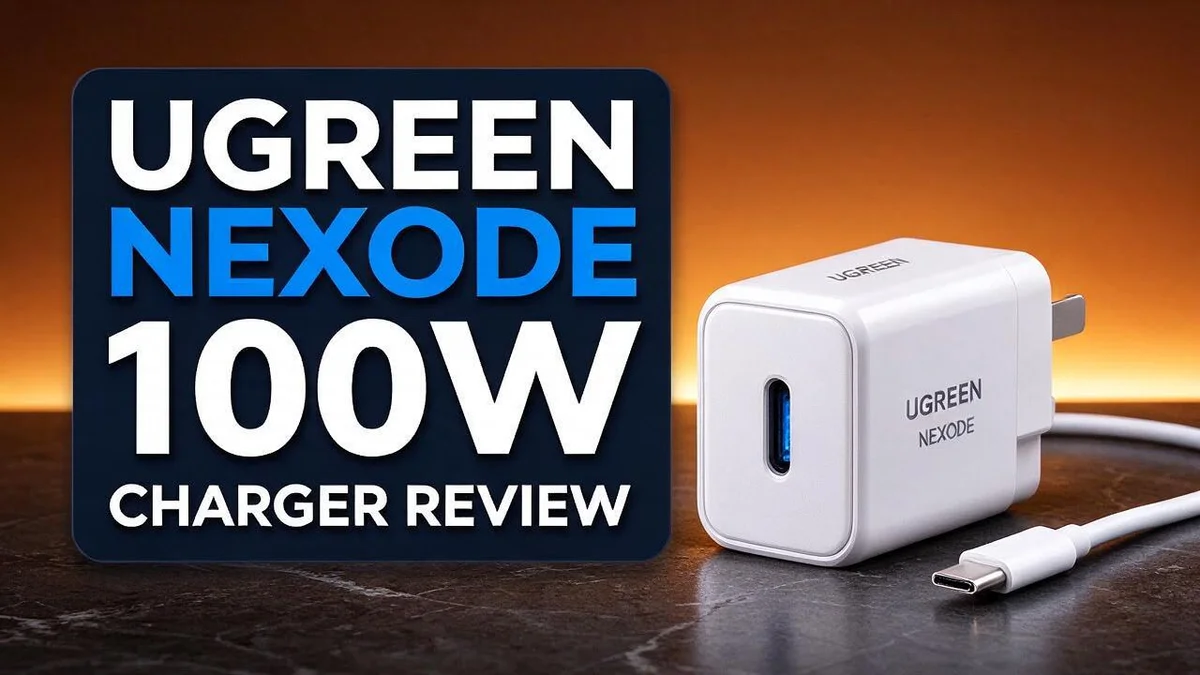
UGREEN Nexode 100W Charger Review: Compact GaN Power for Laptops and Phones
Are you tired of carrying a pile of chargers? The UGREEN Nexode 100W Charger may be the answer you need.
This compact charger packs serious power into a small body. It uses GaN technology to deliver 100W fast charging for your devices.
Most listings show 4 USB C ports and 1 USB A port. Some versions offer 3 USB C ports instead, so check your listing before you buy.
The plug folds flat, so it slides easily into a bag. Users often praise its sturdy build and handy port mix.
One reviewer shared that they used their charger for almost a year with no problems. Still, another reviewer warned others about their experience, so this review looks at both sides.
In a Nutshell
-
Gallium nitride technology does the heavy lifting. This GaN design delivers 100W fast charging in a small package. It helps the charger stay efficient while you power demanding devices.
-
Versions can differ in port count. Some listings show three USB C ports and one USB A port instead of four. Read the product page closely so you get the setup you need.
-
The Nexode Pro adds extra safety features. This three port variant runs on 240V input and includes short circuit protection. It suits people who want added protection for their setup.
-
Read the critical reviews too. One Reddit user said they cannot recommend the charger, but the excerpt does not explain why. Look for full reviews to learn the reasons behind negative feedback.
-
Several UGREEN alternatives exist. You can compare the 65W Nexode charger, the four port GaN II model, or the 100W MagSafe Power Station. Each option fits different charging habits.
-
Pick based on your charging needs. Think about how many devices you charge at once and which ports they need. This simple step helps you choose the right model fast.
Power Output and Charging Speed

- 100W Max fast charge: Connect a single USB C device for up to 100W of power, maximum support 5A current...
- 4 In 1 Multiport charger: 3 * USB C ports and 1 * USB A port provide 100W to phones, tablets, laptops, and...

Last update on 2026-11-26 / Affiliate links / Images from Amazon Product Advertising API
Power sharing matters most. The charger has one total output of 100W. When only one device connects, that device can draw the full power. When two or more devices connect, the charger divides the wattage between them. This makes the charger useful for mixed device groups.
Charging speed depends on the device. A modern laptop can use a large share of the 100W, so it charges at a strong pace. A phone needs much less power, so it charges quickly with plenty of headroom.
Cable choice also affects results. A weak cable can limit the speed, even with a strong charger. Look for cables that support high wattage charging. Use one rated for high wattage so your device gets the full benefit.
Heat is another factor. Chargers that run hard can warm up during long sessions. Give the charger some airflow, and avoid covering it with blankets or bags while it works.
Charging time varies. A phone with a small battery may reach a high level in under an hour. A larger laptop battery takes longer, though it still charges faster than older chargers. Battery size and current charge level both matter.
Smart power delivery adjusts for you. The charger talks with each device. It sends the voltage and current that device accepts. This protects the battery and keeps charging efficient.
Plan your charging setup before you start. Place the charger near an outlet with space around it. Keep a strong cable for the laptop and a shorter one for earbuds or a watch.
Consider your daily routine before you buy. If you charge a laptop and a phone together, the shared output works well. If you charge several devices at once, plan which ports get the most power.
Overall, the UGREEN Nexode 100W Charger offers strong speed for everyday needs. Good cables, airflow, and smart port planning help you get the best results every time.
Design and Portability
Good design matters when you travel. The UGREEN Nexode 100W Charger has a square shape that fits easily in your hand.
It measures about 2.87 by 2.87 by 1.22 inches. That size fits in a jacket pocket or a laptop sleeve.
Many chargers feel bulky on a desk. This one keeps its footprint low, so it takes up little space.
Portability shines during trips. You can toss it into a carry on bag with your phone and tablet. One charger can replace several bulky adapters.
Wall fit matters too. Read the label on your specific model before you plug it in abroad.
Build quality feels solid in hand. Reviewers describe the body as sturdy and functional. That matters when a charger rides in a bag every day.
A small charger also helps you pack light. Fewer cables and bricks mean less clutter in your backpack. Your desk stays tidier too.
Weight is another point to consider. The listing does not share a weight figure in the research, so check the product page before you buy.
Carry options matter too. A small charger slides into a pouch, a glove box, or a hotel drawer without much effort.
A compact shape usually sits well in a palm, so you can plug and unplug with less fuss.
Household use gets easier. Keep one charger on a shelf near the entry. Your family can grab it fast when batteries run low.
Think about your daily carry. If you walk or commute, every ounce counts. If you mostly charge at home, the compact body still fits neatly in a drawer.
Pick a spot for storage. A small footprint makes it easy to keep near a bedside lamp or a backpack pocket. Small items get lost easily, so pick one spot and stick to it.
Overall, the design favors people on the move. It packs a lot into a small frame. It suits trips, offices, and bedside tables.
Port Configuration and Compatibility
Ports matter more than most people think. Before you buy, check what your devices need. A good match saves time and keeps your gear safe.
Start with a simple list. Write down each phone, tablet, laptop, and earbud case you charge. Note which port each one uses.
Next, look at the cable. A USB C to USB C cable works best for newer phones and laptops. Older gadgets may need a USB A cable, so keep one nearby.
Check the label on each device. Look for words like fast charge or Power Delivery. These words tell you the device can accept higher power from a USB C port.
Think about the cable quality too. A thin or worn cable can slow charging even on a strong charger. Use a cable rated for high wattage if you plan to charge a laptop.
Laptops need extra care. Many laptops ask for more power than phones. Check your laptop charging needs in its manual, then confirm the charger can supply that level on one port.
Device priority helps when you charge several gadgets. Plug your laptop into the port with the most power. Let small items like earbuds share the remaining output.
Placement also counts. Ports close together may block bulky plugs. Leave space around the charger so cables bend without strain.
Wall fit affects compatibility as well. Make sure your outlet can hold the foldable plug firmly. A loose fit can cause heat or unstable charging.
Travel adds another layer. Read the voltage on the charger label. Use a plug adapter that fits your destination, but never force the plug into a socket.
Mixing old and new devices works fine. Your USB A port handles older accessories well. It usually offers less power, so save it for low demand items like a fitness band.
Finally, keep your setup simple. Label the cables and store them in a pouch. A clear setup helps everyone in the house charge with confidence.
Top 3 Alternatives
Anker 737 Charger

- Power Through Your Day: With a 24,000mAh capacity, this laptop power bank can charge an iPhone 16 Pro...
- Intelligent Charge Monitoring: The smart digital display on this laptop power bank provides real-time insights...
Last update on 2026-11-26 / Affiliate links / Images from Amazon Product Advertising API
The Anker 737 Charger is a strong pick for people who want fast charging. It uses GaN technology, so it stays compact while it delivers plenty of power. Laptops, tablets, and phones all charge quickly with it.
This model offers several ports. You can charge more than one device at the same time, which saves space in your bag. Many users also like the clean build and the solid feel.
Anker 747 Charger

- Fast Charging for Four Devices: Enjoy the convenience of powering four devices simultaneously with our...
- Dual High-Speed USB-C Ports: Rapidly charge your 15-inch MacBook Air to 50% in just 30 minutes with either of...
Last update on 2026-11-26 / Affiliate links / Images from Amazon Product Advertising API
The Anker 747 Charger steps up the output for heavier devices. It suits people who own a larger laptop and still want to charge a phone or earbuds at once. Power stays steady across every port.
This charger fits well on a busy desk or in a travel bag. It gives you flexibility without adding much bulk. If you often work from different places, this option keeps your gear powered.
Baseus GaN5 Pro

- 3-in-1 Intelligent Charging: Power a laptop, phone, and earbuds at once time with three USB-C ports. Support...
- Active Battery Care: Designed to help keep long-term battery health with smart power-off protection which...
Last update on 2026-11-26 / Affiliate links / Images from Amazon Product Advertising API
The Baseus GaN5 Pro is a compact charger with a modern design. It also uses GaN technology, so it runs cooler and stays efficient during longer sessions. It is a good choice for daily commuting.
Many buyers appreciate its simple setup. You plug it in, connect your device, and start charging right away. It works well for people who want an easy everyday charger without extra features they will never use.
Safety and Protection Features
Safety matters as much as speed. A fast charger pushes a lot of power through small parts. Good protection keeps your devices and your home safe.
The UGREEN Nexode 100W Charger uses GaN technology. GaN designs generally waste less energy as heat than older silicon chargers. Less heat can mean less stress on the internal parts over time.
Some versions of this charger list extra safety features. The Nexode Pro variant lists short circuit protection. This feature cuts power when a wire or connected device fails, which helps stop damage from spreading.
Check the product page for a full list of protections. Look for over temperature, over current, and over voltage protection. These guards pause or stop charging when something goes wrong.
Input voltage also matters. The Nexode Pro variant lists a 240V input, so it suits specific outlets. Always match the charger label to your outlet before you plug in.
Real users offer helpful clues. One Reddit reviewer reported almost a year of use with no problems. Another reviewer gave a harsh verdict, but the reasons were cut off, so read reviews with care.
Simple habits add another layer of safety. Unplug the charger when you leave the house for long periods. Keep it away from bedding, curtains, and paper. Open space allows air to flow around it.
Watch for warning signs during use. A hot case, a burning smell, or flickering lights means you should stop charging right away. Replace the charger if you spot cracks or damage on the plug or cable.
Buy from a trusted seller. Counterfeit chargers often skip important safety parts. An original product gives you better protection and peace of mind.
Safety features give you confidence every day. Pick a charger that lists its protections clearly. Then you can charge your devices with less worry.
Pros and Cons
Pros
- Long term reliability: One Reddit owner used it for almost a year without problems.
- Gallium nitride tech helps deliver 100W power from a small body.
- The foldable plug tucks away neatly when you do not need it.
- The Nexode Pro version accepts 240V input, which suits travel abroad.
- Strong output makes it handy for a desk with several gadgets.
Cons
- One Reddit reviewer strongly advised against buying it.
- The reasons behind that warning are not fully clear.
- Port counts differ between versions, so check the exact model.
- Read recent reviews before you decide.
Who Should Buy It
This charger suits people who want one charger for almost everything. Many shoppers own a drawer full of plugs. This model can replace several of them.
Students often carry a phone, tablet, earbuds, and laptop every day. A compact charger keeps all of those devices ready for class. It also fits easily into a backpack pocket.
Remote workers gain a lot too. Many people want fewer plugs competing for space on the wall. This charger can power several gadgets from a single outlet, which keeps the workspace tidy.
Families with shared devices will appreciate it. Parents can set up one charging point for the whole house. Kids get their own port without fighting over the outlets.
Frequent café workers can benefit as well. Laptop users who work from coffee shops often carry a phone and tablet too. This charger lets them top up everything while they sip their drink.
Gift buyers also find it useful. A tech lover who owns several USB C gadgets will likely enjoy a modern upgrade. It makes a practical present that gets used every day.
Fans of UGREEN gear may feel right at home. Matching accessories can make a setup look neat and feel simple to manage.
Some people should look elsewhere. A person with one old phone and no plans to upgrade may not need extra ports. Shoppers who rarely charge more than one device may find a single port option simpler to use.
Those who want magnetic charging for their iPhone should compare the MagSafe Power Station first. It offers a different style of charging that some users prefer.
Count your daily devices before you decide. Write down each gadget you use each day. Then note which ones need power at the same time. This quick list shows whether a multi port model fits your life.
Final Verdict
Our final verdict leans positive, with a few caveats. This charger suits people who want fewer plugs on their desk. It packs serious power into a compact frame, so it travels well too.
The port mix matters most in daily use. Most listings show four USB C ports and one USB A port. That layout lets you charge a laptop, phone, tablet, and earbuds at the same time.
Some versions only offer three USB C ports, so check the listing before you order. Buying the right model saves frustration later.
Performance earns the strongest praise. Reviewers describe the build as sturdy and functional. One owner kept using it for almost a year without trouble, which suggests it handles everyday use well.
A harsh warning also exists. One reviewer said they could not recommend it. The excerpt cuts off, so the exact reasons stay unclear. Treat that feedback as a reason to test the charger carefully, not as a final answer.
Who should look elsewhere? People who only charge one phone may not need this much output. The UGREEN Nexode 65W charger handles lighter needs with less power.
Travelers who need a 240V input should consider the Nexode Pro version, which has three ports. Users who want more ports can look at the 4-port GaN II model.
iPhone owners who want a desk hub might prefer the MagSafe Power Station. It offers dual 100W USB C ports, a USB A port, and MagSafe charging in one unit.
Compare each option side by side before you choose. Focus on the port count, input needs, and the devices you charge most.
Overall, this charger earns a spot on a busy desk. Pick the version that matches your ports and your travel habits. Then enjoy one neat charging point that keeps every gadget ready.
Frequently Asked Questions
Can this charger power a laptop and a phone at the same time?
Yes, it can. The 100W total output gets shared across the ports. A laptop and a phone can charge together, but each device may charge a bit slower when many gadgets plug in at once.
Does the USB A port work for older gadgets?
The USB A port suits older devices, such as basic earbuds cases and simple accessories. Newer phones and laptops usually need a USB C port for the fastest charging, so plug those into the USB C ports.
Is it safe to leave plugged in overnight?
Many people leave chargers plugged in overnight. The Nexode Pro version lists short circuit protection, which adds a layer of safety. Always check the box for safety certification marks before you buy.
Which devices work best with this charger?
Phones, tablets, and laptops that support USB C charging work best. Check your device’s power needs first. A laptop that needs more than 100W will not reach full speed.

Dillip is the founder and editor of DillipWeb.com, where he simplifies the world of AI software, tech gadgets, and accessories through honest reviews, detailed comparisons, and easy-to-follow guides. With a deep passion for emerging technology, he helps everyday users make smarter, more informed tech decisions.