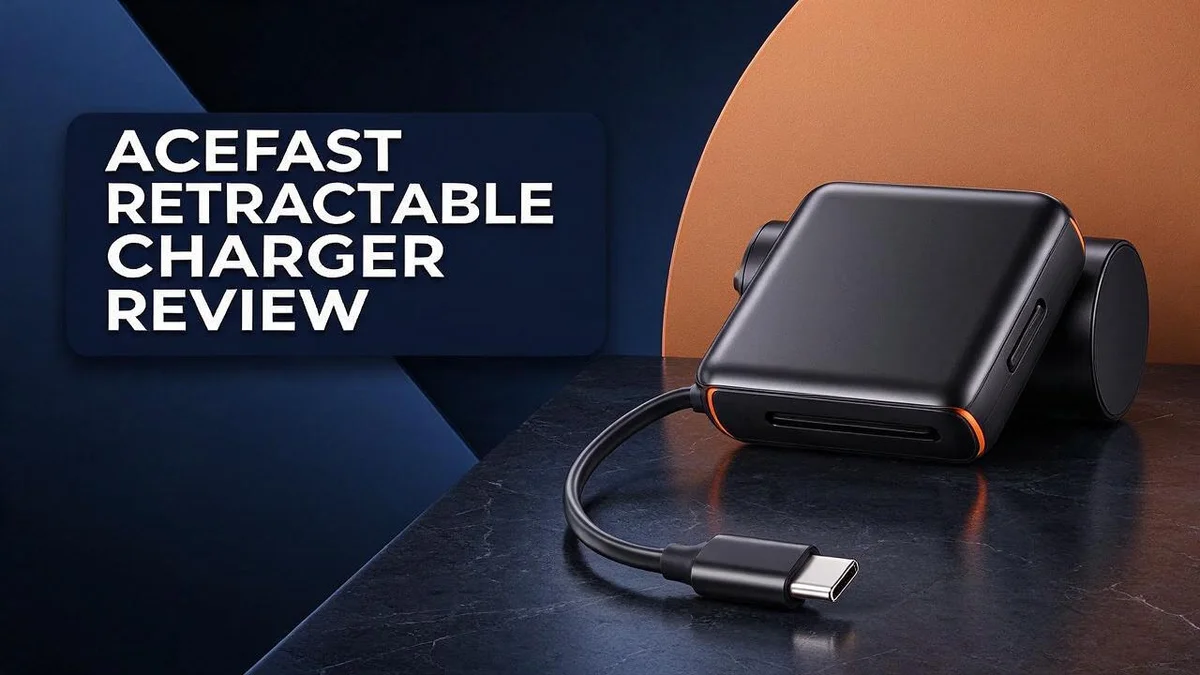
Acefast Retractable Charger Review: Features, Performance and Verdict
Tired of tangled cables on your desk? You are not alone. Many people want a charger that stays neat and still powers every device fast.
Whether you work from home or travel, a clean setup matters.
The Acefast retractable charger line may be the answer. Acefast offers several models, from a 67W GaN charger to the Z9 Pro station.
The Z10 features a retractable cable that keeps your desk tidy. The Z9 Pro adds a built in stand for your iPhone.
In this review, we look at what each model offers, where it shines, and where it falls short. Keep reading to find the right fit for your setup.
In a Nutshell
-
The Z9 Pro works as a full charging station. It offers six outlets, a 100W output, and an adjustable iPhone stand. This setup lets you watch videos while your phone charges.
-
The Z14 suits busy homes. It delivers 100W of charging power for multiple devices at once. Families and small offices can keep several gadgets powered from one spot.
-
The 67W model covers everyday needs. It includes two USB C ports, one USB A port, and a 65cm retractable cable. Power delivery support means faster charging for newer phones and laptops.
-
Wireless charging has a catch. The 25W iPhone charging pad on the Z9 Pro works only with the iPhone 16, according to the source. Other phone owners should check compatibility first.
-
Reviews are still limited. The 67W model shows a 4.7 out of 5 rating, but it has zero reviews. Most sources lack real user feedback, so you should read more opinions before you buy.
-
Competitors offer other choices. The NexTECH 4 in 1 retractable wall charger and a portable MagSafe pad from another brand offer different styles. Compare features carefully before you decide.
Key Features and Power Outputs

- ⚡【6 in 1 GaN Fast USB-C Desktop Charger(105W)】 Equipped with a powerful 105W GaN Fast USB-C Desktop...
- 📈【Multi-Function Travel Charging Station】 This portable travel charging stand is the perfect companion...
Last update on 2026-11-25 / Affiliate links / Images from Amazon Product Advertising API
Port count is only half the story. Many shoppers count ports first. Yet the total wattage decides how fast each device charges. Looking at both numbers gives you a clearer picture.
A single 100W output can be shared across several devices. When you plug in a laptop and a phone at the same time, each one receives less power. Ports often share the load, so plan for this before you buy.
Laptops need the most power. Look for USB C ports that support Power Delivery. This standard sends the higher wattage a laptop expects. A phone or earbuds need far less power, so they charge well on any port.
Think about what you charge every day. A tablet, a smartwatch, and wireless earbuds use little energy. A larger tablet or a gaming laptop needs more. Match the output to your heaviest device, and the rest will follow.
Cable length changes daily use. A 65cm cable reaches a bedside table or a car seat with ease. Longer setups, such as a desk with a monitor, may need extra reach. The retracting feature also keeps the cable out of sight when you do not need it.
Heat is a real concern. High wattage chargers warm up during fast charging. Place the unit on an open shelf or a flat surface. Avoid covering it with blankets, papers, or clothes.
GaN technology helps keep chargers small. A compact charger fits easily into a backpack or a laptop bag. This suits people who travel often and want one charger for both home and office.
Check the plug type before you order. Some models use a standard wall plug, while others need a country adapter. Confirm that the plug matches your outlets at home and abroad. This simple step prevents frustration later.
Try a USB meter for real results. These small tools show the actual watts that flow to your device. You can confirm that the stated output matches what you get in daily use.
Retractable Cable Design and Build
A retractable cable looks simple. But the build decides how long it lasts. Acefast places the cable inside a compact housing, so it rolls back neatly after use.
The housing matters most. A solid shell protects the inner parts from drops and daily knocks. Pick up the charger and check that it feels firm, not hollow.
The exit point is the real weak spot. Every time the cable slides out and back in, it bends at the same place. Good strain relief near the plug helps the wire last longer.
Pay attention to how the cable retracts. A smooth, controlled return feels better than a loose snap. A cable that jerks back hard can stress the internal wire over time.
Test the locking action too. A well made cable should stay at the length you choose. If it slips back while you plug in a device, the mechanism needs more work.
The cable material matters as well. A braided outer layer resists fraying better than smooth plastic. Thin cables can also tangle inside the housing, so a sturdier core helps keep things moving freely.
Built in or detachable designs behave differently. Some models keep the cable fixed inside the body. Others use a cable that slides into a slot.
Fixed designs look neater. Yet they may leave you with fewer options if a part wears out.
Check the support details before you buy. Ask whether the cable can be replaced and how the warranty covers wear. Clear answers show that the maker expects the cable to last.
Also watch the plug end. A plug that sits flush with the body stays safer in a bag. A plug that sticks out can catch on pockets or cords, so look for a shape that tucks in when stored.
Finally, match the design to your routine. A cable that suits a desk may not suit a car seat or a hotel room. Think about where you charge most often, then choose the build that fits those spots.
Charging Performance and Safety
Safety starts with certification. Look for marks like UL, ETL, CE, or FCC on the label or box. These marks show that an independent lab tested the charger.
Good protection features guard your devices. Strong chargers include overcurrent, overvoltage, and short circuit protection. These features stop power surges from harming your phone or laptop.
Rated watts are a ceiling, not a promise. A 100W label shows the maximum output. Your device pulls only the power it can accept. Battery level and room temperature also shape the charging speed.
Cables can limit your speed too. A fast charge needs a cable rated for high current. Many thin cables handle only lower power, even when the charger can deliver more.
Daily fast charging adds wear to batteries. Many phones slow down near a full charge to protect the cell. Let your device manage this process rather than forcing extra power.
Use a sturdy outlet. Avoid weak power strips and worn wall sockets. A stable connection lowers the chance of sparks and failed charging.
Treat ratings with care when reviews are missing. A 4.7 star score with zero reviews tells you very little. Check for lab reports or lasting feedback from real buyers first.
Counterfeit chargers often skip safety tests. They may look identical but cut corners inside. Buy from trusted sellers to avoid this risk.
Keep kids and pets in mind. Small hands can pinch a retracting housing or chew on loose cables. Store the charger out of reach when you leave it plugged in.
Damage changes everything. A cracked shell or bent prong can expose live parts. Stop using the charger right away and replace it.
Inspect the cable and plug every few months. Look for fraying, bulging, or loose fittings. The manual lists temperature limits and cleaning tips, so keep it nearby for quick checks.
Test your setup before you trust it. Plug in a phone, confirm that it charges steadily, and feel the charger body after a short session. Safe charging starts with simple habits.
Top 3 Alternatives
Anker Retractable Cable

- 7-in-1 Charging Station: Includes 7 ports—3 USB-C (100W max), 1 USB-A, and 3 AC outlets—for all your...
- Mighty Power, Organized Space: The compact charging station boasts two built-in retractable cables and neatly...
Last update on 2026-11-25 / Affiliate links / Images from Amazon Product Advertising API
Anker offers a retractable cable that many people trust. It extends to a comfortable length and retracts with a simple press. The cable stays put while your device charges, so you can use your phone without holding it. It works with common phone models and handles everyday use well.
UGREEN Retractable Cable
No products found.
UGREEN gives you a practical option for daily charging. Its compact body slides into a small case. You can keep it in a desk drawer, a bag, or your car. The cable feels sturdy in the hand, which matters when you pull it out often.
Belkin Retractable Cable

- RETRACTABLE USB C CABLE: This convenient, built-in retractable USB C cable is 3.3ft long and tangle-free with...
- FAST CHARGING UP TO 67W: This retractable USB C charger rapidly charges an iPhone 17 from 0-50% in just...

Last update on 2026-11-25 / Affiliate links / Images from Amazon Product Advertising API
Belkin is a well-known brand for chargers and accessories. You can count on its cables for steady power. The retractable design keeps the cord tidy after every use. Many travelers like it because it takes up very little room in a backpack.
Each option brings something different to the table. Think about how you charge your devices each day, then choose the cable that fits your routine best.
Multi-Device Compatibility
Most homes have more gadgets than outlets. A charger that handles several devices saves space and keeps cords off the nightstand. This section looks at how well these Acefast models fit a busy daily routine.
Port layout matters more than port count. Two USB-C ports and one USB-A port can serve a phone, a tablet, and a pair of earbuds. Check which port suits each device before you plug in.
Power gets shared when several devices charge at once. One port may slow down when another device starts drawing power. Charging a phone alone is usually faster than charging three gadgets together.
Laptops need extra wattage. A laptop draws more power than a phone, so it may need a dedicated port. Pair it with the USB-C port that supports Power Delivery for the best result.
The Z9 Pro takes a different approach. It combines a retractable USB-C cable, several outputs, and an adjustable iPhone stand in one unit. This setup suits someone who wants a bedside hub that also holds a phone upright.
The stand gives hands-free time while the phone charges. Watching a video or following a recipe becomes easier. Desk workers may find this layout useful too, especially during long video meetings.
Wireless charging has limits. The Z9 Pro offers 25W wireless charging, but the research only confirms support for the iPhone 16. Owners of other phones should check compatibility before relying on that feature.
The Z14 suits shared spaces. Its station design targets households or offices where several people charge at the same time. Each port can serve a different person. Families can keep phones, tablets, and laptops on one charging point.
Compare these options with your daily routine. A short list helps. Write down each device and when you use it. Then count how many devices need power at the same moment. Choose a model that matches that number instead of the highest port count on the box.
Pros and Cons
Pros
- The Z10 packs 100W GaN power into one compact charger.
- The 67W model adds a 65cm retractable cable for fast charging.
- The Z14 powers several devices from one 100W station.
- The Z9 Pro supports 25W wireless charging for iPhone 16 users.
Cons
- The 25W wireless charging only works with iPhone 16 based on current information.
- Most sources have few real user reviews to compare.
- Rival models like the NexTECH charger offer a similar retractable design.
Who Should Buy It
This charger suits people who handle many gadgets every day. If your bedside table holds a phone, a tablet, and a pair of earbuds, one station can bring order to the mess.
Families sharing one outlet will appreciate the extra ports. Kids often need tablets and phones charged at the same time. A station with several outputs gives everyone a place to plug in.
Home offices offer another good fit. A desk often has a phone, a tablet, and a laptop all needing power at once. A station keeps those cables in one spot, which helps you focus during work hours.
Students in shared dorm rooms may also benefit. Limited space and few wall sockets make a compact unit a practical choice. Roommates can charge their devices without fighting over the last plug.
People who own an iPhone 16 should look closely at the Z9 Pro. Owners of other phone models should look elsewhere for wireless charging, since that feature depends on the phone model.
Anyone who dislikes hunting for cables will enjoy this setup. Each device gets a clear route to power, so nothing gets lost in a drawer or behind a couch.
Gift buyers also have a good reason to consider it. A tidy charging station makes a practical present for a friend who loves gadgets.
Busy households with mixed devices gain the most. Parents, teens, and partners all share one charging point. That setup reduces arguments over who used the last plug.
Who should skip it? People who use one phone and a basic plug may find it more than they need. Simple chargers often do the job well for light use.
Think about your daily routine first. Count the devices you charge at once, then match that number to the ports you need. A good fit saves time, reduces frustration, and keeps your setup simple.
Final Verdict
Our overall take on the Acefast range is positive but cautious. The lineup covers a wide spread of needs, from a compact 100W charger to a larger station with a built in stand.
Start by counting your daily devices. Write down every gadget you charge each day. This simple count shows whether you need two ports or six. Then match that number to the ports on the model you pick.
Check the cable length before you buy. A 65cm lead works well beside a bed or sofa. On a wide desk, it may feel short, so measure your space first.
Durability is the next big question. Independent testing data is hard to find, so treat the brand claims as a starting point. Read recent photos and videos from real buyers before you commit.
Retractable cables also have moving parts. Over time, they can wear out sooner than fixed cables. Keep the cord clean, and avoid pulling it hard when you retract it.
The Z9 Pro suits people who want one station for everything. It combines a stand, several outputs, and a retractable cable.
The Z10 and 67W models suit people who want a compact option. They fit into a bag more easily. They also deliver fast charging for phones and tablets.
Compare any rival model side by side before you decide. Look at port count, output limits, cable type, and warranty length. Warranty length often says a lot about a brand’s confidence. A quick list on paper can make the choice much easier.
Read the return policy before you order. A good return window gives you time to test the cable, the ports, and the fit on your desk. Check whether the seller accepts returns for opened items. Keep the packaging until you are sure.
In short, the Acefast chargers deserve a place on your shortlist. Match the model to your device count, cable needs, and iPhone. Then test it for a week before you decide.
Frequently Asked Questions
What does PD fast charging mean?
Power Delivery, or PD, is a fast charging standard. Your phone or tablet must also support it to charge quickly. Look for the PD label on the charger and check your device settings.
Where is the best place to put the charger?
Place it on a desk or shelf near a wall socket. Keep the vents clear so the unit stays cool. Avoid tucking it under blankets or loose papers.
How often should I retract the cable?
Pull the cable back in when you finish charging. This keeps the lead safe from bumps and dust. A quick habit keeps the cable in good shape.
Can I charge two devices at once?
Yes, the multiport models let you charge two gadgets together. Use the ports with the highest output for your laptop or tablet. Phones need less power, so they can share the rest.
Do I need a plug adapter when travelling?
Plug shapes change from country to country. A GaN charger can still work abroad with a suitable adapter. Check the plug type before you pack.

Dillip is the founder and editor of DillipWeb.com, where he simplifies the world of AI software, tech gadgets, and accessories through honest reviews, detailed comparisons, and easy-to-follow guides. With a deep passion for emerging technology, he helps everyday users make smarter, more informed tech decisions.