Geekom A8 Review: Ryzen 9 Mini PC Performance, Ports, and Verdict
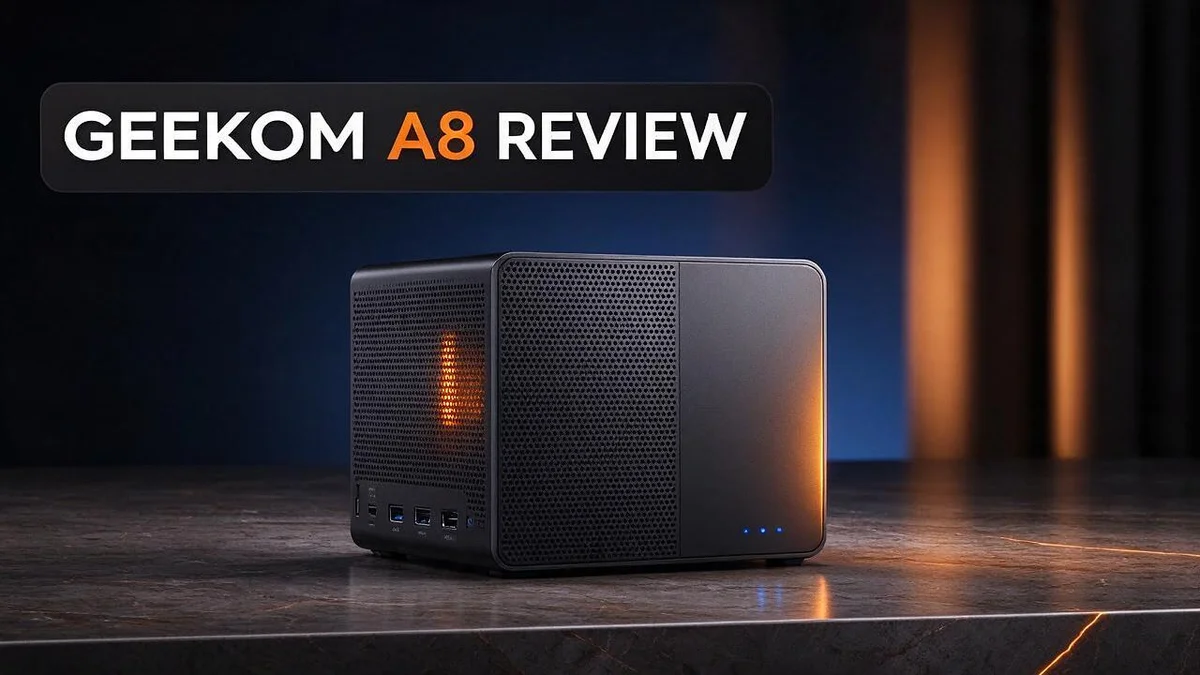
Are you looking for a small computer that packs a punch? The Geekom A8 might be the answer you need. It is a sleek mini PC built for daily work, media, and light gaming.
Under the hood sits an AMD Ryzen 9 8945HS processor. It also includes a dedicated NPU for AI tasks. Some listings show a Ryzen 7 8845HS version instead, so check your model.
Reviewers say this little box delivers strong performance for its size. Even a demanding game like Gears Tactics runs close to expectations at 1080p. Its easy open design gives you simple access to memory, the M.2 SSD, and the wireless module.
Still, not every feature wins everyone over. The front panel offers two USB 3.2 Gen 2 Type A ports but no USB C port. Many reviewers wished for at least one of those.
Keep reading to see if it fits your setup.
In a Nutshell
-
Easy access inside: The case opens with ease, so users can reach the memory, M.2 SSD, and wireless module without special tools. Upgrades stay simple for both new and experienced owners.
-
Multi-screen support: The mini PC drives up to four displays at once. This setup suits busy desks, trading floors, and home offices that need a lot of screen space.
-
Gaming check: In Gears Tactics at 1080p, the low frame rate sits close to what people expect. Players who focus on smooth action may still want to test their favorite titles first.
-
More ports than rivals: Compared with the Beelink SER8, the Geekom A8 offers more I/O ports. That extra room helps when you connect storage drives, keyboards, and other accessories.
-
Front port gap: The front panel has two USB ports but no USB C port. Reviewers wanted at least one, so some users may need an adapter for newer devices.
-
Longer warranty: A 3-year warranty gives extra peace of mind. The Beelink SER8 covers only one year, so this point may matter to long-term owners.
Performance and Processor

- [Ryzen 7 8745HS & Agentic AI Workstation] Powered by the AMD Ryzen 7 8745HS processor (8 Cores, 16 Threads, up...
- [Upgradeable DDR5 Memory & PCIe 4.0 Storage] Stay productive with 16GB DDR5 memory and a 1TB PCIe 4.0 NVMe SSD...
Last update on 2026-11-26 / Affiliate links / Images from Amazon Product Advertising API
Processing power matters most in any mini PC. This model uses the Ryzen 8040 series from AMD, a modern chip built for compact systems.
The chip includes a dedicated NPU. An NPU is a neural processing unit that handles AI tasks on its own. That leaves the main cores free for everyday work.
More apps now use local AI features. The NPU can speed those tasks without draining the main cores as quickly.
Power is another key detail. The processor supports a 65W PL2 limit. PL2 is the short-term boost level, so demanding jobs finish faster during those peaks.
Cooling matters because the chip needs room to breathe. A single internal fan handles all the heat. Under long loads, you should expect the fan to get louder.
Sustained tasks show the real story. Short bursts feel quick on almost any mini PC. Long renders or large builds reveal whether the cooling keeps up.
Storage speed also shapes how the system feels. The machine uses fast SSD storage. Apps launch quickly, and large files load without long waits.
Check the exact configuration before you order. Some coverage lists a Ryzen 7 8845HS variant instead of the Ryzen 9 chip. The chip name tells you which performance tier you get.
Compared with the Beelink SER8, the processor story gets interesting. The SER8 runs a Ryzen 7 chip. Heavier workloads may favor the chip with more processing headroom.
Everyday tasks feel smooth on either setup. Web browsing, office apps, and video calls run without lag. Heavy projects benefit from the extra room.
Creators who edit photos or video should pay close attention here. Extra processing headroom keeps exports moving and previews responsive.
Bottom line: the processor gives this mini PC real muscle. Its NPU, power limits, and fast storage work together. Pick the configuration that fits your workload best.
Design and Build
The Geekom A8 looks sleek on almost any desk. Its small body takes up very little room, so it fits beside a monitor or behind a TV.
The compact frame also helps with tidy cable management. Since the machine is so small, you can place it in a corner or on a shelf without blocking your view.
The outer case has a plain, modern look. Its neutral finish blends with home offices and living rooms alike. Few people want a flashy box next to their television.
Desk space matters for everyday work. A small footprint leaves room for a keyboard, a notebook, and a coffee mug. Setup takes only a few minutes when you have a clear surface.
Portability is another strength of this build. Its size makes it easy to carry from room to room or pack for a trip.
You can set the unit flat on a shelf or tuck it under a desk. This keeps cables and clutter out of sight.
Build quality shows in the small details. The panel edges and corners look neat, which hints at careful assembly.
Surface finish affects how the box looks over time. Dust and fingerprints can show up quickly on glossy panels. A simpler finish helps the unit look fresh for longer.
Setup in a living room feels different from a desk. The A8 can sit on a media shelf and stay out of the way. Its low profile keeps the view clear for guests and family.
Handling the unit is simple and quick. Its light weight makes it easy to lift with one hand.
Good design also means fewer surprises. A tidy layout helps new users find what they need without a manual on hand.
Overall, the design suits people who want a tidy setup. It works well in small apartments, home offices, and media centers. Its clean lines and small footprint make it a practical choice for daily use.
Connectivity and Ports
Good connections shape how well a mini PC fits into daily life. Smart port planning saves time and keeps your desk clear. The Geekom A8 covers many everyday needs with a practical mix of connections.
Fast external drives feel natural here. The front USB ports follow the USB 3.2 Gen 2 standard. This standard moves data quickly, so backups and large file transfers finish sooner.
Newer devices may need an adapter. Many recent phones, tablets, and portable drives use the Type C plug. A small adapter or hub helps these gadgets connect without trouble. Keep one within reach for quick file moves or charging.
A hub can expand your setup. A powered USB hub adds extra slots for a keyboard, mouse, webcam, and card reader. This approach keeps cables off the desk and reduces clutter around the unit.
Wireless signal strength matters too. Place the mini PC where the signal stays strong. Thick walls, metal cabinets, and crowded shelves can weaken a connection. A clear spot near the router often leads to smoother video calls and faster downloads.
Most accessories plug in with ease. Keyboards, mice, headsets, and game controllers use common USB Type A plugs. You can connect them without extra steps, so setup stays simple for almost anyone.
Plan your cables before setup day. Lay out your devices, count the plugs, and note which ones need adapters. A quick plan prevents surprises and helps you choose the right accessories from the start.
Strong connectivity turns a small machine into a flexible workstation. With the right accessories and a clear layout, you can enjoy a clean, efficient setup every day.
Top 3 Alternatives
Beelink SER5
The Beelink SER5 is a strong pick for people who want more speed in a small box. It runs on an AMD Ryzen processor. This chip handles office work, web browsing, and light multitasking with ease. Many buyers also use it for video calls and streaming.
Its compact body fits neatly on a desk or behind a monitor. Setup takes only a few minutes, so you can start working fast.
Best for: Users who want steady performance in a small footprint.
Minisforum UM790 Pro

- Processor: AMD Ryzen 9 7940HS Processor, 8 Cores/16 Threads (16M Cache, up to 5.2 GHz) GPU: AMD Radeon...
- 【DDR5&2 x PCIe4.0】MINISFORUM UM790 Pro uses 64GB DDR5 5600 SODIMM dual-channel memory, supports maximum...
Last update on 2026-11-26 / Affiliate links / Images from Amazon Product Advertising API
The Minisforum UM790 Pro steps up the power for heavier workloads. It offers a faster processor and stronger graphics for photo editing and light gaming.
Many users also value its extra ports and upgrade options. It also supports fast storage for large project files. This makes it a good fit for people who want a machine that can grow with them.
Best for: Creators and power users who need more headroom.
Beelink Mini S12

- 【Beelink Intel S12-N95 Processor】The newly upgraded Mini S12 N95 Mini pc features an Intel Processor Alder...
- 【 8GB DDR4 RAM/480GB SATA3 SSD 】 The mini computer is equipped with high-speed 8GB DDR4 (up to 16GB with...
Last update on 2026-11-26 / Affiliate links / Images from Amazon Product Advertising API
The Beelink Mini S12 keeps things simple and light. It uses an Intel processor that covers web browsing, video streaming, and document editing.
Its small size makes it easy to carry or mount behind a screen. It runs quietly, which keeps your workspace calm. This model suits students and home users who need a reliable second computer.
Best for: Everyday tasks and home media.
Upgrade Options and Storage
Upgrade options matter more than many buyers expect. A mini PC that opens easily gives you room to grow over several years.
The Geekom A8 gives you access to the memory, the M.2 SSD, and the wireless module. You can reach these parts when the case opens, so future changes feel simpler.
Check the exact M.2 format before you buy a drive. Drives come in different lengths and interfaces. A quick look at the specs prevents a return and a wasted trip to the store.
A second drive keeps your files organized. If your model has room for one, you can place games, photos, and work files on separate storage. Your system drive stays clean and easier to manage.
Cloning makes a drive swap smoother. Cloning software copies your old drive onto a new one. Your apps, settings, and files move over, so you skip a fresh install.
Memory upgrades follow a similar path. Open the case, find the memory modules, and confirm the maximum capacity first. Matching the speed and type of your current memory keeps performance steady.
The wireless module may get a future update too. Easy access makes a swap possible when new standards arrive. Check the layout of your unit before you order parts, since the exact fit can vary.
Back up your data before you open the case. Save important files to cloud storage or an external drive first. Power down the unit and unplug it before you touch any parts.
External drives handle big media libraries well. Large photo archives and video projects can live outside the mini PC. This frees internal space for everyday work and apps.
Plan your storage needs before you start. List the apps, games, and files you plan to keep. This simple habit helps you pick the right size now and avoid a rushed upgrade later.
Cooling and Noise Levels
A mini PC keeps its heat in a small space. The Geekom A8 packs an AMD Ryzen 9 8945HS chip into a compact body. Cooling plays a key role in how the unit performs every day.
The system uses a single internal fan. That one fan moves air over the processor and other parts. Its workload grows when the system works hard.
The processor can draw up to 65W on its PL2 limit. Heavy tasks like video editing or modern games push that limit. The fan then speeds up to keep temperatures in check.
Fan noise often depends on the workload. Light web browsing and document work keep the fan quiet. Gaming or long rendering jobs may bring a steady hum. Our research does not list exact decibel readings, so test the noise in your own room.
Airflow matters more than many people expect. Give the vents open space on every side. Avoid placing the unit inside a closed cabinet or on a soft blanket. Trapped heat makes the fan run faster and louder.
Dust slowly blocks the fan and vents. Clean the vents with compressed air every few months. A clean system runs cooler and often quieter.
Power settings give you control. Balanced modes keep noise low for everyday tasks. Performance modes raise speed and heat output. Switch modes based on what you need that day.
Room temperature plays a role too. A cool room helps the fan stay calm. Keep the unit away from heaters and direct sunlight.
Monitoring tools show what the system does. Free apps display fan speed and chip temperature in real time. Watching these numbers helps you spot heavy background tasks. You can then close programs that waste resources.
A quiet, cool mini PC keeps your setup pleasant. Small habits make a big difference over time. Give the Geekom A8 clean air and steady power, and it will run well for years.
Pros and Cons
Pros
– Sleek and compact body fits tight desk spaces.
– Strong performance for its small size.
– Gears Tactics runs close to expected frame rates at 1080p.
– A 3 year warranty gives you extra peace of mind.
– A dedicated NPU helps with AI tasks on the device.
Cons
– The front panel has only two USB 3.2 Gen 2 Type A ports.
– There is no front USB C port for newer devices.
– Reviewers wanted at least one Type C port.
– It has fewer ports than the Beelink SER8.
Who Should Buy It
Home office workers are a strong match for this mini PC. Daily tasks like email, video calls, and spreadsheets run smoothly.
Students who need one machine for research, writing, and online classes will also find it useful.
Setups with several monitors are a major draw. The system supports up to four displays, so trading desks and coding stations feel simple to set up.
Living room viewers can use it as a media hub. Streaming shows, music, and photos on a TV feels easy with its small footprint.
Hobbyists who test local AI tools may enjoy the chip’s neural processing unit. They can try AI apps without sending every task to the cloud.
Photo editors and light video creators get solid performance from the Ryzen chip. Editing photos and cutting short clips feels responsive.
Remote workers who switch rooms often can carry this small box with ease. It connects to any monitor or TV without much setup.
Small business owners who run accounting software or simple dashboards will find it dependable.
Buyers with a lot of USB C gear should plan ahead. A USB C hub or adapter can fill the port gap.
Serious gamers who expect top frame rates in demanding titles may want a system with a dedicated graphics card. The integrated graphics here suit lighter play.
Shoppers who compare models closely should weigh the port layout against other mini PCs before they decide.
Overall, this model suits people who want a capable, compact desktop for work, study, and entertainment.
Before you buy, list your daily tasks and match them to the ports and performance you need. That simple check helps you pick a machine that fits your life.
Final Verdict
The Geekom A8 is a strong choice for anyone who wants serious power in a tiny box. It fits neatly on a crowded desk.
It feels less like a compromise and more like a smart fit. Most daily tasks run smoothly, so the machine rarely gets in your way.
Think about your daily routine before you buy. A quick list of tasks helps you decide.
Buyers should check their current gear before ordering. Older monitors, keyboards, and drives usually connect without trouble. Newer gadgets may need a simple adapter.
Upgrades also add lasting flexibility. Easy access to memory and storage lets you expand the system later.
Gamers should set realistic expectations. Light and older titles run well. Demanding new releases may need lower settings.
Users with large hardware collections may find the setup crowded at times.
The Beelink SER8 remains the main rival. Compare its Ryzen 7 chip and port layout before deciding.
Shoppers who love a clean desk will appreciate the tidy footprint.
Mixed workloads, like spreadsheets with a browser full of tabs, usually feel responsive.
Think of the purchase as a long term tool. A capable machine can serve for years with the right care.
Pairing it with a good monitor and keyboard completes the setup.
Test your favorite accessories before committing to the purchase.
Readers who love simplicity will likely feel at home. Setup feels quick, and the compact body stays out of sight.
Final thoughts come down to your priorities. Pick the machine that fits your daily needs.
Take a moment to match features with habits. A clear choice saves time later.
Choose this machine if performance and size matter most. Skip it if you need extra ports for daily work.
Overall, the Geekom A8 earns a solid place on your shortlist. It rewards careful buyers who know what they need.
Frequently Asked Questions
Is the Geekom A8 easy to upgrade later?
Yes. The easy open design gives you access to the memory, the M.2 SSD, and the wireless module. You can add storage or refresh parts without buying a new machine.
What if my devices need a USB Type C port?
Use a USB Type A to USB Type C adapter or a small USB hub. These add the port your newer devices need. Choose a hub that supports power delivery if you want to charge a phone or tablet at the same time.
Does the Geekom A8 come with a screen and keyboard?
No. This is a mini PC, so it does not include a screen, keyboard, mouse, or battery. Plan to bring your own display and peripherals. Most standard monitors and keyboards connect without trouble.
How do I choose the right chip for my needs?
Check the exact processor listed for the unit you plan to buy. Some coverage mentions a Ryzen 7 8845HS variant, while the main model uses the Ryzen 9 8945HS. The Ryzen 9 suits heavier multitasking, while the Ryzen 7 may work well for lighter daily tasks.

Dillip is the founder and editor of DillipWeb.com, where he simplifies the world of AI software, tech gadgets, and accessories through honest reviews, detailed comparisons, and easy-to-follow guides. With a deep passion for emerging technology, he helps everyday users make smarter, more informed tech decisions.