Keychron B6 Pro Review: Slim Wireless Keyboard Tested for Typing, Connectivity and Battery
Are you searching for a wireless keyboard that feels good under your fingers? The Keychron B6 Pro deserves a close look.
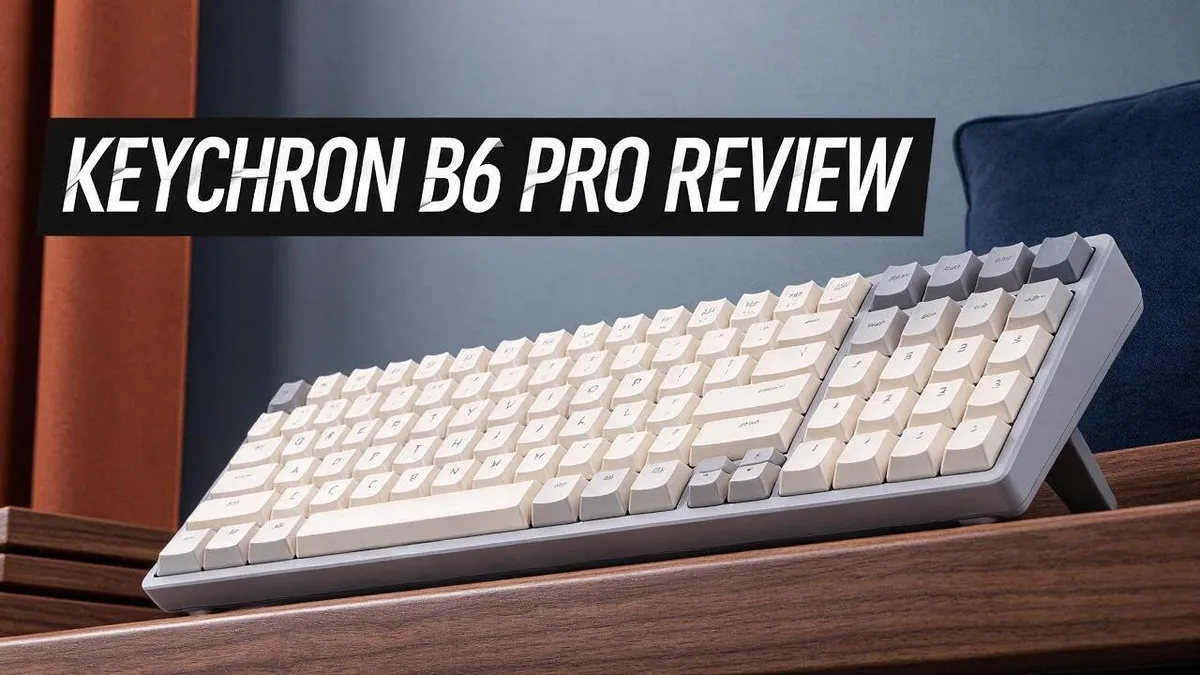
This full-size keyboard is ultra slim and lightweight. It moves easily from your desk to your bag.
Connecting is simple. You can pair it through 2.4 GHz, Bluetooth 5.2, or a USB-C cable.
It also switches between multiple devices with ease. Battery life can reach up to 1,200 hours, so charging breaks stay rare.
Many reviewers praise the typing feel and solid build. However, some users say it does not match the feel of the Logitech MX Keys S.
Others miss a backlight and kickstands. In this review, we look at what the B6 Pro does well and where it falls short.
In a Nutshell
Here is a quick look at what matters most with this keyboard.
- Long lasting power: The keyboard offers up to 1,200 hours of battery life. That means fewer trips to the charger for busy people who work all day.
- Quiet typing: Its low profile switches stay calm and quiet. This makes it a good pick for shared offices, libraries, or late night work sessions.
- Flexible connections: You can pair it through 2.4 GHz, Bluetooth 5.2, or a wired USB C cable. Choose the setup that fits your desk and your devices.
- Hobbyist friendly firmware: It runs ZMK firmware, which many keyboard fans enjoy. This gives tinkerers more control over key layouts.
- Premium build comparison: Reviewers say the Logitech MX Keys S offers superior build and premium materials. Shoppers who value a high end feel may lean that way.
- Rubber dome concerns: Some users report NKRO issues with its rubber dome design. Fast typists and gamers should test it before making a final decision.
Design and Build Quality
Design matters because you touch your keyboard every day. The Keychron B6 Pro uses a full layout with a number pad. This setup helps anyone who works with spreadsheets or long lists of figures.
The low profile frame sits close to the desk. This shape can help your wrists stay in a relaxed position. Your forearms may feel less strain after long typing sessions.
Desk space is another key point. A full size board takes more room than a compact model. Even so, the slim body keeps the setup looking clean and tidy.
Portability also plays a role. The light body moves easily from your desk to a couch or a travel bag. Students and remote workers often value this kind of flexibility.
Build quality is where opinions split. Some owners feel the body holds up well over time. Others feel the materials lack the polish of premium keyboards. Your expectations will shape how you judge it.
Think about where you place the keyboard. A wooden desk, glass surface, or fabric mat can change how the board feels under your palms. Test a few surfaces before you settle.
Stand the keyboard on a flat surface first. Then test your typing posture for a few minutes. This quick check shows whether the layout suits you.
The USB C port handles wired use when needed. Keep the cable neat with a simple clip so it does not pull on the board. A tidy cable makes the whole desk feel calmer.
Cleaning is simple with this design. A soft brush removes dust from the gaps between keys. Wipe the top surface with a dry cloth once a week.
Keys on any keyboard collect oil from fingers over time. Clean them often to keep the surface fresh. Regular care helps the board look newer for longer.
The overall look is calm and simple. Plain colors and clean lines fit well in most offices and homes. A simple design also makes the board easy to read at a glance.
Who benefits most? Writers, office workers, and coders gain the most from this layout. Gamers who need fast lighting cues may want a different option. Think about your daily tasks before you decide.
Typing Experience and Switch Feel
Typing on the Keychron B6 Pro feels smooth for most people. Reviewers often praise how the keys respond to light pressure.
Your fingers notice the travel first. The keys sit close to the base, so each press feels short and direct. Many people enjoy this quick feedback during long writing sessions.
Some fans of the Logitech MX Keys say the feel is different. One Reddit user said it does not match the MX Keys typing feel. That gap matters if you type all day.
Rubber dome keys work differently from mechanical switches. Each press feels softer and more cushioned. Many people adjust to this style quickly, while others prefer a firmer response.
Fast typists should pay attention to key combinations. Some users report NKRO issues, which can lead to missed keys during quick rolls. Simple tests can reveal how the board handles your habits.
Try a few tests before you commit. Type a paragraph at normal speed, then type faster. Press several keys together and watch for missed letters. This quick check shows whether the feel suits your style.
Writers and coders often type in bursts. Short bursts and long pauses can reveal how quickly the keys reset. A steady rhythm usually feels natural on this board.
Long writing sessions show the feel best. Essays, emails, and code comments all test your patience. Notice whether your fingers feel tired or relaxed after an hour.
Keep the first week in mind as well. Your fingers may need time to adapt to a new response. Give the keyboard a fair chance before judging it too quickly.
Your own taste matters most here. Some people love the soft response, while others want a firmer click. A short trial often answers the question faster than any review.
Connectivity and Multi-Device Setup
Setting up the Keychron B6 Pro for several devices is simpler than you might expect. You can keep a laptop, a tablet, and a phone ready at the same time.
Switching between devices is the real test. Each pairing slot remembers one device. Press the slot key for the device you want, and your typing moves to that screen.
Keep the 2.4 GHz receiver close by. A USB receiver gives a steady link for a desk setup. Plug it into your main computer and leave it there.
Bluetooth works well for tablets and phones. Pairing takes a moment, and reconnecting after sleep is usually quick.
Wired use makes sense in some cases. If the battery runs low during a long session, plug in the USB C cable. You can keep typing without a pause.
Think about your daily routine before you pair anything. A desk setup with one main computer needs less switching. A mix of devices on the go calls for more pairing slots.
Reconnection matters more than you think. When you wake a laptop, the keyboard may take a second to rejoin. Give it a moment before you assume something is wrong.
Interference can affect wireless links. Keep the receiver away from metal objects and thick walls. Place it near the keyboard for the best results.
Mac and Windows users should check their key labels. Some modifier keys may need a quick test after setup. A few minutes of testing saves frustration later.
Gamers and fast typists may notice small delays. Wired mode or the receiver often feels more direct than Bluetooth. Test your favorite apps before you rely on the setup.
Plan your setup during the first week. Pair every device, switch between them, and note which connection feels best. This simple routine helps you choose the right default.
Keep a note of your pairing order too. A sticky note helps when you forget which slot holds which device. It takes seconds and avoids confusion.
Overall, the Keychron B6 Pro handles multiple devices with ease. Pick the connection that suits your workday, and switching becomes second nature.
Top 3 Alternatives
Keychron K8 Pro

- ✅【Upgraded Keychron K8 Pro Keyboard】: Compared with the K8, the K8 Pro has been fully upgraded. Fully...
- ✅【Program with QMK & VIA】: With the K8 Pro’s QMK/VIA, you can intuitively remap your favorite keys and...

Last update on 2026-11-26 / Affiliate links / Images from Amazon Product Advertising API
Keychron K8 Pro is a tenkeyless mechanical keyboard. It fits well on a small desk.
It works over Bluetooth or a USB cable. You can switch between devices with a quick key press.
Many typists like its hot-swappable switches. You can change switches without soldering. Its compact layout also leaves room for your mouse. It looks clean on a desk with a simple design.
Logitech MX Keys

- Fluid Typing Experience: Laptop-like profile with spherically-dished keys shaped for your fingertips delivers...
- Automate Repetitive Tasks: Easily create and share time-saving Smart Actions shortcuts to perform multiple...
Last update on 2026-11-26 / Affiliate links / Images from Amazon Product Advertising API
Logitech MX Keys is a full-size wireless keyboard. Its keys feel smooth and quiet.
It pairs with up to three devices. Use one button to move between a laptop, tablet, and desktop.
The backlight adjusts to your room light. Office workers often pick it for long writing sessions. Its battery lasts for many days between charges.
Razer BlackWidow V4

- GREEN MECHANICAL CLICKY SWITCHES: With a 1.9mm actuation point requiring just 50g of force, experience the...
- 2-SIDE UNDERGLOW and PER-KEY LIGHTING: Featuring Razer Chroma RGB per-key lighting and a striking underglow...
Last update on 2026-11-26 / Affiliate links / Images from Amazon Product Advertising API
Razer BlackWidow V4 is a full-size gaming keyboard. It uses mechanical switches for fast, clear key presses.
It includes dedicated macro keys and a media control dial. Its underglow lighting adds a bold look to your setup.
It connects with a USB cable, so you never need to charge it. Gamers who want quick response often choose it. Its switches come in several types, so you can pick your feel. Its layout gives you quick access to shortcuts.
Battery Life and Firmware
Battery life is one of the biggest selling points of the Keychron B6 Pro. The listed figure reaches up to 1,200 hours. That number is a best case result, so treat it as a ceiling rather than a promise.
Real world use will look different. Your battery drain depends on how often you type and which connection you use. Bluetooth and the 2.4 GHz link each use power in their own way.
Lighting plays a smaller role here. This model has no backlight, so it skips the power drain that LEDs cause. That leaves the wireless radio as the main power user.
Idle behavior matters too. Many wireless boards reduce power use after a pause. Test how quickly your board goes quiet when you step away from your desk.
Firmware is the other big topic. The B6 Pro runs ZMK firmware. ZMK is open source, so anyone can study the code. Some users value that openness because they can see how the keyboard works.
Open source firmware gives you more control over the board. ZMK setups can support custom layers and changes to key behavior. Beginners may need some time to learn the process.
Updating firmware needs care. Read the instructions before you flash new code. A failed update can leave the board in an odd state. Keep the USB C cable plugged in during the whole process.
Who should care most? Typists who enjoy tweaks will like the ZMK route. People who want a plug and play board may never open the firmware at all. Both groups still get the same typing experience.
Battery planning gets easier with a few habits. Check the battery level before a long writing session. Note how many days pass between charges over a week. That habit gives you a real number for your own desk.
Overall, the B6 Pro offers strong endurance on paper and a flexible firmware base. Read real user reports before you decide. Your own habits will shape the final result.
Pros and Cons
Pros
- The ultra slim, lightweight body is easy to move between desks.
- Quiet typing suits shared offices and late night work.
- The full size layout keeps a number pad for spreadsheets and data entry.
- The clean, low profile look fits minimal desk setups well.
- Many users find the solid feel in hand reassuring for daily use.
Cons
- There is no backlight, so keys can be hard to see in dim rooms.
- There are no kickstands, so changing the typing angle takes extra effort.
- The rubber dome design may cause NKRO issues for some typists.
- Next to the Logitech MX Keys S, it lacks the same premium materials and polish.
Who Should Buy It
Not every typist needs the same keyboard. The Keychron B6 Pro suits a few clear groups best.
Laptop users making their first external keyboard switch will feel at home quickly. The layout looks familiar, so the change takes little time.
Students and new office workers often share desks and tight spaces. A board that packs away easily helps on busy days.
Writers who draft on the go may enjoy a steady feel during long sessions in a cafe or library.
Buyers unsure about mechanical keyboards can use this board as a simple test. It shows what a lower key height and a softer feel offer before they spend more time on research.
Travelers with a small bag will appreciate how little space it takes up. Pack it with a laptop and a phone for a light setup on hotel desks.
Home cooks and hobbyists who browse recipes on a tablet may use it in the kitchen. Its size fits a narrow counter without taking over the space.
Parents who work from a kitchen table need a board that stores away fast after school hours. Its light body makes cleanup quick.
Remote workers who switch between a work laptop and a personal tablet can keep one keyboard for both. This saves desk space and avoids buying duplicate gear.
Office teams sharing hot desks may like a board that travels with each user. Everyone can bring their own setup without fuss.
Fast competitive gamers should look at other options. A rubber dome build is not designed for quick, competitive play.
Heavy daily typists should try the board in person before they commit. A short hands on test shows whether the feel matches your fingers.
Your daily routine decides the answer. Think about where you type, what devices you use, and how often you move between rooms. If those habits match the groups above, the B6 Pro is a practical choice.
Final Verdict
The Keychron B6 Pro earns a solid recommendation for the right buyer.
It brings together a slim frame, quiet keys, and flexible connections.
Still, it asks for a few compromises that matter to some people.
Think of this board as a practical daily driver.
It works well for emails, documents, and long spreadsheet sessions.
It does not try to dazzle with extras.
Where it shines most: The full size layout, wireless freedom, and calm typing sound stand out.
Switching between a laptop and a desktop feels simple.
Where it falls short: Dim rooms will test your patience without a backlight.
Typists who crave the feel of an MX Keys style board may notice the gap.
These compromises are fair, not dealbreakers for everyone.
Think about your daily setup before you decide.
If you type in bright offices, the lack of light may never matter.
If you work late at night in a dark bedroom, it may bother you quickly.
Build quality deserves a fair look too.
Reviewers praise the typing feel, yet some owners report disappointment.
Try it in person when you can.
Your own hands will tell you the most.
Comfort over time depends on your habits.
Your wrists and posture matter more than any spec sheet.
Pair the board with a wrist rest if you type for hours.
Keep your screen at eye level and adjust your desk height.
Small changes often help more than a new keyboard.
Our final take: The B6 Pro suits people who want a simple, quiet, wireless keyboard with a number pad.
It suits less those who need light, stands, or a premium metal finish.
Choose it for function over flash, and you will likely be happy.
If you enjoy tinkering with settings, this board can keep you interested for years.
Keep your buying checklist simple. List your must haves first.
Then compare that list with the specs above.
In short, this keyboard rewards clear expectations.
Know what you need, and it will serve you well.
Frequently Asked Questions
Can the Keychron B6 Pro connect to more than one device?
Yes, it can. You can link it through 2.4 GHz, Bluetooth 5.2, or a wired cable. Switching between devices takes little effort, so one board can serve a laptop and a tablet in the same day.
How long does the battery last?
The spec sheet lists up to 1,200 hours of battery life. Your results depend on how often you type and how you connect. Most people will charge it far less often than their phone.
What does ZMK firmware mean for you?
ZMK is open source firmware. It gives tech fans more room to adjust how keys behave. Everyday typists can use the board right away without any changes.
Which keyboards should I compare it with?
Many shoppers look at the Logitech MX Mechanical and the Keychron Q6 Max. The Logitech MX Keys S is RTINGS’ top everyday pick, so it makes a useful benchmark. Compare layout, typing feel, and connection options before you decide.

Dillip is the founder and editor of DillipWeb.com, where he simplifies the world of AI software, tech gadgets, and accessories through honest reviews, detailed comparisons, and easy-to-follow guides. With a deep passion for emerging technology, he helps everyday users make smarter, more informed tech decisions.