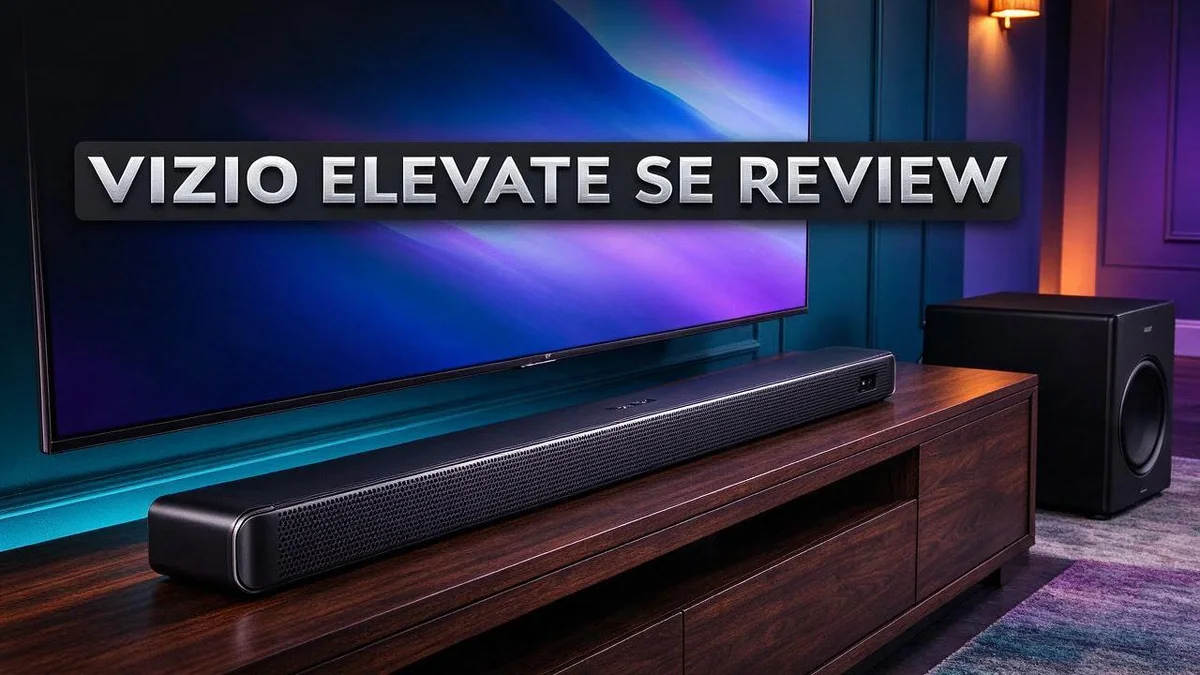
Vizio Elevate SE Review: Is This Dolby Atmos Soundbar Worth Buying?
Want overhead sound without a complicated setup? The Vizio Elevate SE might be the answer. It gives you a clear taste of what height audio can do in your living room.
Its adaptive height speakers do the heavy lifting. When Dolby Atmos or DTS:X content plays, the top drivers rotate up. They bounce sound off your ceiling, so rain, helicopters, and crowd noise seem to surround you.
Many buyers see this model as a smart entry point. It sits below the top-tier Vizio Elevate P514a-H6 in the lineup.
Some owners even compare it with bigger names. One user reported that the SE impressed them more than a Samsung Q990D during side by side tests with TrueHD Atmos clips.
Keep reading to see how it performs, what owners say, and whether it fits your setup.
In a Nutshell
-
Upward firing speakers bounce sound off your ceiling. When the soundbar detects Dolby Atmos or DTS:X content, the height drivers send sound up so it reflects down toward your seating area.
-
Movie scenes feel wider and more spread out. Rain, helicopters, and crowd noise can seem to surround you instead of coming only from the front.
-
Early owner tests look promising. One owner compared it side by side with a Samsung Q990D using TrueHD Atmos clips and found the Samsung underwhelming. This is one person’s experience, so test it in your own room if you can.
-
Menu design may feel dated. Wired’s review of the related M Series Elevate pointed out tired menus. That review covers a different model, so the SE may differ.
-
Some key specs are still unclear. Driver count and power output are not confirmed in current research. Check the manufacturer details before you decide.
-
It suits living rooms with limited space. If you want height effects in a single unit without adding extra rear or ceiling speakers, this model may match your needs well.
Key Features

- Soundbar remote control sold separately
- Receive the latest product updates and adjust advanced soundbar settings by downloading the VIZIO mobile app...
Last update on 2026-11-26 / Affiliate links / Images from Amazon Product Advertising API
Height sound is the main feature here. The Elevate SE aims to add overhead audio from one soundbar. You do not need extra speakers on the walls or ceiling.
Dolby Atmos and DTS:X tracks carry extra sound data. That data includes effects placed above the listener. A soundbar with height drivers can use that data to build a fuller sound field.
Content choice matters a lot. Atmos and DTS:X effects appear only in certain films, shows, and games. Regular stereo or basic surround tracks will not trigger the height effect, so the bar will sound like a normal soundbar with those titles.
Streaming apps make this easy to test. Many services label their Atmos titles clearly. Pick an action scene with lots of sound effects and listen for movement above your head. This gives you a quick way to judge the feature.
Your player settings count too. Make sure your streaming device, disc player, or console sends a Dolby Atmos or DTS:X signal. Check the audio output menu on each device. If the source sends only standard audio, the height drivers have nothing special to play.
Room shape changes the result. Bare floors and hard walls can add echo and muddy the sound. Rugs, curtains, and a sofa help soak up extra reflections. Good room balance lets the overhead effect feel clean and focused.
Placement under the screen works best. Center the bar below your TV and keep it level. Avoid placing it behind thick glass or inside a closed cabinet. Clear space lets the sound travel in a natural way toward your seating area.
Ceiling height is a real factor. Very high ceilings may weaken the overhead effect because the sound has more distance to cover. Standard home ceilings usually give a clearer result. Measure your room before you buy so you know what to expect.
Listening habits shape your choice. If you watch mostly talk shows and news, height sound adds less to the experience. Movies, concerts, and games show the biggest gain. Think about what you watch most before you decide.
Test voices during quiet scenes. Dialogue should stay clear while effects move around the room. Listen to a calm conversation and note whether the speech feels natural and easy to follow. This quick check tells you a lot about daily viewing.
Try it in your own space. Play a known Atmos clip and listen closely. Move around the room and notice how the sound changes. Your own ears will show whether this overhead effect fits your setup.
Immersive Sound Performance
Listening for height is a skill you can train. Most people hear the effect faster when they know what to look for. Start with a scene that has clear overhead action.
Try a jet flyover or a wind chime scene first. Those sounds should drift above your head and fade in a smooth line. If the sound jumps to one corner, the source track may lack a height layer.
Height sound should never hide speech. Dialogue usually stays anchored at the front, so actors still sound close. Compare a drama scene with an action scene to hear the contrast.
Volume plays a big role in how height sound feels. Very quiet playback can hide upward cues. Keep the level comfortable but lively so the ceiling reflections register.
Stereo music tests the bar in a different way. Many songs use only two main channels, so the overhead effect may feel light. Concert films with Atmos mixes show the full difference.
Ceiling height also shapes the result. Standard ceilings let reflections reach your ears quickly. Very high or sloped ceilings can spread the sound too wide for a clear overhead image.
Give the effect a few days. Your ears adjust over time, and small changes become easier to notice. Keep a short playlist of scenes you know well for quick checks.
Pay attention to timing too. Sound effects should move across the room in step with the picture. If a plane appears on screen but the noise lags behind, check your input settings or update the software.
Spend a full evening testing different scenes. You will learn where the height effect works best in your room and where it fades. Small changes can also shift how overhead cues land at your ears.
Your viewing distance matters as well. Sitting too far away can soften the ceiling bounce, while a closer seat often feels more direct. Test a few spots before you settle on one. Sitting near the center often feels best.
Setup and Menu Usability
Setting up the Elevate SE should feel simple. Most people can finish the basics in one sitting. Start by placing the bar below your TV and keeping it level.
Connect the bar to your TV first. Plug the power cord into a wall outlet. Then run an HDMI cable from the soundbar to your TV. Check your TV for an eARC or ARC port, because this port sends sound back to the bar with fewer cables.
Confirm the sound source. Switch your TV input so it matches the port you used. Play a short clip from a streaming app. If you hear sound from the bar, the connection works.
Pair the remote and adjust the basics. Point the remote at the bar and press the power button. Keep the remote near the bar so it responds well. Use the volume and input buttons to test each source. Small changes help you find a level that feels comfortable for your room.
Use the on-screen steps with care. Setup prompts can vary by firmware version, so read each step before you press a button. Take your time with the first few screens. A quick pause often prevents a wrong setting.
Check the height effect before you finish. Play a movie or game labeled with Dolby Atmos or DTS:X. Listen for sound that seems to rise above your head. Try a jet flyover or a wind chime scene first. If the effect is missing, check the audio output on your streaming device.
Move through menus with patience. Use the arrow keys to move between options. Most core settings sit in the same area, so you rarely need to hunt. Write down your favorite mode once you find it. That way, you can return to it quickly later.
Good setup makes every later test easier. Once the bar runs smoothly, you can focus on enjoying the show. Give the settings a few days of use, then adjust what feels off. Small tweaks over time can make a big difference.
Top 3 Alternatives
Sonos Arc

- All-new acoustic architecture with Sound Motion technology fills every inch of the room and precisely place...
- Unparalleled 9.1.4 spatial audio experience with Dolby Atmos

Last update on 2026-11-26 / Affiliate links / Images from Amazon Product Advertising API
Sonos Arc delivers rich, immersive sound from one sleek soundbar. It supports Dolby Atmos, so overhead effects feel lifelike. Connect it to your TV with HDMI eARC for a simple, clean setup.
Sonos Arc also fits well in smaller rooms. Its Trueplay tuning adjusts the sound to your space. You control everything through the Sonos app, which makes daily use easy.
Samsung HW-Q990C

- 11.1.4 CH. TRUE DOLBY ATMOS SOUND: Feel sound all around with 11 front-facing speakers, 1 subwoofer and...
- Q-SYMPHONY: Amp up your audio with the greatest duo of all time—Samsung TVs paired with Samsung soundbars...
Last update on 2026-11-26 / Affiliate links / Images from Amazon Product Advertising API
The Samsung HW-Q990C creates a true surround experience for movie nights. A wireless subwoofer and wireless rear speakers keep cables out of sight. Dolby Atmos and DTS:X help sound move all around the room.
This system suits larger living rooms and big screens. Its height speakers add depth to action scenes and concerts. Many viewers enjoy the cinematic feel it brings home.
Sony HT-A7000

- SONY USA AUTHORIZED - Includes Full SONY USA Protection
- Sound Field Optimization calibrates to your environment for easy set up | Immersive Audio Enhancement converts...
Last update on 2026-11-26 / Affiliate links / Images from Amazon Product Advertising API
The Sony HT-A7000 offers a natural, layered sound field from every angle. Its wireless rear speakers make placement flexible. Dolby Atmos and DTS:X add height to dialogue and effects.
360 Spatial Sound Mapping gives music and films extra depth. This option works well for people who want strong surround sound without complicated wiring. It rounds out a strong set of alternatives for your home theater.
Connectivity and Compatibility
Think about your full entertainment chain first. The Elevate SE works best when every device supports the same audio formats. One older box can block the height effect without any warning.
One owner tested the SE with TrueHD Atmos clips and noticed a clear difference. Lossless tracks give the upward speakers more detail to work with.
Test each source one at a time. Play a labeled title from your streaming app, then try the disc player, then the game console. Note which source delivers the clearest overhead sound. This quick check reveals any weak link in your setup.
Stable internet keeps streams clean. Streaming Dolby Atmos titles often uses more data than standard shows. A wired connection to your streaming box can prevent dropouts in the middle of a scene.
Phones and tablets rarely deliver height sound. Most phone audio runs in stereo, so the upward effect will not appear. Use a streaming app on your TV for the best results.
Plan your inputs before you connect everything. Many TVs have limited ports, so a game console and a streaming stick may compete for space. A small input switch can solve this problem. Each device then keeps a direct path to the bar.
Compare the SE with other bars side by side. One owner reported that a Samsung Q990D sounded underwhelming after direct tests against the SE. Use the same clips on each system and switch quickly between them. Fast switching makes small differences easier to hear.
Check the official manual for port and codec details. Some specs remain unclear, so the manual is the best place to confirm what your gear can send. Look for codec lists and supported input types. Written details prevent guesswork and save time.
Good compatibility makes every scene feel natural. When each link works well, the height effect blends smoothly into the main sound. A few minutes of checks can prevent hours of frustration later.
Pros and Cons
Pros
- Height speakers rotate up when Dolby Atmos or DTS:X content plays.
- The sound bounces off the ceiling to create an overhead effect.
- One owner found the Samsung Q990D underwhelming after a side by side test with TrueHD Atmos clips.
- The effect works with Dolby Atmos and DTS:X titles.
- It serves as a clear upgrade path for people who want more height sound.
Cons
- The height effect only appears with labeled Atmos or DTS:X content.
- Reliable reviews for this exact model are still limited.
- Full specs like driver count and power output are not clearly confirmed.
- A related model drew complaints about tired menus, so the menu experience may feel dated.
Who Should Buy It
This section helps you decide if the Vizio Elevate SE fits your home. Use this guide to match the SE with your viewing habits.
The SE suits people who watch lots of Atmos or DTS:X content. Movies, shows, and games with these labels show the height effect best.
If most of your viewing is news or older shows, the upward sound will rarely shine. Those viewers may not notice much difference.
Families who watch animated films often enjoy the lift. Rain, crowds, and music can feel more open overhead. Check your favorite titles for the Atmos label first.
Think about your room first. The height drivers bounce sound off the ceiling, so a standard ceiling works best. Very high or sloped ceilings may change how the overhead effect feels.
Sit close to the TV for the clearest result. A nearby seat lets you hear the shift in sound more clearly. People who sit far back should test the spot before they settle in.
Hard surfaces like tile or glass can add echo. That echo may hide some of the height detail. Soft rugs, curtains, and furniture help the sound feel full.
Upgraders from built-in TV speakers gain the most. Flat TV speakers struggle with depth and clarity. Even a basic soundbar brings dialogue forward. This model adds an extra layer for supported content.
The SE may not suit you if you want a full surround system with rear speakers. It focuses on the front soundstage and the upward effect. Gamers and movie fans who want enveloping sound all around may look at a larger setup. Large rooms with wide seating may call for a bigger setup too.
Finally, consider how you like to set up gear. The SE works best for people who want a simple soundbar with a clear purpose. If you want an easy way to hear Atmos titles, this model is a strong match. Take a moment to list your favorite shows before you decide.
Final Verdict
The Vizio Elevate SE is a strong choice for people who want overhead sound. It delivers real height effects when your movies and shows carry the right labels. Many viewers will hear a clear step up from flat TV speakers.
Reliable reviews for this exact model are still limited. Full specs like driver count and power output are not clearly confirmed, so check the latest product details before you decide.
The menu experience may also feel dated. Feedback on a related model mentioned tired menus. You will likely use the menus mostly during setup.
Your viewing habits will decide the result. If you watch lots of Atmos or DTS:X titles, the upgrade feels worthwhile. Action movies and concert videos also show off the height effect well.
Owner feedback so far leans positive. Early comments suggest the SE can hold its own against premium options in certain tests. Still, a few comments cannot replace your own listening session.
Who should skip it? People who want a full feature list before buying may feel uncertain. Those who rarely watch Atmos content may not hear enough difference to justify the upgrade.
Your next steps are simple. Read recent user reviews and confirm that your TV can send Atmos or DTS:X audio to the soundbar. Then play a labeled movie scene.
A short test at home tells you more than any spec sheet. It shows whether the height effect fits your room and your taste. If that effect excites you, the SE deserves a spot on your shortlist. It offers a clear path to better sound without a major overhaul.
Frequently Asked Questions
Does the Vizio Elevate SE create real overhead sound?
Yes, it uses adaptive height speakers that rotate up. When Dolby Atmos or DTS:X sound plays, the speakers bounce audio off your ceiling. This creates a sense of sound coming from above.
How does the SE compare with the top Elevate model?
The SE sits below the top-tier Vizio Elevate P514a-H6 in the lineup. Both aim for the same overhead effect. Compare them side by side if you can, and focus on the features you use most.
Does the SE need a high ceiling?
Upward-firing sound generally works best with a standard, flat ceiling. A very tall ceiling may weaken the height effect. Measure your room first so you know what to expect.
What should you check before you buy?
Look at the apps and devices you use most. Confirm that your TV or player outputs Atmos or DTS:X audio. Also check the return policy, so you can test the sound at home.
Where can you find missing details?
Driver count and power output are not clearly confirmed yet. Check the official product page and manual for the latest details. Contact the seller if exact specs matter for your setup.

Dillip is the founder and editor of DillipWeb.com, where he simplifies the world of AI software, tech gadgets, and accessories through honest reviews, detailed comparisons, and easy-to-follow guides. With a deep passion for emerging technology, he helps everyday users make smarter, more informed tech decisions.