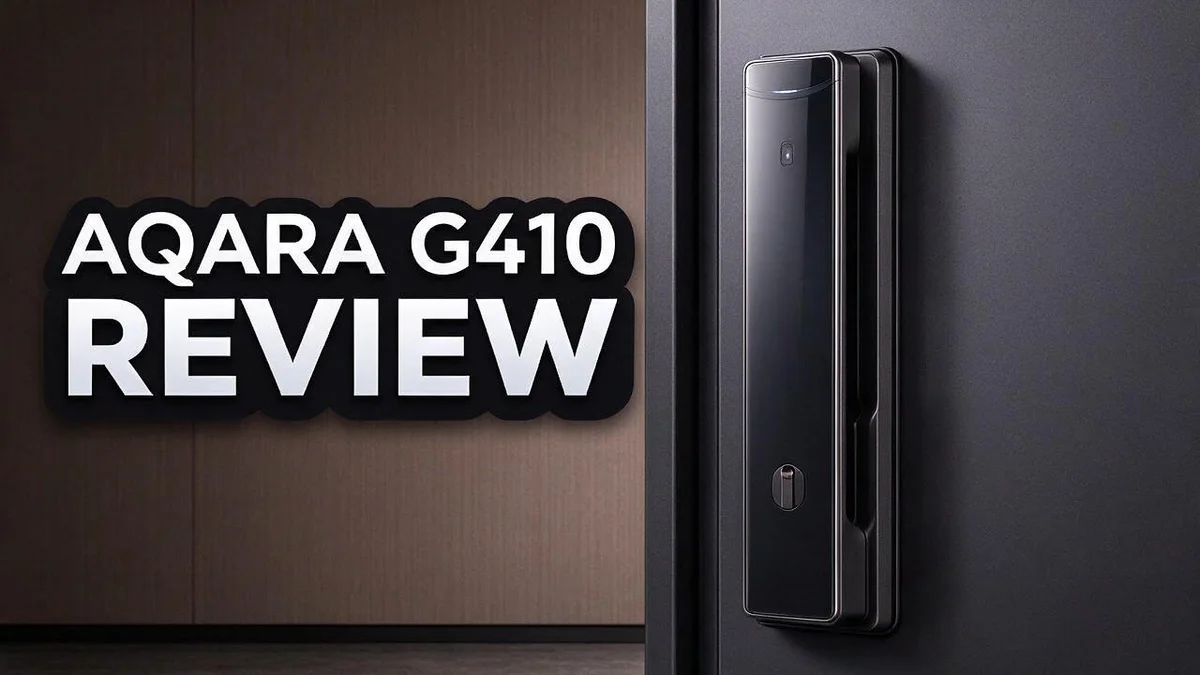
Aqara G410 Review: Key Features, HomeKit Support, Facial Recognition and Verdict
Looking for a smart camera that fits right into your home? The Aqara G410 might be the answer you need.
Many homeowners want security without the hassle. This camera aims to deliver just that. It offers 2K video and a wide 175 degree view, so you can see more of your space.
It works natively with HomeKit, which makes setup simple for Apple users.
You can also keep clips without a paywall. Local SD recording and RTSP streaming give you control over where your footage lives.
Strong facial recognition and a loud chime repeater add extra peace of mind.
Still, it has a few quirks to know about. In this review, we explore what it does well, where it falls short, and whether it deserves a spot in your home.
In a Nutshell
- Wide view: The camera offers a 175 degree field of view in a 4:3 frame. It captures more of your room, porch, or yard in one shot.
- Sharp footage: It records in 2K video. Clear details make it easier to spot faces and parcels at your door.
- Smart hub skills: It works as a Matter controller, Thread border router, and Zigbee hub. Many of your other smart devices can connect through this one unit.
- Motion from up close: A mmWave sensor wakes the camera when someone stands between 1 and 5 meters away. This helps you catch visitors near the entrance.
- Flexible power and storage: You can wire it in or run it on a battery. Clips save to a local SD card, so your footage stays at home.
- Outdoor caution: One owner reports that it is not waterproof for external use. Check your mounting spot and weather exposure before you install it.
Key Features

- Works with HomeKit Secure Video and All Major Ecosystems: Fully compatible with Apple HomeKit Secure Video...
- Built-In Aqara Zigbee & Matter Hub for Simple Device Control: No extra hub needed. This doorbell includes a...
Last update on 2026-11-26 / Affiliate links / Images from Amazon Product Advertising API
Let’s look at the features that help this camera stand out.
Local recording keeps your footage close to home. The camera saves clips to an SD card, so your videos stay on site. Many homeowners like knowing where their clips live.
Want more control over your video? The camera supports RTSP streaming, which sends footage to a NAS for long term archives. Planning this setup before you start makes the process feel smooth.
A wide detection area means fewer blind spots. The camera covers a 100 degree horizontal area, so movement across a room or yard gets noticed. Hallways, driveways, and back patios all benefit from that coverage.
Facial recognition runs on the device itself. Processing happens right on the camera instead of in a remote system. Keep the lens clean and the lighting clear so the camera sees faces well.
Dual band support helps the camera stay connected. It uses both 2.4 GHz and 5 GHz bands. This gives you a backup option when your wireless network gets crowded.
A stable connection also helps your video. Fewer interruptions mean smoother clips when you review them later.
Good placement makes the biggest difference. Mount the camera where your wireless signal is strong, and the video stays steady.
Storage choices give you room to decide. Keep footage on the SD card for quick access, or send it to a NAS for longer storage.
Try each feature one at a time. You will learn which setup fits your home best. Good planning makes every feature work better together.
Design and Build
A simple shape helps it blend in. Most people want a camera that does not steal attention from the room. The G410 keeps a clean look, so it fits well in living rooms, hallways, and entryways.
Mounting is where design choices start to matter. You can place it on a shelf, a desk, or a wall bracket. Each spot gives you a different view, so test a few options before you commit.
Plan the cable path first. If you wire the camera in, map the route before you drill. Hiding the cord keeps the room tidy and stops someone from bumping it by accident.
Battery models change the layout. You do not need a nearby outlet, so you can place the camera where the view is best. Just check the battery level often so you never miss a clip.
Lens position counts. Aim the lens at the main entry point, not at a bright window. Strong backlight can wash out faces and fine details.
Keep the camera away from heat. Direct sunlight and nearby heaters can affect how the device runs. Choose a spot with steady temperatures and good airflow.
Test the view at night too. Lighting changes the picture a lot, so check how the camera handles darkness before you settle on a spot.
Clean the lens regularly. Wipe it with a soft, dry cloth every few weeks. Dust and fingerprints can soften the image and reduce the sharp detail you want.
A well planned install looks neat and works well. Take time to check the view on your phone before you finish mounting. That final check saves a lot of effort later.
Performance and Detection
The G410 aims to be useful in everyday moments. Its performance depends on how it senses movement, records footage, and reacts to people.
Quick reactions matter most. When someone steps into the detection zone, the camera wakes up and starts recording with very little delay.
Good detection is about more than seeing. It also means knowing when to stay quiet.
Smart alerts help cut down on noise. Because the sensor responds to closer movement, distant activity has less chance to trigger a notification.
The sensor and camera work as a team. The sensor picks up presence first, then the camera checks what is happening in the frame.
Lighting also shapes results. Bright spots and deep shadows can confuse the image, so look for even light across the entry.
Know the limits. The camera handles most daily scenes well. Very busy areas, however, may produce more alerts than you want.
Think about what you want the camera to watch. A focused view gives cleaner results than a view full of swaying branches or passing traffic.
Set the zone carefully. Narrow the view to the path you care about most. This simple step reduces false alarms and keeps your alerts useful.
Motion alerts work best when they arrive on time. Fast delivery matters when you want to check a package or a visitor right away.
Real world testing is worth the effort. Walk through the zone yourself and watch the live feed. You will see how the camera responds to your own movement.
Keep an eye on alert patterns during the first week. Small changes in angle or height can make a noticeable difference in results.
Patience pays off. Adjust the camera a few times before you settle on a final spot.
Overall, detection feels dependable. Owners who pick a smart spot can expect steady performance every day for home security.
Top 3 Alternatives
If you want a different option than the Aqara G410, these three video doorbells are worth a look. Each one offers live video, motion alerts, and easy app control.
Ring Video Doorbell

- Capture it all with Retinal 2K video — From wide views to tighter focus, it’s easy to see your home or...
- Zoom in up to 6x — Catch details at a distance, inspect faces, and more with up to 6x Enhanced Zoom.

Last update on 2026-11-26 / Affiliate links / Images from Amazon Product Advertising API
The Ring Video Doorbell lets you see and speak to visitors from your phone. It sends fast motion alerts, so you never miss a package delivery. Setup takes only a few minutes with the app. Many people also like its clear night view.
Eufy Video Doorbell

Last update on 2026-11-26 / Affiliate links / Images from Amazon Product Advertising API
The Eufy Video Doorbell supports local storage, which keeps your footage close to home. Many privacy-minded owners prefer this approach. It offers sharp video and smart person detection to cut down on false alerts. The battery design also makes installation simple for renters.
Google Nest Doorbell

- Meet the wired Nest Doorbell; with 2K HDR video and Gemini, it knows what’s at your door and and what to do...
- No need to recharge or replace batteries; the Nest Doorbell keeps you plugged into home, day and night
Last update on 2026-11-26 / Affiliate links / Images from Amazon Product Advertising API
The Google Nest Doorbell works smoothly with the Google Home app and other Nest devices. It can recognize familiar faces and sends helpful activity alerts. Its wide field of view covers your porch and walkway. Its video quality makes it a solid pick for busy households.
Compare the features above and choose the one that fits your daily routine. Each option gives you peace of mind at the front door.
Connectivity and Smart Home Integration
The G410 does more than record video. It works as a Matter controller, so it can help manage compatible devices from different brands.
It also includes a Thread border router. Thread lets sensors and smart plugs form a mesh network. Devices can then pass messages to each other more easily. This setup can reduce reliance on one central router.
A built in Zigbee hub adds another option. Many door sensors, contact sensors, and light switches use Zigbee. You can connect them directly, so you may not need a separate bridge.
Apple users will appreciate the native HomeKit support. Setup takes only a few taps in the Home app. The camera then sits beside your lights, locks, and thermostats.
Automations become more useful this way. For example, a light can switch on when the camera spots movement at the front door. Scenes can also lock doors or adjust blinds at set times.
Software needs attention too. Owners report firmware and notification quirks from time to time. Check for updates every month. New releases can fix bugs and improve how devices talk to each other.
Wired installs offer another path. The Aqara G5 Pro offers PoE and wireless options, which some homes prefer for a steady link. If your router sits far away, ask whether a wired connection fits your layout.
Ease of use matters too. Ring often wins for simple setup and app flow, so beginners may find it easier at first. The G410 gives you more control over local storage and open standards.
Map your devices before you start. List which standards each gadget uses. A clear plan keeps your smart home organized and easy to manage.
Storage and Recording Options
Local SD recording keeps your footage close to home. The G410 saves video straight to an SD card inside the camera. Your clips stay in your own hands.
Start by picking a card with enough room for the days you care about. Higher capacity holds more footage before older clips get replaced. Check the card every month so you know it still works.
Many SD setups overwrite the oldest files first. Decide how long you want footage to last, and plan your card size around that goal.
Local storage also keeps working when the internet drops. The camera still records to the card even when the network goes down.
RTSP streaming opens the door to a network storage box. Many homes already have a NAS for backups. The G410 supports RTSP, so you can send its video feed there. This builds a longer archive without filling the camera itself.
Setting this up takes a little patience. Confirm the stream address and login details first. Then run a short test to make sure the feed arrives.
Clips stay easy to reach because there is no paywall. You can save and review recordings without unlocking extra features. That makes it simple to share a clip with a family member when needed.
Resolution plays a role too. Compared with the G4, the G410 records at a lower resolution. Files may take up less room, but fine details may look softer.
Plan your storage before you mount the camera. Decide where the card lives and how the network link runs. A quick plan saves time later.
Good storage habits protect your footage for the long run. Review old clips often, and delete what you no longer need. Keep a backup copy of anything important. Your archive stays useful and organized.
Pros and Cons
Pros
- Native HomeKit support makes setup easy for Apple users.
- There is no paywall for clips, so you can review recordings anytime.
- RTSP streaming sends footage to a NAS archive.
- Strong facial recognition helps you spot familiar faces.
- A loud chime repeater lets you hear visitors around the house.
Cons
- The camera is not waterproof, according to one owner who used it outdoors.
- Firmware and notification quirks can cause occasional frustration.
- Recording resolution is lower than the older G4 model.
Who Should Buy It
The Aqara G410 fits best in a home that already runs on smart gear. If you own Matter devices, sensors, or lights from several brands, this camera can act as a central helper. It joins the mix without much fuss.
Renters may also find it useful. Battery power means you can place it without drilling holes or running new cables. Mount it on a door frame, check the view, and move it later if you need to.
Households that care about privacy often appreciate local control. Footage can stay on a card inside the camera instead of traveling to a distant server. Many people feel more at ease when they decide where their clips live.
Homeowners with a storage box already have a head start. A tidy library of footage builds up over time. You own the files, and you decide how long to keep them.
Front door watchers gain a clear benefit. Visitors usually walk straight toward the lens at a doorway. A camera like this can catch faces clearly before anyone reaches the step.
Tinkerers and automation fans will enjoy the extra options. You can build routines that link cameras, sensors, and lights. Each new device adds another idea to try.
Some buyers should look elsewhere. People who want the sharpest possible video may feel let down. Anyone who wants the easiest possible setup, with almost no learning curve, may prefer a simpler brand.
Think about your daily habits before you commit. Ask yourself how much time you want to spend on setup. Then decide whether you want a camera that grows with your smart home or one that simply works out of the box.
Final Verdict
The Aqara G410 earns a strong place on the list for smart home fans. It mixes local storage, Matter control, and mmWave sensing in one compact device. Not every shopper needs all of those features, though.
Think about your setup first. If your home already runs on Apple devices, the camera fits right in. If you rely on another ecosystem, you may find fewer perks.
Ring remains the simpler pick for people who want quick setup with less effort. Its subscription options also feel more flexible for some households. The G410 asks for a bit more effort, but that trade gives you greater control over your footage.
Shoppers who need wired power through a single network cable should look at the Aqara G5 Pro. It offers PoE and wireless options that the G410 does not match.
The G410 suits a specific buyer best. It works well for front door monitoring, local recording fans, and people who value privacy. It works less well for outdoor setups in harsh weather, since the camera is not waterproof.
Firmware updates may smooth out the rough edges over time. Keep an eye on release notes so you know what changed. Many owners find the experience improves after a few rounds of updates.
Test the camera before you settle on a final spot. Walk up to the door and watch how the view looks at different times of day. Lighting changes can shift how clear faces appear on screen.
Try a short trial run with a family member or roommate. Their feedback can reveal problems you might miss on your own. Shared access helps everyone feel comfortable with the setup.
Our main advice is simple. Plan your storage, check your smart home gear, and confirm the mounting spot before you buy. A little planning now leads to a much happier experience later.
Frequently Asked Questions
How close does someone need to be to trigger the camera?
Activation starts between 1 and 5 meters. The mmWave sensor covers a 100 degree horizontal area. This helps the camera catch people near the front step before they reach the door.
How wide is the camera view?
The Aqara G410 offers a 175 degree field of view. Its 4:3 frame shows more height, so you can see a porch from top to bottom. The 2K video keeps small details clear.
Can the G410 connect to other smart devices?
Yes, it works as a multi protocol hub. It acts as a Matter controller, a Thread border router, and a Zigbee hub. This setup can reduce the need for extra bridges in your home.
Does the camera need a wired connection?
You can choose wired or battery power. A hardwired install keeps the camera running without charging breaks. Battery mode works well when you want a quick placement on a door frame or wall.

Dillip is the founder and editor of DillipWeb.com, where he simplifies the world of AI software, tech gadgets, and accessories through honest reviews, detailed comparisons, and easy-to-follow guides. With a deep passion for emerging technology, he helps everyday users make smarter, more informed tech decisions.