DJI Mini 5 Pro Review: 1-Inch Sensor, 4K/120fps Video and 52-Minute Flight Time Tested
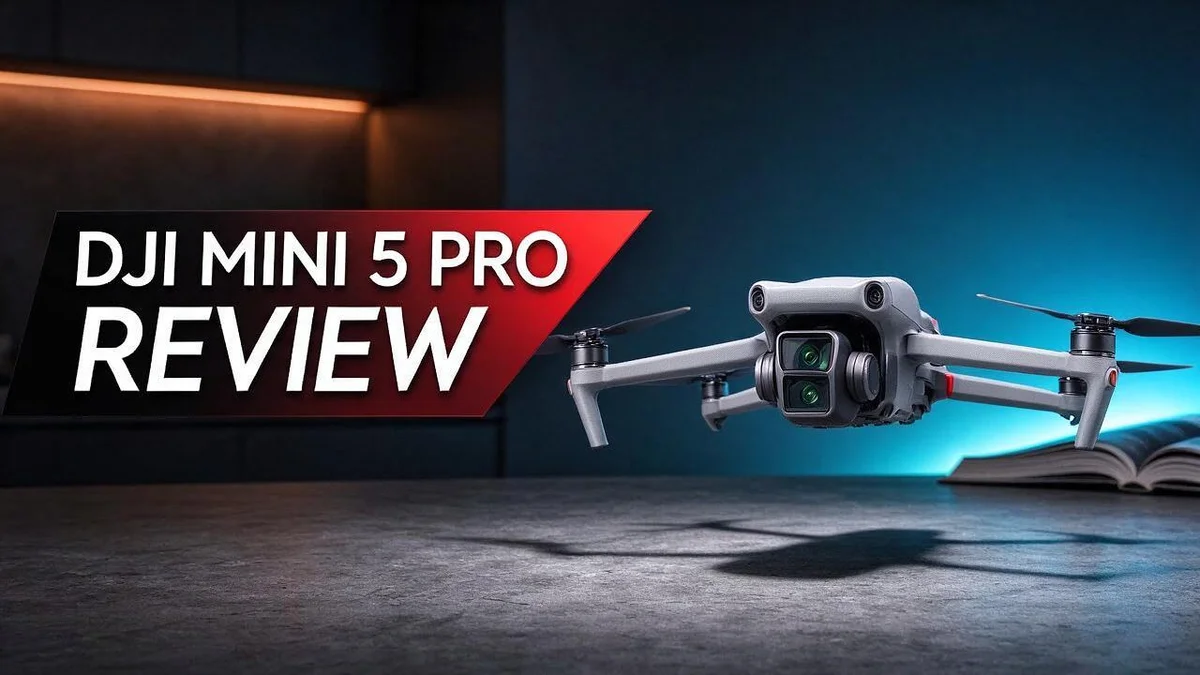
Ever wanted a drone that fits in your palm but still captures stunning photos? The DJI Mini 5 Pro aims to do just that. It packs a one inch sensor into a light frame that stays under 250 grams.
Image quality stands out right away. The 50MP stills look sharp, and the 4K video at 60fps gives your clips a smooth, cinematic feel. Want slow motion? It shoots 4K at 120fps for dramatic moments.
The drone unfolds and powers on ready to fly. Its O4 Plus link reaches up to 20 km, so you can explore far from home. Flight time reaches about 52 minutes.
In this review, we break down the specs, real footage results, and the main battery concern. Keep reading to see if this mini drone fits your flying style.
In a Nutshell
-
Big sensor, small body: The one inch sensor brings strong image quality to a light drone. Photos show more detail, and 50MP stills give you room to crop. Bright skies and shadowy streets both look balanced.
-
Flexible video for editors: The drone records 10 bit D Log M and HLG color profiles. Your footage gives you more room to adjust colors during editing.
-
Smooth slow motion: Shoot 4K at 120 frames per second for dramatic slow motion clips. Fast action like waves or spinning leaves looks striking on screen. Your clips stand out in social media feeds.
-
Long range control: The O4 Plus link reaches up to 20 km. It also streams 10 bit HDR video to the RC N3 controller, so you can review shots with confidence.
-
A refreshed gimbal: The new gimbal should keep footage steady during movement. Smooth footage matters most when you track moving subjects. The darker gray finish also gives the drone a sleek look.
-
Extra batteries help: The Fly More Combo adds two batteries, a charging hub, and ND filters. Since battery life is a key concern, this bundle helps you plan longer sessions. Pack spare batteries for any trip longer than a short hop.
Design, Weight and Gimbal

- FOUR BATTERIES INCLUDED: Take your DJI Mini 5 Pro on location with four Intelligent Flight Batteries total...
- 50MP CAMERA WITH 1-INCH SENSOR: Capture detailed aerial photographs with a 1-inch CMOS sensor and f...
Last update on 2026-11-26 / Affiliate links / Images from Amazon Product Advertising API
The DJI Mini 5 Pro stays under 250 grams, which keeps it in a light class. Light drones are easier to carry on hikes, road trips, or quick outings.
You can slip one into a jacket pocket or a small daypack without much fuss. Weight also shapes how the drone handles wind.
A light frame can react quickly to gusts, so pilots should stay alert. Check the forecast before every flight, even on days that look calm.
The body uses a darker gray finish. This shade looks calmer against the sky than bright white. It also helps the drone blend into outdoor scenes.
The new gimbal sits under the camera and holds the lens steady. Always inspect it before takeoff. Dust, grit, or a small bump can affect the camera angle and footage quality.
A quick gimbal check takes only seconds. Look for loose parts, dust on the lens, and any stiff movement. Gently move the camera by hand first, then power on.
The compact frame packs down neatly for travel. Store it in a padded case to protect the arms and camera.
The RC-N3 controller pairs with the drone, so the setup stays simple. Pack the controller separately so its sticks do not get bumped in your bag.
Beginners often feel nervous with new gear. The lightweight body makes handling feel less heavy in the hands. Practice hovering in an open field before trying more advanced moves.
For careful pilots, the gray finish and light weight make a neat pair. Together they suit travel well and keep the setup discreet.
Local rules matter just as much as design. Check your country’s drone laws before you fly. Some areas need registration or special permission, even for light drones.
Camera and Image Quality
The 50 megapixel photo mode gives you plenty of room to work. You can crop tight on a distant rooftop. Detail stays sharp even after cropping. Large prints also look clean.
Many pilots wonder how the camera handles bright sky and deep shadows. The HDR video mode balances both in one frame. This helps most over sand, water, or snow.
Zoom matters for safety as well as style. The improved zoom lets you frame a subject from a safe distance. Wildlife and people stay calm when you keep your distance.
Shooting 4K at 60 frames per second suits travel clips. Motion looks smooth without feeling rushed. Slow pans across a coastline look especially natural.
Color grading takes some practice. Test a short clip first, then adjust the tones slowly. Small changes can make a big difference.
Dawn and dusk flights ask more from any sensor. Shoot a test clip before a sunset trip. This shows you how the exposure behaves as the light fades.
Wind can soften a zoomed photo quickly. Choose a faster shutter speed when the breeze picks up. Sharp edges matter most in tight crops.
Stills and video use the same sensor, so colors match across your project. That consistency saves time during editing. Mixing both formats in one edit looks natural.
Viewing footage on a large monitor reveals more detail. Phone screens can hide small softness. Check important shots on a bigger display before you share them.
Lens cleaning matters too. A quick wipe with a soft cloth removes dust and haze. Clean glass keeps contrast high in every shot.
Night scenes need patience. Hold the drone still for a second after each move. Shorter moves reduce blur in dim light.
Good images start with planning. Check the light before takeoff. Pick your mode and take a few trial shots. Then record the final scene with confidence.
Flight Time and Battery Life
The DJI Mini 5 Pro lists a flight time of up to 52 minutes. Real flights often run shorter, so plan with that in mind.
Battery life is the main concern reviewers raise. Long term use shows how well each pack holds its charge over many cycles.
Wind and cold play a big role. A gusty afternoon makes the motors work harder. Cold mornings can also drain a pack faster than expected.
Start each day with fully charged batteries. Label each pack with its charge cycle count so you know which one to trust.
Flight time also depends on how you fly. Climbing fast, pushing into headwinds, and flying at top speed all shorten each flight. A smooth, steady pace stretches every charge further.
Here is a simple routine that works well. Check the battery level before takeoff. Land with a little reserve, since the drone needs power to return home safely.
Keep your spare batteries warm. Carry them in a jacket pocket or a small bag before a cold shoot. Warm batteries deliver power more steadily during a flight.
Set a return home level in the app. The drone then comes back before the pack runs low. This simple step prevents stressful surprises in the air.
Flying in short bursts helps you save energy. Hover less, and plan a direct route to your subject. Quick, clean flights often capture better footage than long wandering ones.
Test your setup before a big trip. Fly a short session at home and time how long one pack lasts. Those numbers give you a realistic plan for each outing.
Good storage habits protect your batteries. Store packs at a partial charge when you will not fly for several days. Avoid leaving them in a hot car, because heat wears cells down quickly.
Top 3 Alternatives
DJI Mini 4 Pro

- Bundle for everyone, see Description for details Seriously Pro Shots
- Under 249 g, No Registration Is Required[1] - Travel light and skip registration for a user-friendly...
Last update on 2026-11-26 / Affiliate links / Images from Amazon Product Advertising API
Looking for a small drone that flies for longer? The DJI Mini 4 Pro is a strong pick. It weighs under 250 grams, so it fits easily in a bag. It records sharp 4K video and offers obstacle sensing in multiple directions. Beginners will enjoy its easy-to-use flight modes for smooth tracking shots.
DJI Air 3S

- This Bundle Includes: DJI Air 3S Drone, RC 2 Remote Controller, 3 x Intelligent Flight Battery, 128GB Extreme...
- Capture Breathtaking, Immersive Shots - DJI Air 3's dual cameras offer creative focal-length options ideal for...
Last update on 2026-11-15 / Affiliate links / Images from Amazon Product Advertising API
The DJI Air 3S suits people who want a more flexible camera. It uses two lenses, so you can switch between wide and zoomed views. This helps you capture both sweeping landscapes and distant subjects. Its strong sensors also help you fly with more confidence in busy areas.
Autel EVO Nano+

- No Registration Needed - Under 249 g, this drone with camera for adults 4K does not require FAA registration...
- 4K Ultra HD & 3-Axis Gimbal for Cinematic Quality Shooting - Capture stunning moments in any light—sunrises...
Last update on 2026-11-26 / Affiliate links / Images from Amazon Product Advertising API
The Autel EVO Nano+ offers a different style of flying. It folds down into a compact shape for easy travel. Its large sensor produces detailed photos, even in lower light. If you value clear image quality in a small package, this drone deserves a close look.
Flight Experience and Transmission Range
Flying the DJI Mini 5 Pro feels calm and direct. The controls respond well, so small moves feel easy to manage. Many new pilots find the first flight less stressful than they expected.
The real highlight for distance is the O4 Plus transmission system. It offers a range of up to 20 km under ideal conditions. That number sounds huge, so it helps to know what it means in real use.
Range figures usually come from open test areas with no obstacles. A clear line of sight matters more than any spec sheet. Buildings, hills, and dense trees can weaken the link fast.
The video feed also benefits from this system. The O4 Plus link carries 10 bit HDR video to your controller. You see brighter highlights and richer detail on screen, which helps you judge framing from far away.
Signal strength appears on the controller screen during every flight. Watch it closely and never ignore a drop. If the bars fall, bring the drone closer before you fly farther out.
Radio traffic can also cause trouble. Cities hold many Wi Fi networks, phones, and other devices. Fly from an open park or field when you want the cleanest connection.
Confirm your home point after GPS locks on. This gives you a safe fallback if the signal weakens during a long flight. Take a moment to check the screen before you climb.
Keep the drone in sight whenever you can. Local airspace rules may limit how far you can fly, so check them before you leave home.
A calm mindset also helps. Slow down when the screen shows any warning, and land early if you feel unsure.
Test the range in a safe open space before you plan a long trip. This quick check shows how your area affects the signal. You learn more from one practice session than from any chart.
Fly More Combo Accessories
The Fly More Combo gives you more than a drone in a box. It adds two extra batteries, a charging hub, and a set of ND filters. These extras change how you plan each outing.
ND filters help you handle bright light. They cut the amount of light that reaches the sensor. Bright days can make footage look harsh or overexposed.
A filter helps you keep natural motion blur and smooth tones. This matters most when you shoot 4K/120fps slow-motion. Fast frame rates need careful light control, so pick the right strength before you take off.
The charging hub saves you time. It lets you power several batteries at once. You do not need to wait for one pack at a time.
This keeps your day moving. You spend more time capturing shots and less time watching a charger.
Two batteries mean fewer pauses. Swapping packs between flights keeps your session going. You can capture a sunrise, land, swap, and fly again within minutes.
Plan your shots in order before you start. A simple shot list keeps each flight focused and stops you from wandering.
Rotate your batteries evenly. Label each pack after a full charge. Use them in order so every battery gets the same amount of work. This habit keeps your whole set in good shape.
Pack everything the night before. Check that each battery is charged, each filter is clean, and the controller is ready. A quick checklist helps you avoid surprises in the field.
Keep the case in one place at home. Your kit stays together, and you grab it and go.
Pros and Cons
Pros
- It weighs under 250 grams yet carries a 1 inch sensor.
- The 50MP stills capture strong detail for its size class.
- The 4K at 120fps slow motion adds a cinematic touch.
- 10 bit D Log M gives you more room for color grading.
- It unfolds and powers on ready to fly, so you can start in seconds.
Cons
- DJI has largely left the US market.
- US buyers may find stock and local help harder to access.
- Shoppers who want a US made drone will need to look at other brands.
Who Should Buy It
Hobbyists who post clips online will notice the difference fast. This drone suits people who want more from a small camera. Creators who shoot travel content often feel right at home with it.
Owners of the earlier model will see clear gains. Zoom, low light, and stabilization all look better in user footage. If your current drone feels soft in dim scenes, this upgrade makes sense.
Beginners should still take their time. Practice in open areas before you chase tricky shots. A steady learning pace builds confidence faster than rushing into complex flights.
Long session flyers should plan with care. Reviewers flag battery life as a key concern. Plan missions that fit a shorter window, even with 52 minutes listed on paper.
Current DJI owners can keep their gear. The drone works with the RC-N3 controller. Anyone with that controller can focus on the drone itself.
Gift buyers should think about the learning curve. A fresh pilot may need guidance from a friend. Pairing the drone with a short lesson keeps early flights safe and fun.
Students and teachers can explore aerial basics. Schools may want gear that is light and simple to carry. This drone gives learners a real camera in the sky.
Weekend explorers can capture more memories. Hikers and road trippers often want a camera that packs light. This drone can record scenic views without a heavy kit.
Some buyers should look elsewhere. Professional fleets may want bigger systems with more features. Pilots in strict zones should confirm local rules before flying.
Most people who want a compact camera drone will be happy. It balances size, image quality, and ease of use well. Think about your flying style first, then decide with confidence.
If possible, watch a friend fly first. That short demo shows how the controls feel in real use, so you can decide with more confidence.
Final Verdict
The DJI Mini 5 Pro is a strong pick for creators who want better pictures in a small body. It gives a clear step up for its size class.
Think about how you plan to fly first. Short local walks call for different habits than long scenic trips. This drone handles both styles well when you plan each flight.
The biggest win is image quality. Clean detail and flexible color give you footage you can shape in editing. Many people will notice that upgrade on day one.
Who gets the most from this drone? Video makers, photo lovers, and families who want a fun camera in the sky all benefit. Each group gets a clear reason to fly.
Who should pause? People who need long, uninterrupted sessions may feel limits sooner. They should build breaks into their plans and keep a steady charging routine.
Your local rules matter too. Check drone laws in your area before your first flight. A quick check keeps your hobby fun and stress free.
Buyers who want a drone from a US brand should compare options first. The market has shifted, so look at local stock and support before you decide. This step saves you from surprises later.
Skill matters as much as gear. Practice simple shots first, then try bolder moves once you feel calm in the air. Your footage will improve fast with steady practice.
Editing also plays a role. Shoot in the highest quality mode you can manage, then grade your clips with care. Small tweaks can make a big difference.
Finally, decide what you want from your next flight. Clear goals keep you focused and make each battery count.
In short, the Mini 5 Pro offers a compact path into serious aerial photography.
Frequently Asked Questions
What comes in the Fly More Combo?
The Fly More Combo adds two extra batteries, a charging hub, and ND filters. This bundle suits people who plan longer shoots. The filters also help you capture smoother video in bright sunlight. Pack the spare batteries before you head out.
How far can the drone fly from the controller?
The O4 Plus link reaches up to 20 km. That range gives you plenty of room for scenic routes. Keep the drone in clear sight at all times. Always follow the flight limits set for your area.
How long can one flight last?
The drone lists up to 52 minutes of flight time. Swap in a fresh battery when the first one runs low. The charging hub from the combo keeps your spare batteries ready to go. Plan your shots so you use each battery well.
What is new about the design?
The drone features a new gimbal and a darker gray finish. The gimbal helps the camera hold its position during flight. The darker color gives the drone a sleek look on the ground. Many owners like how it looks in the hand.

Dillip is the founder and editor of DillipWeb.com, where he simplifies the world of AI software, tech gadgets, and accessories through honest reviews, detailed comparisons, and easy-to-follow guides. With a deep passion for emerging technology, he helps everyday users make smarter, more informed tech decisions.