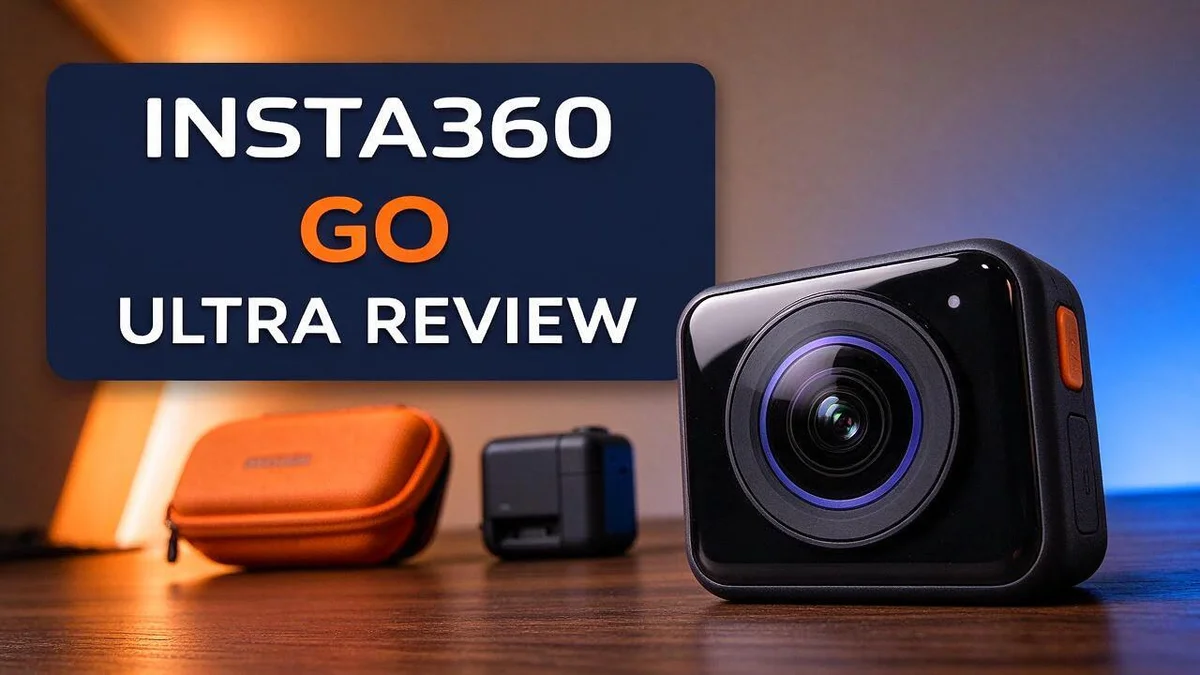
Insta360 GO Ultra Review: Image Quality, Battery Life, and Verdict
Looking for a tiny camera that goes everywhere with you? The Insta360 GO Ultra could be the perfect fit. It packs a large sensor into a lightweight body that clips onto almost anything.
Reviewers say image quality takes a major step up from the older model. Low light shots look cleaner, and 4K video at up to 60fps looks sharp.
The magnetic design makes mounting quick and secure. Swappable microSD storage gives you flexible footage management. Many reviewers also note longer battery life for extended outings.
Still, some users report recording limits, charging problems, and occasional failures to record. Knowing these details helps you decide. In this guide, you will see what works, what doesn’t, and how it compares to rivals like the DJI Osmo Nano and Insta360 GO 3S.
In a Nutshell
-
Best for hands-free fun: Clip it to a backpack, helmet, or shirt and forget about it. The camera stays out of your way during hikes, rides, or trips.
-
Great for quick action clips: 4K video at up to 60fps keeps fast moves smooth and sharp. Surfing, biking, or kids running around all look good on screen when you share them later.
-
Swap storage on the go: Removable microSD cards let you keep recording when one card fills up. Pack a few spares for long days out.
-
Check battery claims first: Reported run times differ a lot between sources. Plan to charge between outings and test the battery before a big trip.
-
Compare before you decide: The DJI Osmo Nano may produce darker images, while the Insta360 GO 3S offers another option. Pick the one that fits your style and shooting habits.
-
Think about bigger cameras for long projects: Creators who need extended recording may prefer a larger setup. This model shines for spontaneous, casual footage that captures everyday moments.
Image Quality and Low-Light Performance

- Buying from EVO Gimbals supports a Small Oregon Business! Customer Service is based in Bend, OR, replies in...
Last update on 2026-11-27 / Affiliate links / Images from Amazon Product Advertising API
The Insta360 GO Ultra uses a 1/1.28 inch sensor. A larger sensor catches more light. That matters when the sun goes down.
Behind the scenes, a 5nm AI chip processes each frame. It works fast and helps keep dim scenes clean. Cafes, indoor parties, and evening streets all benefit.
Indoor footage looks clean and pleasant. Faces keep their detail. Warm lamps look soft instead of harsh.
The wide 156 degree view gathers a lot of scene. However, the corners can soften in dark areas. Keep your subject near the center for the best detail.
Tap the screen to set focus and exposure on your subject. This step makes faces brighter in dim settings. Lock the exposure before you start moving.
Clean the lens before night recording. Fingerprints cause haze and glowing halos around bright lights. A soft microfiber cloth fixes that in seconds.
Night scenes still show some grain. Deep shadows may look speckled. Use a steady mount or rest the camera on a solid surface to avoid blur.
Good light always beats extra settings. Shoot near windows, street lamps, or stage lights. Your clips will look sharp, bright, and full of color.
Plan your framing before you hit record. Cropping a vertical clip from the wide frame can lose detail. Keep the full frame when you can.
Lighting changes fast during trips. Sunsets, tunnels, and shaded trails can shift brightness in seconds. Watch the preview and adjust before you press record.
Think about your background too. Bright skies behind a person can make them look dark. Turn your body so the light falls on your face.
Pick the right approach for each scene. Quick walks in daylight need little change. Night outings reward a short test clip, so you can check brightness on your phone before you commit to a long recording.
Design and Wearability
Small size makes a big difference. The Insta360 GO Ultra fits easily into a jacket pocket. You can carry it all day and barely notice it.
Weight plays a part too. Sources list it at about 50 to 53 grams. That gap is small, so your hand will hardly feel it. Even so, a light body helps on long hikes.
A compact body also makes the camera easy to place in tight spots. You can slide it into a small bag or a sports belt pouch. This setup suits busy days out.
Fit matters for comfort too. A snug fit keeps the camera from bouncing during a run. A loose fit may cause the lens to point the wrong way. Take a few steps and check the frame each time.
Think about your shooting spot first. A chest or shoulder position often gives a natural viewpoint. A waist or pocket position shows the scene from a lower angle. Try a few spots at home before a big trip.
Sweat and rain need a plan too. Dry the camera after each use. Keep it in a soft case when you travel. This habit helps the camera last longer.
Clothing choice also shapes the result. Thick jackets may hide the lens. Thin layers let the camera sit close to your body and stay in view.
Wearing the camera for hours can feel different from holding it. Check how it sits on your clothes after a short walk. Adjust the angle if the lens tilts down too much. A quick test saves you from missed shots later.
Pack a small kit with you. Bring spare microSD cards and a charging cable. Add a small cloth for the lens too. Keep everything in one pouch so your gear stays ready for surprise moments.
Battery Life and Storage
Battery life often decides how much you can film. Plan each outing around the time you actually have.
Use the lower run time as your starting point. Treat longer claims as a best case rather than a promise.
Cold weather can drain a battery faster than expected. Keep the camera in an inside pocket between takes so it stays warm.
Heat can also shorten how long it lasts. Avoid leaving the camera in a hot car or in direct sun.
A small power bank makes a big difference on long days. Quick top ups between scenes keep your shoot moving. Store the cable in an easy spot so you can grab it fast.
Set a daily routine for battery checks. Charge every device each night and check the battery level before you leave. This habit helps you avoid sudden shutdowns during a great moment.
Think about how many clips you plan to record. Short bursts use less power and less space than long continuous takes. Match your habits to your goals so the camera lasts longer.
Storage needs a plan too. Video files grow quickly when you film in high quality, so one card may not last a full day.
Format each microSD card in the camera before a trip. This step helps avoid errors and gives every card a clean start.
Label each card with a number or date. Clear labels keep footage organized and stop mix ups when you swap cards in a hurry.
Keep spare cards in a small case. Dust and moisture can damage exposed cards, so a closed case protects your footage.
Move files to your phone or laptop after each day. A full card leaves no room for new clips, so clearing it early keeps you ready.
Keep your phone storage open as well. Large video transfers need free space on your device, or the copy may stop halfway.
Top 3 Alternatives
DJI Osmo Pocket 3

- Capture Stunning Footage - Osmo Pocket 3 vlogging camera features a 1-inch CMOS sensor and records in 4K...
- Effortlessly Frame Your Shots - Get the ideal composition with Osmo Pocket 3's expansive 2-inch touch screen...
Last update on 2026-11-21 / Affiliate links / Images from Amazon Product Advertising API
The DJI Osmo Pocket 3 is a great choice for people who want big video quality in a small body. It has a one inch sensor and shoots smooth 4K footage. The flip out screen makes framing your shots easy. The built in gimbal keeps every clip steady, even while you walk or run.
It works well for vlogs, travel, and family moments. Its battery lasts long enough to film all day.
GoPro HERO13 Black

- HB-Series Lenses with Auto Detection: HERO13 Black is compatible with the HB-Series Lenses that let you...
- Best-in-Class 5.3K Video: 5.3K video delivers breathtaking image quality with 91% more resolution than 4K and...
Last update on 2026-11-27 / Affiliate links / Images from Amazon Product Advertising API
The GoPro HERO13 Black is a strong pick for action lovers who need rugged gear. It handles water, dust, and bumps with ease. Its HyperSmooth stabilization keeps footage steady on bike rides and hikes. The camera also has a front screen and a rear touchscreen for quick setup.
Many creators like its clean colors and fast controls. It fits well into sports, outdoor adventures, and everyday fun.
DJI Osmo Action 4

- Superior Low-Light Performance with 1/1.3-inch Sensor - Struggling with grainy footage in low light? Osmo...
- Pro-Grade Color Science - Worried your videos lack real-life colors? 10-bit color depth captures subtle...
Last update on 2026-11-27 / Affiliate links / Images from Amazon Product Advertising API
The DJI Osmo Action 4 is a solid option for people who film in tough light or cold weather. Its large sensor captures bright, clear shots in low light. The dual screen design lets you check your framing from the front or back. Magnetic mounts make it simple to attach the camera to bikes, helmets, and more.
It shines during outdoor sports and long days in the field. Viewers will notice the sharp detail and natural colors.
Ease of Use
Control is the first thing you notice. The main button starts and stops recording with one press. A small light shows the current mode, so you always know what the camera is doing.
The magnetic connection makes mounting quick. You place the camera on a magnetic base, and it locks in place with a firm click. Many reviewers say the hold feels stronger than older models.
Switching mounts takes only seconds. Each mount snaps on in a single motion. The new clip options let you attach the camera to a bag strap, a hat brim, or a bike handlebar. You do not need any extra tools for these setups.
Your phone becomes the control panel. The companion app connects to the camera and shows a live preview. You can change modes, check free space, and review clips on a larger screen than the camera offers.
The app menus follow a clear layout. Some settings sit deeper in the list, so spend a few minutes exploring them at home. You will feel more confident when the moment to record arrives.
Charging can need a little patience. Some users report charging problems, so inspect the cable and port before each outing. A clean connection often fixes the issue. If the camera still refuses to charge, try a different power source.
Recording hiccups have simple fixes. A few users say the camera occasionally fails to record. Restarting the device often clears the problem. Also check the recording settings, since some modes stop clips at three minutes.
Overall, the controls feel natural after a short practice session. New owners usually find the camera easy to run within one afternoon. The magnetic mount and app work together to keep the experience smooth. Keep the app updated so new features arrive on time.
Common Issues and Reliability
The Insta360 GO Ultra has a few known issues that can affect how dependable it feels. The good news is that most problems have simple answers. Knowing these steps before you leave helps you avoid surprises.
Some clips stop after 3 minutes. A few users report that recording ends at about three minutes. This can cut off a long action moment. Check the recording settings in the app before a long shoot, and test them once at home.
Keep the software current. Updates can fix bugs and improve stability. Check for new firmware in the app before each trip. Use a stable internet connection so the update finishes without interruption.
Run a short test clip every morning. Record about ten seconds, then watch it on your phone. This quick check shows whether the camera records correctly. It also shows how the image and audio look in your light.
Mounts need care too. Dust, grit, and small bits of debris can weaken the magnetic grip over time. Wipe the mount and the camera base with a dry cloth after each outing. A clean contact point keeps the camera secure.
Handle the camera gently. Drops can crack the lens cover or loosen the case. A soft pouch protects the lens when you carry it in a bag. It also prevents scratches from keys and coins.
Plan a backup for key moments. Bring a second camera or a phone for events you cannot repeat. A backup acts as a safety net if the main camera stops working. Your footage stays safe even on a bad day.
Warranty and support matter for long term reliability. Save your receipt and note the serial number. Register the camera with the maker soon after you get it. Contact support quickly if the camera keeps failing.
Reviews and user reports vary, so your results may differ. Some owners have no issues at all. Others need a replacement. Treat the camera with care, and it will likely serve you well.
Pros and Cons
Pros
- Image quality is a big step up from the earlier model.
- Low light shots look cleaner and more detailed.
- The 4K mode at up to 60fps gives smooth motion.
- The 156 degree view captures a wide slice of each scene.
- Reviewers say it runs longer than the older version.
Cons
- Long recordings may stop early and cut your footage short.
- Charging can act up and slow down a full shoot day.
- A sudden recording failure can miss a key moment.
Who Should Buy It
The Insta360 GO Ultra suits people who want to capture life as it happens. It works well for active people who move fast and do not want to carry heavy gear.
Travelers and weekend explorers will find it handy. Slip it into a jacket pocket and it stays out of the way. You can film a hike, a market, or a boat ride without stopping to pack up a big rig.
Parents and grandparents often want to film kids without holding a phone up all day. A small camera on a chest strap or hat brim lets you stay present. You get the footage and still enjoy the moment.
Vloggers who record on the go gain a camera that fits almost anywhere. You can walk, talk, and film with both hands free. This makes casual content feel natural instead of staged.
Cyclists, dog walkers, and outdoor fans can use it for first person footage. The light build keeps the setup comfortable on longer outings. It sits well on the body during active moments.
New creators who want to learn video often do well here. The setup is quick, and the camera rarely gets in the way of your ideas. You can practice framing and storytelling without a steep learning curve.
Some buyers should look elsewhere. If you want a drone style aerial view, the DJI Mini series may suit you better. It offers a bird’s eye perspective that this camera cannot match.
Owners of the Insta360 GO 3S should compare features first. Check whether the newer sensor and clip options justify a switch. If your current camera already meets your needs, you may not need an upgrade right away.
Ask yourself one simple question. Do you want to film everyday moments without fuss? If the answer is yes, this camera deserves a close look. It rewards people who value speed, comfort, and freedom of movement.
Final Verdict
The Insta360 GO Ultra earns a strong spot in our final verdict. It feels like a real step forward for tiny action cameras. Most of its upgrades show up in everyday use.
The camera works best for people who want simple, hands free capture. It clips onto bags, jackets, and helmets with ease. Quick moments feel effortless to record.
Think about your shooting style before you buy. If you plan long single takes, the recording limits may frustrate you. Short moments and quick highlights suit this camera well.
Your daily routine matters too. Parents, travelers, and cyclists gain the most from its small size. Creators who need steady cinematic footage may want a larger rig.
The DJI Osmo Nano may appeal to people who want a different look. Reviewers report that its images run darker, so compare samples first.
The JIALAIWOWO 4K Action Camera offers another route for those who want to try action video first.
Our overall take is positive but measured. The GO Ultra brings clear gains that most owners notice quickly. Its reliability concerns still deserve attention before you rely on it for a big event.
Practice with it before a major trip or event. A few test sessions help you learn its habits. Confidence grows fast once you know how it reacts.
Think about your editing habits too. A laptop or phone can handle short clips, while longer projects need more planning.
In short, the GO Ultra suits active creators who need portability. It may frustrate people who need uninterrupted recording every time. Weigh those tradeoffs, and you will know whether it fits your life.
The GO Ultra makes sense for people who want fast, easy footage. It rewards those who plan around its limits. Used with care, it can become a reliable everyday companion. Start with a clear goal, and the choice gets much simpler.
Frequently Asked Questions
Can I swap the storage if my card fills up?
Yes, you can. The microSD card pops out easily, so you can insert a fresh one in seconds. Keep a spare card in your bag. A full card should never end your day early.
How do I keep the camera secure on a bike or helmet?
The magnetic connection holds firmly to compatible mounts. New clip options let you attach it to a jacket, bag strap, or helmet. Test the grip at home before a ride. Check the lock again after bumpy trails.
Should I carry a backup device on long trips?
Yes, a backup helps. Sudden recording failures can miss key moments. Your phone or a second small camera can cover those gaps. Pack chargers and cables in one pouch so nothing gets left behind.
How can I avoid losing footage when a clip stops early?
Start a new recording as soon as you notice a stop. Split long events into short segments. This habit keeps your footage organized and makes editing easier later.
Is it a good first camera for beginners?
Many newcomers find it easy to start. You point the lens, press record, and capture the moment. The wide view fits a lot into each shot, so you can learn framing without complex settings.

Dillip is the founder and editor of DillipWeb.com, where he simplifies the world of AI software, tech gadgets, and accessories through honest reviews, detailed comparisons, and easy-to-follow guides. With a deep passion for emerging technology, he helps everyday users make smarter, more informed tech decisions.