Kindle Colorsoft Review: Is This Color E-Reader Worth It for Comics and Magazines?
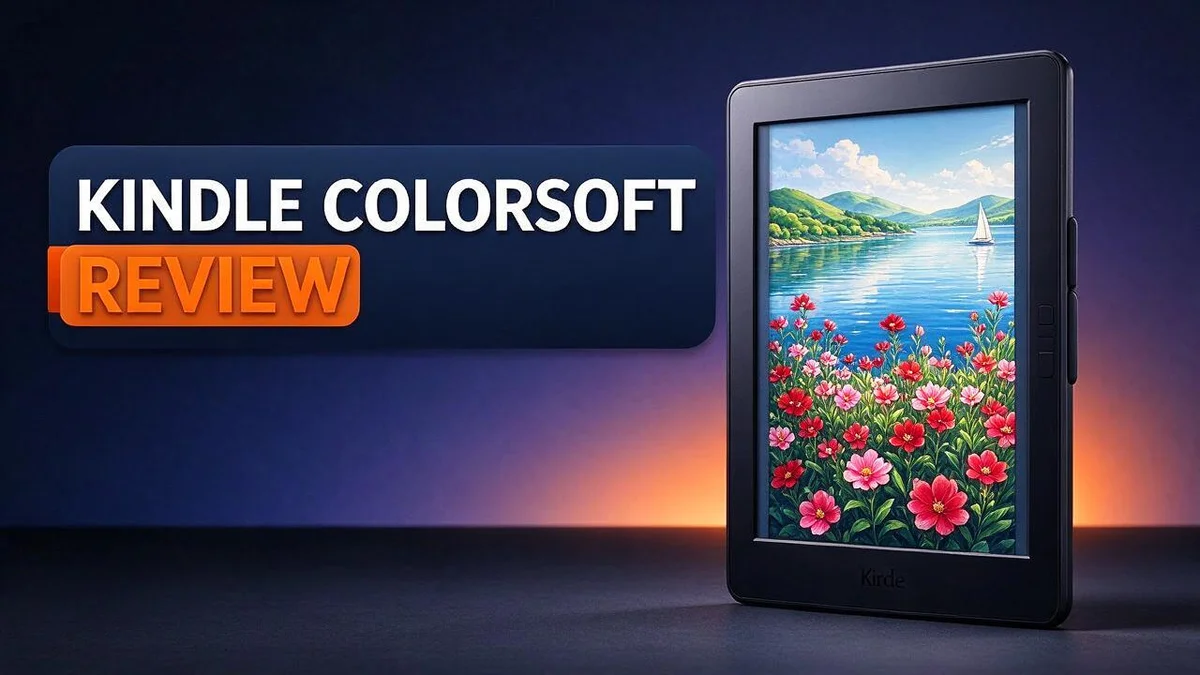
Reading has never looked this colorful. The Kindle Colorsoft brings bright, rich pages to your hands. It feels like flipping through a printed magazine, yet the text stays sharp and clear.
Amazon’s latest color reader uses a 7 inch E Ink Kaleido 3 display. Comics, graphic novels, magazines, and webtoons look their best on this screen. Your favorite stories finally get the colors they deserve.
Is it the right pick for you? This guide covers everything you need to know. You will learn about its display, battery life, storage options, and how it stacks up against rivals like the Kindle Paperwhite and Kobo Clara Colour.
Light, portable, and quick to respond, it fits easily into daily life. Let’s dive in.
In a Nutshell
-
Comics and magazines look vibrant. Colors seem close to printed pages, so graphic novels, magazines, and webtoons stand out on this reader.
-
Text stays sharp. Words remain crisp and clear, so long novels feel easy on the eyes.
-
Storage comes in two sizes. The 2025 edition offers 16GB, while the original model offers 32GB. Choose based on how much you plan to store.
-
Wireless charging depends on the version. The original model supports it, but the 2025 edition does not, so check before you buy.
-
Contrast may feel lower. Some users notice that the screen looks less punchy than a standard black and white reader.
-
Strong rivals exist. The Kindle Paperwhite, Kobo Clara Colour, and Apple iPad each offer a different mix of screen, color, and reading features.
Display and Color Performance

- Kindle Colorsoft Signature Edition, now in aluminum: Thinner, 7" paper-like color display. New edge-to-edge...
- Color your pages: Paper-like color perfect for comics, graphic novels, and more. Highlight your favorite...

Last update on 2026-11-26 / Affiliate links / Images from Amazon Product Advertising API
Color on this screen works differently than on a tablet. E Ink displays reflect light from the room instead of glowing. Your eyes can rest more easily during long reading sessions, even when you spend hours on a page.
The screen uses a black and white resolution of 1264 by 1680 pixels. Text is the main focus here, so letters stay sharp and easy to follow. Colored art has less fine detail than the black ink, so tiny lines in a comic panel may look softer than they do on paper.
Lighting plays a big role in how colors look. Bright rooms show the hues at their best. Dim corners can make the palette look muted, so reading near a window or under a good lamp works well.
The 7-inch display feels compact in the hand. Full two-page spreads from large art books may look small, so you might prefer single-page layouts. Most people find that the size suits novels, magazines, and webtoons that scroll well on a small frame.
Try a sample before you commit. Open a colorful comic or magazine page from your own library, or view a demo unit at a store if one is available. Look at skin tones, sky shades, and bold graphics. Notice whether the colors feel pleasant over ten or fifteen minutes of reading.
Think about your reading habits too. If you mainly read text-heavy novels, the color layer may matter less. If you read picture-filled books every day, the color screen can change the experience. Ask yourself which type of book fills most of your shelf, and let that guide your choice.
Design and Portability
The design keeps things simple. The Colorsoft looks like a familiar Kindle at first glance. Its edges feel smooth, and the back sits comfortably in your palm.
It slips easily into daily routines. You can drop it into a tote bag or a coat pocket. Most people will carry it without a second thought.
One hand reading feels natural. You can hold the device while you sip coffee or wait for a train. Your thumb rests on the side without strain.
A case adds protection. A simple cover guards the screen from scratches. A sleeve also keeps it safe inside a backpack. Choose a case that folds back, so the device can stand upright on a table.
Outdoor reading takes a little planning. E Ink screens look best in shade or soft daylight. Direct sunlight can make the page look washed out, so find a shady spot for your favorite comics.
Travel becomes simpler with one device. You can pack several graphic novels or magazines without adding bulk. Your bag stays light on long trips, and you have plenty to read on the go.
Nighttime reading feels gentler. Many readers find the screen easier on the eyes than a bright tablet. You can read in bed with a soft lamp nearby and still enjoy the pages.
Test the feel before you decide. Spend a few minutes in your usual reading spot. Notice whether your wrists tire or your fingers slip. A short test tells you more than any spec sheet can.
Storage and Charging Options
Storage can shape how you use the Colorsoft. The right size depends on how many titles you want on the device at once.
Colorful comics and magazines take more space than plain novels. Each image adds weight to your library, so heavy readers may fill up faster.
Many readers never need to store everything locally. Your books and magazines can live in the cloud, then download when you want to read them.
Download only the titles you plan to read this week. Removing finished issues frees room without deleting your full collection.
Charging needs a little attention before you buy. The original model supports wireless charging, but the 2025 edition does not, so the version you choose matters.
If you like placing a device on a pad and walking away, confirm the model first. Check the model details on the product listing before you order.
Wired charging keeps things simple. Keep a spare cable in your bag so the reader never runs low during a long trip.
Charging habits also matter. Top up the battery overnight, so it starts each day ready for the train or a quiet café.
Cloud storage also helps you read on more than one device. Your library and reading progress can sync, so you can pick up where you left off.
Offline reading still matters, though. Download key issues before a flight or a road trip, since the signal may drop in remote areas.
Many readers also keep a small set of favorites on the device at all times. This habit gives quick access to comfort reads without searching through a long list.
Plan your storage around your reading style. Light readers may enjoy the smaller option, while collectors of graphic novels might prefer more room.
Take a moment to map out your habits. A quick count of your favorite titles helps you choose wisely and avoid regret later.
Top 3 Alternatives
Kobo Libra Colour

- BROWSE & READ EBOOKS IN FULL COLOR - Book covers, comics, graphic novels, illustrations, note-taking and more...
Last update on 2026-11-26 / Affiliate links / Images from Amazon Product Advertising API
Kobo Libra Colour is a great choice for readers who want buttons. It has physical page turn buttons on the side. That makes reading easy with one hand. The seven inch color screen shows book covers and comics in rich detail.
It also resists water, so you can read by the pool or in the bath. The device works well with the Kobo store and many public library ebooks.
Kobo Clara Colour

- 𝗥𝗘𝗔𝗗 𝗖𝗢𝗠𝗙𝗢𝗥𝗧𝗔𝗕𝗟𝗬 𝗔𝗡𝗬 𝗧𝗜𝗠𝗘 - Glare-free...
- 𝗘𝗔𝗦𝗬 𝗢𝗡 𝗬𝗢𝗨𝗥 𝗘𝗬𝗘𝗦 - Use ComfortLight PRO to adjust your eReader’s...
Last update on 2026-11-26 / Affiliate links / Images from Amazon Product Advertising API
Kobo Clara Colour is the lighter and simpler option. It has a six inch color screen that fits in a small bag or coat pocket. Reading for long hours feels comfortable. The screen has no buttons, so every page turn happens with a tap or swipe.
This model also resists water, which is perfect for beach trips. It suits new readers who want a clean, easy setup.
Boox Go Color 7

- Does not support EMR stylus, Only Support Active Stylus InkSense, but the sytlus is not included in the box...
- Screen: 7" Kaleido 3 (4096 colors) glass screen with flat cover-lens. Resolution: 1680 x 1264 (B/W 300 ppi...
Last update on 2026-11-26 / Affiliate links / Images from Amazon Product Advertising API
Boox Go Color 7 suits readers who want more than books. It runs on Android, so you can install reading apps and other tools. It also supports handwritten notes with a stylus. This makes it useful for students and people who mark up documents.
The seven inch color screen shows magazines and charts clearly. If you like to customize your reading setup, this device gives you more control. Choose it when flexibility matters most.
Reading Comics, Magazines and Webtoons
Comic fans want bright art and sharp lettering. The Kindle Colorsoft offers both in one slim device.
Speech bubbles stay clear. Small captions remain easy to read because the text looks crisp. Color fills add mood without crowding the words.
Graphic novels also shine on this screen. Long stories flow well when each chapter fits neatly on the display. Story arcs feel complete.
Webtoons follow a different pattern. Episodes often run as one long vertical strip. Scrolling takes a steady rhythm.
Long episodes feel smooth when you read in small chunks. Pause at the end of each scene. Then continue when you feel ready.
Webtoon creators use vivid palettes. The Colorsoft shows those shades with a soft finish that feels like paper.
Magazines bring a different challenge. Glossy layouts mix photos, headlines, and narrow columns. The color display makes pictures look lively.
Small print needs zoom. Some magazine text sits tight on the page. A quick pinch brings it into focus.
Comic panels also respond well to zooming. Many files let you focus on one panel at a time. This helps you catch tiny details in busy scenes.
Reading speed changes with each format. Comics move quickly, while magazine articles take more time. Plan your sessions around the content.
Sample pages reveal the best fit. Open a title with bright cover art. Check how skin tones and backgrounds look to you.
Your favorite genre matters too. Action fans may enjoy bold splashes, while travel readers may prefer glossy photo features. Choose what excites you most.
Sharing matters for some readers. Friends often swap comic recommendations, and magazine picks spark good talks. A color screen makes those conversations more fun.
Give the device a fair test with several formats. Then you will know if it suits your weekly reading habits.
Battery Life and Efficiency
Battery life is one of the Colorsoft’s strongest traits. Reviewers often praise how long the device runs between charges. Most readers rarely think about power until the battery gets low.
E Ink screens use power only when the page changes. A static page needs almost no energy to stay visible. This design helps the battery last through long trips and quiet weekends.
Color adds a small cost. The Kaleido 3 layer needs more energy than plain black and white text. Still, the drain stays modest for most daily reading.
Your settings shape how long the battery lasts. Screen brightness uses more power than almost any other setting. Lowering the front light at night helps the battery last longer.
Wireless connections also draw energy. Turn on airplane mode when you read offline. Switch off Bluetooth if you never use accessories.
Automatic syncing can quietly drain power too. Set downloads to happen only when you ask for them. This simple habit protects the battery during busy weeks.
Standby time matters as well. Put the device to sleep when you finish a chapter. A locked screen uses far less power than a device left awake on a table.
Frequent cloud backups can also use extra power. Review your sync settings once a month. Small changes can make a clear difference over time.
Heat affects battery health. Keep the device out of hot cars and direct sun. Mild temperatures help the battery stay steady for years.
Charge fully before a long trip. Pack a short cable in your bag just in case. A full battery gives you confidence on a train, a plane, or a beach day.
Colorful comics and magazines may use a little more energy than novels. The gap stays small for most readers. Regular reading sessions rarely cause worry.
Watch the battery indicator during the first week. You will learn your own reading pattern. Then you can plan charging around your routine.
Pros and Cons
Pros
– – Colors look like printed magazines while text stays sharp.
– – Light and easy to carry around.
– – Page turns feel fast and responsive.
– – Text remains clean and easy to scan.
– – Strong fit for color-heavy reading.
Cons
– – Contrast is lower than many readers expect.
– – Color imagery has clear limits.
– – The 2025 edition lacks wireless charging.
Who Should Buy It
This device suits a certain kind of reader. It works best for people who want a focused reading tool. Phones and tablets often pull attention away from the page.
Students who study from illustrated books may benefit. Diagrams and charts gain clarity in color. The text still looks crisp, so study sessions feel calm.
Travelers can also gain a lot here. One device can hold a full library of titles. Packing light becomes much easier on long trips.
Parents who read picture books together will enjoy the bright art. Children often point at colors and shapes on the page. Shared reading time becomes more lively.
Commuters who read on crowded trains also benefit. A simple screen keeps the focus on the story. Nobody needs to glance at a glowing feed.
Some readers should look elsewhere. If you read mostly plain text novels, a black-and-white model may suit you better. The Kindle Paperwhite (2024) handles long text sessions with ease.
Shoppers who need top contrast should test the screen first. Visit a store if possible and compare pages side by side. Look at small text and fine image details closely. Your eyes will tell you what fits.
Tablet fans may prefer a different path. An Apple iPad (11th Gen, 2025) offers video, games, and apps. Choose it if you want more than reading.
Consider your reading habits before you decide. Think about what you read most each week. Take a few minutes to answer those questions honestly. The right match depends on your favorite formats.
Final Verdict
The Kindle Colorsoft is a strong choice for readers who want color. It turns a simple reading device into a window for illustrated stories. Still, it is not the right pick for everyone.
Think about what you read most often. If your shelf holds mostly plain novels, a black-and-white model keeps things simple. If your reading includes comics, picture books, or glossy magazines, this device earns its place on your nightstand.
Compare it with your daily habits. Many people read in short bursts on the couch, on a bus, or before bed. A focused screen like this one helps you settle into a book without distractions. Tablets offer many apps, but they can pull your attention away from the story.
The Kindle Paperwhite is the natural alternative for text lovers. It suits readers who care most about crisp words and a classic reading feel. The Colorsoft gives up some simplicity in exchange for a richer view of art and images.
Other options deserve a look too. The Kobo Clara Colour and the Onyx Book Go Color 7 target a similar crowd. Each one brings its own strengths, so compare how they handle your favorite titles before you decide.
Test before you commit. Download sample pages from books you already love. Look at the colors, check how text appears, and notice how the page turns feel in your hands. Your own eyes will tell you more than any spec sheet can.
Our overall take is simple. The Kindle Colorsoft offers a pleasant, focused reading experience with real color. It works best for people who value illustrated books and visual stories. If that sounds like you, this device is worth serious consideration. If you mostly read plain text, you may find a different model fits your life better.
Frequently Asked Questions
Does the Kindle Colorsoft work well for comics?
Yes, it does. The color display suits comics, graphic novels, and webtoons. Panels stay clear, and speech bubbles remain easy to read.
Does the Kindle Colorsoft support wireless charging?
Only the original model lists wireless charging. The 2025 edition does not include it. Check the model year before you buy if charging style matters to you.
How much storage do you get?
The 2025 edition offers 16GB, while the original model offers 32GB. Most readers can store a large collection of titles on either version.
Is the screen comfortable for long reading sessions?
Contrast runs lower than many readers expect. Text may look softer than on other devices. Try a few pages of your favorite book to see if the screen suits your eyes.
Should I choose the Kindle Paperwhite instead?
Pick the Kindle Paperwhite if you mostly read plain text novels. It keeps the focus on words. Pick the Kindle Colorsoft if you want color in your books, magazines, or illustrated titles.

Dillip is the founder and editor of DillipWeb.com, where he simplifies the world of AI software, tech gadgets, and accessories through honest reviews, detailed comparisons, and easy-to-follow guides. With a deep passion for emerging technology, he helps everyday users make smarter, more informed tech decisions.