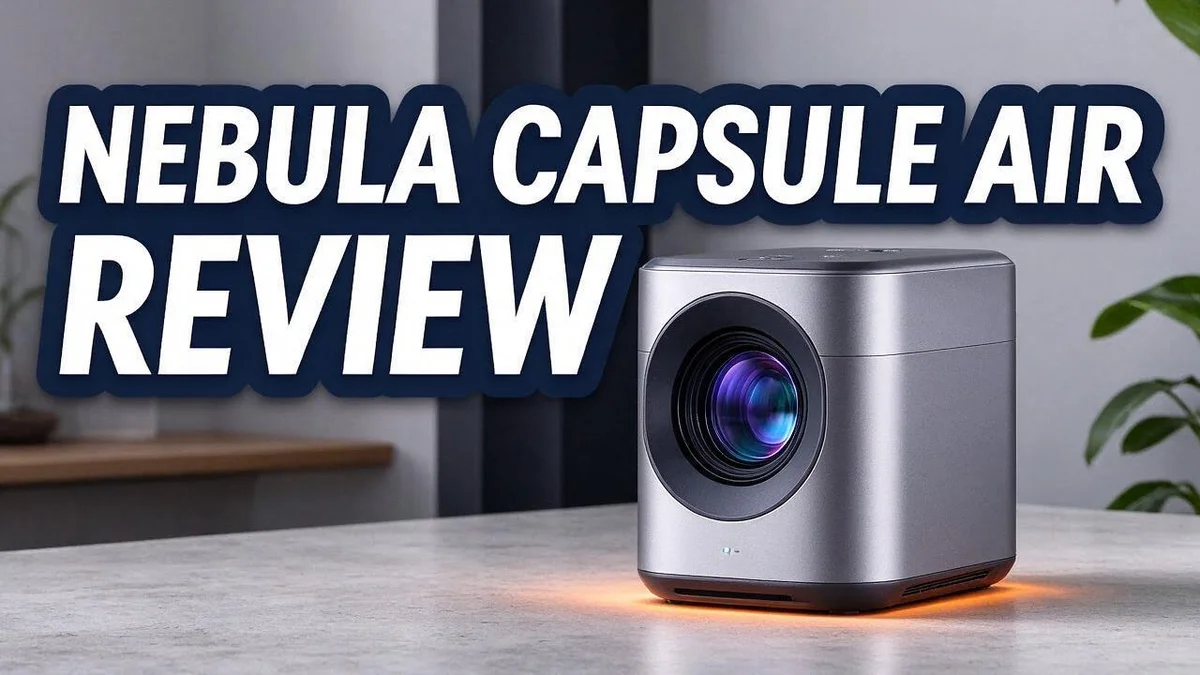
Nebula Capsule Air Review: Is This Compact Google TV Projector Worth It?
Looking for a projector you can take anywhere? The Nebula Capsule Air might be the one. It is small, simple, and ready to use fast.
Carrying a big screen in your bag sounds hard, but this device makes it easy. It fits into tight spaces and goes where you go.
Google TV comes built right into the device. You can open your favorite apps without plugging in extra gear. That means less setup and more movie time.
Battery life is about two hours. That is enough for a short film night or a relaxed evening with friends. Reviewers gave it an 86% score in March 2025.
Ready to see if it fits your space? Keep reading to learn what makes this model stand out.
In a Nutshell
-
Strong reviewer approval: The Nebula Capsule Air earned an 86% score in a review by EFTM on March 13, 2025. That rating gives shoppers a clear sense of overall quality before they buy.
-
Simple design: The layout stays easy to follow. New users may find the setup less confusing than bulkier models. The design keeps things simple for everyday use.
-
Small size for travel: The compact body suits road trips, sleepovers, and quick work presentations in small rooms.
-
Few documented drawbacks: Current research lists no major cons for the Air model itself. That makes it easier to judge the device on its own strengths.
-
Older model confusion: Complaints about resolution claims often come from earlier Capsule versions. Check the model name before you compare reviews.
-
Other options to compare: Shoppers often look at the Anker Nebula Solar, Kodak Luma 350, ViewSonic M1+, and AUN mini projector. Compare screen features side by side before you decide.
Design and Portability
Where will you use your projector? Many people want one device for bedrooms, living rooms, and quick office talks. This section explains how the design supports that kind of movement.
Setup spots matter more than you think. A projector needs open space in front of a wall. Place it on a shelf, a table, or a stand. Then aim it at a plain surface.
Keep the sides clear so warm air can escape. Blocked airflow can make any electronic device run hot. Give the unit some room on every side.
Think about cable routing next. A power cord and any streaming accessories need space too. Plan your outlet before you set up. Short cords reduce clutter on the floor.
Packing it for a trip is simple for most people. Slide the unit into a soft bag with the charger. Protect the lens from dust and scratches.
Check the weight first. Exact weight can matter for frequent moves. Weigh the device on your own scale if you plan many trips. This small step helps you judge comfort.
Setup speed also counts on busy days. A quick start saves time before a meeting. Plug it in, power it on, and open your content. Keep your streaming login ready so you skip extra steps.
Ask yourself a few questions first. Will you move it every day? Will you use it in one room only? Your answers show whether this design fits your routine.
Think about where you store it. A small unit fits in a drawer or closet. Keep it near your main viewing area. Quick access means you use it more often.
Good design should feel natural. Most people want fewer tools and less fuss. This model keeps the process simple, so you spend more time watching. Small things add up over time. Easy setup and easy storage make the device feel friendly.
Built-In Google TV Features
Built in Google TV makes streaming easy. Many people want a projector that works without extra gear. This model gives you a streaming home screen right away.
Your favorite apps sit in one place. Google TV groups shows, movies, and music into clear rows. You can scroll through picks without digging through menus.
Search helps you find titles fast. Type a movie name once and see where it streams. This saves time when everyone wants to pick something together.
Profiles keep choices personal. Each person in your home can set up their own profile. Suggestions then match each viewer instead of one mixed list.
Sign in with your Google account. Your account can link favorite apps and watch history. This makes it easier to pick up where you left off.
Strong internet matters more than you think. Streaming needs a steady connection. Test your network before movie night so playback stays smooth.
Pick your show before you start. Browsing for ages can waste a good evening. Choose a title first, then sit back and relax.
Smart suggestions learn your taste. The home screen adapts as you watch more. Over time, recommendations feel more like a personal guide.
Kids can have a safer viewing space. Profiles can help separate younger viewers from adult content. Check the settings to set limits that fit your family.
Use the remote for quick control. Move through menus with simple button presses. Adjust settings in a few taps.
Movie nights feel more social. Everyone can choose a pick from the same screen. Shared choices make the room feel more fun.
Check your favorite apps before you start. Not every service may look the same on every device. Look up each app to confirm it works for you.
Google TV makes the Air feel complete. A built in home screen saves setup time. Grab the remote, pick a show, and enjoy the view.
Picture and Sound Performance
Picture quality often decides whether a projector gets used again and again. Most people want sharp shapes, natural colors, and text that reads easily from across the room.
Room light is the biggest factor. Bright lamps and sunlight can wash out a projected image. Close the curtains and dim the lights for the best view.
Distance from the wall changes the image size. Move the unit closer or farther until the picture fills the wall without spilling over the edges. Keep the lens straight on the wall for a clean, even shape.
Wall color matters too. A plain white wall gives the most natural look. Patterned wallpaper or dark paint can make colors look dull or uneven.
Sound comes from the unit itself. Many people pair a projector with a soundbar or a small speaker for fuller audio. Place the speaker near the screen so voices feel connected to the action.
Volume settings matter in small rooms. Turn the volume up only as far as needed to avoid harsh sound. Lower levels also keep neighbors happy during late shows.
Good sound also helps with speech. Clear dialogue makes news and tutorials easier to follow. Use the sound settings to boost voices if they sound muffled.
Test before you commit to a setup. Play a movie you already know well. Watch dark scenes and bright scenes, then notice how the image holds up. Listen for dialogue during loud music, since that tells you how clear the audio stays.
Streaming quality also depends on your internet speed. A weak connection can make even a great picture look soft or blocky. Pause the video if it stutters and check your network first.
Good picture and sound make a big difference for family films and sports. Take a few minutes to adjust your space. The result feels much more like a real cinema night.
Top 3 Alternatives
XGIMI MoGo 3 Pro

- ...
- 360° 𝑨𝒅𝒋𝒖𝒔𝒕𝒂𝒃𝒍𝒆 𝑺𝒕𝒂𝒏𝒅:Project from wall to ceiling with ease...
Last update on 2026-11-27 / Affiliate links / Images from Amazon Product Advertising API
Looking for a light projector that moves easily? The XGIMI MoGo 3 Pro fits well in a backpack.
It runs Android TV, so streaming apps are ready right away. Its built-in speaker makes movie nights feel fuller.
Setup takes only a few minutes. Auto keystone helps the image line up on most walls. Pick it up, plug it in, and start watching. It is great for camping trips or guest rooms.
Samsung Freestyle Projector
No products found.
Want a projector that doubles as a lifestyle piece? The Samsung Freestyle Projector is compact and simple to carry.
It rotates to project on walls, ceilings, or floors. That flexibility helps in small rooms.
Its smart interface opens streaming apps fast. Ambient mode can display art or photos when you are not watching a movie. This is a good choice for families who want one screen for everything. Easy setup keeps things relaxed.
Epson EpiqVision Mini

- BIG SCREEN ENTERTAINMENT — Make every event truly epic by watching your favorite content on an immersive...
- OUTSTANDING PICTURE BRIGHTNESS — 3-chip 3LCD produces 1,000 lumens of color brightness (IDMS-rated) and...
Last update on 2026-11-27 / Affiliate links / Images from Amazon Product Advertising API
Need a bright picture in a small body? The Epson EpiqVision Mini is a sleek pick.
It uses 3LCD technology for vivid colors. Built-in Android TV lets you stream without a laptop.
Dolby Audio adds depth to shows and games. This model works well in a bedroom or dorm room. Its compact frame fits on a small shelf, which makes it great for everyday viewing and casual gaming.
Battery Life and Real-World Use
Battery life sets the limit for each movie night. The Nebula Capsule Air runs for about two hours on a single charge. That is enough for many sitcoms or a short film.
Plan your viewing around that window. A feature film often runs longer than two hours. Pause the film at a natural break if needed.
Keep the cord nearby for longer shows. Plugging in the unit keeps the show going past the battery limit. Choose a spot near an outlet before you start.
Think about outdoor nights. The Air suits a backyard get together or a camping trip. Check the power details in the manual before you pack a power bank.
Charge it before weekend plans. A full charge before guests arrive means fewer interruptions. Make it a quick habit after each use.
Battery drain depends on how you use it. Bright scenes and loud sound may use power faster. Lower the brightness in a dim room to save energy.
Short sessions suit the Air best. Many families move it from the living room to a bedroom. Quick viewing fits the battery window well, especially on weeknights.
Check the charge level early. Look at the battery before the main feature starts. This small step avoids a sudden stop in the middle of a scene.
Reviewers noticed the battery limit too. EFTM gave the Air an 86% score in March 2025. The two hour battery life appears in that review.
Track the time while you watch. Note how long the battery has run. A quick glance helps you plan a break or a charge. Simple habits make the night smoother for everyone at home.
Match the battery to your habits. If you watch short shows, the Air fits well. If you want marathon films, plan breaks or keep a charger close.
Expect the number to vary. Real results depend on brightness, sound, and your habits. Test a short movie at home first.
Setup and Everyday Ease of Use
Setting up the Air takes only a few minutes. Most people finish the first start without opening a manual. Prompts on the screen guide you through each step.
Connecting to the internet comes next. Pick your wireless network from the list. Type the password once, and the unit remembers it for future nights.
The remote feels light and simple. Buttons sit in easy reach of your thumb. You can move through menus while you sit back on the couch.
Focus needs a quick check before the movie starts. Turn the focus ring slowly until the text looks crisp. Check the edges of the picture, since they show blur first.
A stable surface prevents bumps and shifts. Place the unit on a table or shelf that will not wobble. A steady base keeps the picture in place during long movies.
Software updates arrive quietly in the background. The system checks for new versions on its own. Keep the unit connected to the network so improvements install without extra effort.
Opening apps feels quick once the home screen loads. Scroll left or right to reach your favorite services. Most menus respond fast, so you spend less time waiting.
Carrying the unit is simple for trips. The compact body slides into a bag with room to spare. Pack the power cord in a separate pocket so it stays tidy.
Shutting down takes one press. Turn the unit off when you finish watching. Let it cool for a few minutes before you pack it away.
Guests can join the fun without help. Show them how to use the remote in under a minute. Simple controls mean fewer questions and more time for the movie.
Ease of use grows with daily habits. Wipe the lens with a soft cloth each week. Try a test run on a quiet evening to learn what works best for you.
Pros and Cons
Pros
- Compact size fits easily into a bag or a small room.
- Simple design keeps the look clean on any shelf or table.
- Google TV gives you access to many streaming apps in one place.
- The unit earns an 86% score in a recent review.
- Easy to carry between rooms for movie nights anywhere.
Cons
- Resolution and brightness figures are not clearly listed.
- Weight is not confirmed, so check it before a trip.
- Few direct comparisons with rivals like Anker Nebula Solar exist.
Who Should Buy It
The Nebula Capsule Air suits people who want a simple way to stream. It works well for anyone who dislikes complicated menus.
Renters often like this kind of projector. They can move it to a new apartment without any fuss. Nothing needs mounting on the wall.
Students and roommates benefit too. A dorm room or shared flat often lacks space for a full television. This device can sit on a desk and still deliver a big picture.
Couples who watch shows in bed will enjoy it too. A small projector can throw an image onto a plain wall.
Families with young kids may find it useful. Kids can explore their favorite apps with a few button presses.
Viewers in sunny rooms should plan for dimmer evenings. Daylight can wash out the picture, so closed curtains help.
Viewers who want a huge home theater setup may prefer a larger model. Those seeking a full cinema feel may want a bigger projector.
Travelers who like to pack light can enjoy this device on trips. It suits hotel rooms and short stays.
Anyone who wants a quick movie night without a long setup will like it. Friends can gather around a wall and watch together.
Grandparents who want easy movie nights may also find it helpful. The device suits people who prefer fewer choices on screen.
Buyers should compare features before they decide. Read several reviews and check specs against personal needs.
Shoppers can also look at rivals like the Kodak Luma 350 or ViewSonic M1+. Side by side views help people pick the right fit.
In short, the Air fits casual viewers who like simple controls and easy movement.
Final Verdict
The Nebula Capsule Air earns a solid verdict. It blends easy portability with a clean setup. Overall, it makes a smart pick for casual viewing.
Think of it as a simple companion. It does not try to replace a full home theater. Instead, it gives quick access to shows wherever you settle down.
The biggest win is ease of use. Many people feel nervous about new gadgets. This model removes most of that stress from day one.
The 86% score reflects a device that handles its main job well. Still, some details remain unclear. Check brightness and resolution specs before you decide.
Your room setup matters most. Light levels, wall color, and seating distance shape the picture. A quick test run shows whether the image works for you.
Think about your daily habits too. Short episodes and casual films suit it well. Long binge sessions may need a charger close by, since the battery runs down sooner than many users expect.
Consider how often you will watch. Daily viewers will notice the convenience fast. Occasional watchers may enjoy it as a fun extra rather than a must have.
Regular use turns a simple gadget into a habit. Movie nights become easy to plan because the setup stays ready. Users who set it up once rarely struggle later. A quick check every few weeks keeps things smooth.
Keep expectations realistic. It shines as a casual screen, not a cinema replacement. Dim rooms and short sessions bring out its best side. Expect a fun experience, not a theater one.
Ask yourself what you want from the screen. If the answer is quick fun with easy apps, this model fits the bill. If you want maximum detail, look elsewhere first.
The bottom line is simple. If you want streaming without fuss, this device delivers. Set it up on a steady surface, focus the image, and enjoy your next show.
Frequently Asked Questions
Do I need an internet connection to use it?
Yes, you need internet for most streaming apps. Google TV pulls shows and movies from online services. Connect the device to your home network during setup so your favorite apps load quickly. Without a connection, the apps will not open or play content.
How long does the battery last on one charge?
Expect around two hours of viewing per charge. One review reports this figure. Keep a charger nearby if you plan to watch a long movie or several episodes in a row. Many people find it easiest to leave the unit plugged in while they watch.
Is setup easy for someone new to projectors?
Yes, most people finish setup in one sitting. Plug in the unit, follow the on-screen steps, and sign in to your Google account. The steps guide you through each choice, so you never need to guess what comes next. If a step feels confusing, you can pause and return to it later.
Can more than one person use the device at home?
Yes, Google TV supports separate profiles. Each person can sign in to their own account and keep a personal list of apps. This helps families and roommates avoid mixing up watch histories and recommendations. Everyone can enjoy the same screen without sharing one login.

Dillip is the founder and editor of DillipWeb.com, where he simplifies the world of AI software, tech gadgets, and accessories through honest reviews, detailed comparisons, and easy-to-follow guides. With a deep passion for emerging technology, he helps everyday users make smarter, more informed tech decisions.