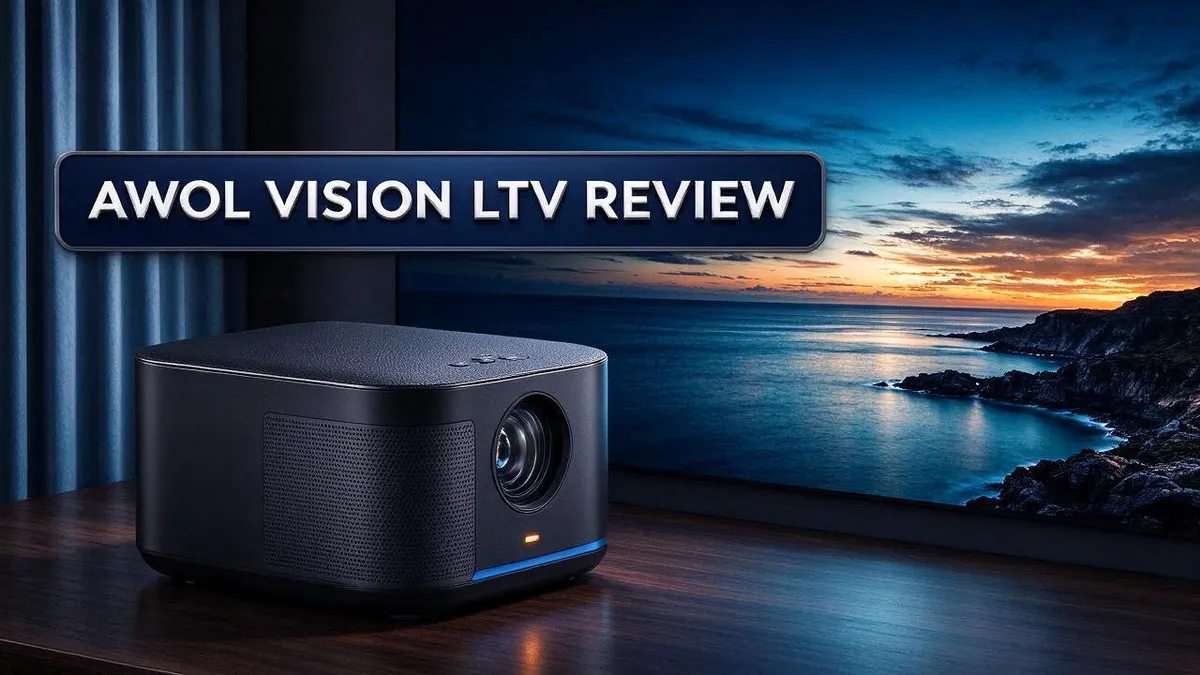
AWOL Vision LTV Review: Ultra Short Throw Projector Picture Quality, Brightness and Verdict
Do you want a big picture without a big setup? The AWOL Vision LTV might be the right fit for your room.
Many people want a home theater feel. Few want a projector that needs a long throw distance. This lineup solves that problem with ultra short throw technology.
Three models make up the range: the LTV-2500, LTV-3000 Pro, and LTV-3500 Pro. Each one sits close to the wall and still fills the space with a large image.
Picture quality stands out across the line. The LTV-3000 Pro offers 4K UHD resolution at 3840 x 2160. The LTV-3500 Pro adds support for Dolby Vision, HDR10+, and HLG.
Noise matters during movie night too. The LTV-2500 is rated under 27 dB, so it stays quiet. Users also praise its strong picture and easy-to-use remote.
Is this projector right for you? This guide breaks down each model, its key features, and what real users say about it. Keep reading to make a confident choice.
In a Nutshell
-
Built-in sound: The LTV-3500 Pro includes an integrated soundbar. You can skip extra speakers and keep your room tidy. Dialogue and effects come straight from the unit.
-
Wide HDR support: The top model reads Dolby Vision, HDR, HDR10, HDR10+, and HLG. Your movies and shows can play in the format they were made for.
-
Streaming built in: The LTV-2500 has a holder for an included Fire TV stick. You can start streaming fast. It also offers three HDMI 2.0 ports for other devices.
-
Simple controls: Owners say the LTV-2500 remote is easy to use. Changing settings takes little effort, even if you are new to projectors.
-
Focus made easy: The LTV-3500 Pro offers motorized focus. You can sharpen the image without touching the lens. This saves time during setup.
-
Brightness watch: Some users report a brightness pop on Dolby Vision UHD discs with the LTV-3000. If brightness matters most, the Formovie 4K Max offers 4,500 ANSI lumens, which is much brighter.
Picture Quality and HDR Support

- World’s First UST Projector with Built-in Center Channel Speaker: Innovative center speaker mapping delivers...
- All-Scene 4K 3D Triple Laser Projector: Triple Laser (No Color Wheel) + 4K UHD + Dolby Vision + HDR10+ + 3D...
Last update on 2026-11-26 / Affiliate links / Images from Amazon Product Advertising API
Picture quality decides how much you enjoy a movie night. Let’s look at what this lineup can show on your wall.
The LTV-3000 Pro delivers 4K UHD resolution at 3840 x 2160 pixels. Each frame holds four times the pixels of standard 1080p. Edges look sharp, and fine details like tree leaves or film grain stay visible.
High dynamic range, or HDR, adds extra punch to a scene. Bright highlights and deep shadows both keep their detail. Explosions glow more, and night scenes feel less muddy.
Contrast matters just as much. Higher contrast makes colors look more lifelike. A dim room helps this effect, so many viewers prefer evening screenings.
Brightness matters more than many people expect. Projector makers rate output in ANSI lumens. The Formovie 4K Max lists 4,500 ANSI lumens, which the source describes as substantially brighter than the LTV-3000 Pro.
Room lighting changes everything. Ultra short throw projectors sit close to the wall, so the surface behind them matters. A light gray or white wall works well. Closing blinds during the day makes a big difference.
Screens can help too. The TrueThrow Fresnel ALR is a screen, not a projector. It fits ultra short throw models with throw ratios from 0.19:1 to 0.30:1. It helps cut down glare from room lights, so colors stay rich.
Dark scenes deserve a test. Before you commit, play a favorite film with deep black scenes. Watch how shadows look and whether detail stays visible.
Trust your eyes more than specs alone. A projector that looks great in a store may look different in your home. Your walls, lights, and seating all shape the final image.
A few setup steps help a lot. Choose a picture mode that fits your room. Adjust focus and keyst*one carefully. Small changes often add big gains.
Resolution, brightness, and room lighting work together. Get all three right, and the picture stands out.
Brightness and Viewing Environment
Your room shapes how every picture looks. Light control matters with any model in this range. Bright daylight or strong lamps can wash out the image fast.
The LTV-2500, LTV-3000 Pro, and LTV-3500 Pro are all ultra short throw projectors. They sit close to the wall, so the screen surface does a lot of work.
Choose a screen that fits the projector. TrueThrow Fresnel ALR is a screen, not a projector. It is sized for ultra short throw models with throw ratios from 0.19:1 to 0.30:1.
Some shoppers compare brightness across brands. The Formovie 4K Max lists 4,500 ANSI lumens. The source describes that as substantially brighter than the LTV-3000 Pro, so people with very bright rooms may want to compare both.
Your brightness needs depend on your space. A basement theater with blackout curtains needs far less light than a sunny living room. Think about when you watch most.
Wall color also changes the result. Bright white walls can reflect glare and make the image look flat. Darker, neutral walls often keep colors looking natural.
Floor and furniture colors also bounce light. A dark rug and a deep sofa absorb extra glow, which keeps the focus on the screen.
Window treatments make a big difference during daytime viewing. Heavy curtains or blinds block sunlight and reduce reflections on the screen.
Lamp placement matters too. Put lamps beside or behind the seating area. Direct light aimed at the screen washes out the picture.
Think about seating distance as well. Sitting far from the screen can make a dim image feel smaller and less bold, so test a few spots before you settle in.
Ask yourself how often you watch in daylight. Weekend afternoons call for more light control than night films do. Plan for both habits.
Plan the room first. A little planning before setup helps every model shine. Your eyes will thank you during movie night.
Installation and Throw Distance
An ultra short throw projector needs a different setup than a standard projector. Most AWOL Vision LTV models sit very close to the wall. This placement saves floor space in smaller rooms.
Throw distance tells you how far the projector sits from the screen. A short distance lets the unit rest on a low stand. It also keeps people and furniture out of the light beam.
Measure your wall before you buy any mounting gear. Mark the width of the screen area you want. Then place the projector at the distance the manufacturer lists for that screen size.
Tip: Write down the wall space, the ceiling height, and the nearest outlet location. Small measurements prevent big mistakes later.
A sturdy media console works well for most rooms. Choose a surface that stays level and can hold the weight. A wobbly shelf can shift the image over time.
Check the placement with a small bubble level. A tilted projector can make the picture sit crooked on the screen. Correct the angle before you move on.
Leave open space around the vents. Blocked airflow causes heat buildup, which can affect performance. Give the unit a few inches of clearance on every side.
Plan your cable routes early. The LTV-2500 has three HDMI 2.0 ports. Leave room for a streaming stick, a game console, and a soundbar. Use cable clips to keep cords tidy along the wall.
Power outlets should sit within easy reach. A nearby outlet avoids long extension cords and trip hazards. A surge protector adds another layer of safety for your equipment.
Once the projector sits in place, run a quick test pattern. Check the corners, edges, and focus. Small adjustments often fix blurry spots or uneven borders.
Patience pays off here. Move the projector slightly and retest until the image fills the screen evenly. Take your time with this step.
Finally, turn off the room lights and watch a short clip. Confirm that the picture looks sharp and fits the screen. Then secure the projector so it stays put during movie nights.
Top 3 Alternatives
Neewer LED Video Light

- 【72Wh Battery RGB COB Light】 HB80C high power 80W mini LED light boasts threaded mixing cavity for more...
- 【7 Lighting Modes & 18 Special Effects】 HB80C can switch among 7 light modes: CCT Mode, HSI Mode, RGBCW...
Last update on 2026-11-26 / Affiliate links / Images from Amazon Product Advertising API
The Neewer LED Video Light is a great pick for beginners and home creators. It gives soft, even light for video calls, tutorials, and product clips. Most models let you adjust brightness and color temperature with a simple dial or app. This makes it easy to match natural daylight or warm indoor lamps.
Its compact frame fits well on a small desk. You can also mount it on a standard tripod. Setup takes only a few minutes, so you can start filming fast.
Godox LED Video Light

- 60W Powerful LED Beads: 5.5*9.0*9.5inch, 3.5lb, Godox SL60W LED video light with highly light brightness and...
- Large-sized LCD Screen: SL60W LED light has different features from other LED lights, in addition to the clear...
Last update on 2026-11-26 / Affiliate links / Images from Amazon Product Advertising API
The Godox LED Video Light suits creators who want more power and control. It produces bright, clean light that works for interviews, vlogs, and small studio shoots. Many versions include a built-in fan and a stable mounting system for steady use.
Godox lights also support accessories like softboxes and diffusers. These tools help you shape shadows and reduce harsh spots on the face. Good light makes your footage look polished and professional.
Aputure Amaran 60d

- Upgraded High SSI LED Bi-Color Light: amaran COB 60xS is an ultra-compact 60W bi-color Bowens Mount...
- On the Move: The amaran 60x S is an ultra-compact bi-color LED video light with surprising output and full...
Last update on 2026-11-26 / Affiliate links / Images from Amazon Product Advertising API
The Aputure Amaran 60d is a strong choice for serious filmmakers and photographers. It offers high output with accurate color, so skin tones look natural. Its design includes a cooling system that keeps the light running smoothly during long sessions.
This light works well for film sets and live streams. It pairs with a wide range of modifiers and mounts. If you need reliable performance on demanding projects, this option is worth a look.
Sound and Operating Noise
Sound matters just as much as the image. Fan noise can ruin a quiet scene in a movie. Many viewers want a projector that stays calm during dialogue and soft music.
The LTV-2500 is marketed at under 27 dB. The LTV-3500 is listed at 30 dB. A lower number usually means a quieter machine, but small gaps can still be noticeable in a silent room. Decibels use a logarithmic scale, so small differences can matter. Think about your room size first. A small bedroom makes fan hum easier to hear than a large living area.
Listen during real playback. Specs give a starting point, but your ears make the final call. Play a quiet film scene at a low volume. Then listen for whine, hiss, or a steady hum.
The integrated soundbar on the LTV-3500 Pro changes the audio setup. Speakers built into the unit can reduce the need for extra gear in small rooms. Larger spaces may still benefit from a separate sound system.
The LTV-2500 has a holder for an included Fire TV stick. Airflow affects fan speed, so keep the stick away from warm air near the vents.
Use the remote for quick changes. Reviewers say the LTV-2500 remote is easy to use. You can adjust settings from your seat without getting up.
Placement plays a role in sound too. Hard floors and bare walls can echo fan noise. Add rugs, curtains, or cushions nearby. Soft materials absorb sound and make the room feel calmer.
Night viewing is a special case. Quiet rooms make every sound stand out, so a calm fan matters most after dark. Check the sound during late hours before you make a final choice.
Test before you commit. Run a full movie at your normal volume. Sit in your usual seat and listen closely. If the hum bothers you, try another spot.
Ease of Use and Smart Features
Setting up a projector should feel simple. The AWOL Vision LTV lineup aims to keep the process smooth, from turning it on to the first movie night.
A little planning goes a long way. Many people finish the basic setup in one evening.
The LTV-3500 Pro adds motorized focus. You can sharpen the image with a button press instead of reaching behind the unit. Crisp text and fine details look better this way, especially during sports and subtitled films.
Once everything connects, start with the menus. Take a few minutes to explore each option. Change one setting at a time so you can see what it does. Good notes help you return to your favorite look later.
Picture modes deserve a close look. Choose a mode that fits your room and your eyes. Brighter modes often suit daytime viewing, while darker modes often suit movie nights. Test both with a familiar film.
The LTV-3500 Pro supports several HDR formats. Check the settings for automatic detection. If the menu offers that option, turn it on.
This lets the projector adjust when a disc or stream sends HDR content. If you do not see the option, the manual explains the steps.
After setup, look for software updates in the system menu. Updates can improve performance and add features over time. Keep the projector connected to your network if the menu asks for it.
If you use the included streaming stick, sign in to your accounts soon after setup. Arrange your favorite apps so the most used ones sit at the top. This cuts down on scrolling every night.
Smart features work best when you keep things simple. Learn the menus, save your settings, and check for updates. A few small changes can make every night feel easier. Then you spend more time watching and less time adjusting.
Pros and Cons
Pros
- Reviewers praise the picture quality of the LTV-2500.
- The LTV-3000 Pro offers 4K UHD resolution for sharp detail.
- The LTV-3500 Pro supports Dolby Vision and several other HDR formats.
- Three models let you match features to your room.
- The ultra short throw design lets you place the projector close to the wall.
Cons
- Some users report a brightness pop on Dolby Vision UHD Blu-ray discs with the LTV-3000.
- The Formovie 4K Max offers 4,500 ANSI lumens, which is much brighter than the LTV-3000 Pro.
- Ultra short throw projectors often need a matching screen for the best results.
Who Should Buy It
Choosing a projector comes down to your space and how you like to watch. This section helps you see who fits best.
Families who share one living room often enjoy a large image. Everyone can see the screen from the sofa, the armchairs, and even the floor.
Hosts who run movie nights may like this setup too. Guests feel like they sit in a real cinema, and the big picture makes every film feel special.
Renters can also benefit. A projector sits on a stand or shelf, so there is no need to drill holes in the wall.
People who dislike messy cables often prefer a simple setup. A single unit placed low keeps the room tidy and uncluttered.
Viewers moving up from a small TV may feel the difference right away. A wide, filled wall changes how shows and films look and feel.
Movie lovers who care about detail should look closely at the higher models. The LTV-3000 Pro and LTV-3500 Pro suit people who want sharp, lifelike images from the couch.
Some buyers should think twice. Viewers who watch mostly in bright daylight may need more light output than these models offer. A sunny room can wash out the picture.
People who want a plug-in-and-forget device may also need extra time. Expect to adjust settings and test different spots in the room before the picture looks right.
Think about your room, your habits, and your wall first. If these points match your daily life, this projector could be a strong fit for your home.
Final Verdict
So, is the AWOL Vision LTV worth your time? For most people who want a large screen with little fuss, the answer is yes.
The LTV-2500 stands out for quiet operation. It is marketed at under 27 dB, so it stays easy to ignore during a film.
The LTV-3500 Pro runs a little louder at 30 dB. Its integrated soundbar may still help you hear dialogue clearly.
Remote control is another reason to like the entry model. Reviewers say the remote feels easy to use every day.
Connections matter too. The LTV-2500 offers three HDMI 2.0 ports, so you can link a console, a streaming box, and a sound system at once.
The LTV-3000 Pro sits in the middle. It suits dim rooms better than bright daytime spaces.
Check the throw ratio before you buy any accessory screen. The TrueThrow Fresnel ALR, for example, fits projectors in the 0.19:1 to 0.30:1 range.
Before you commit, measure your wall and your seating distance. Small changes in placement can shape how the image looks on screen.
Here is the bottom line. Choose the LTV-2500 for quiet, simple viewing. Pick the LTV-3500 Pro if you want the most complete feature set.
Who gets the best fit? Buyers who want a quiet room and an easy remote will feel at home with the LTV-2500.
Still, no projector fits every home perfectly. Test the setup in your space when possible, and compare the models side by side.
Overall, this projector earns a solid recommendation. Match the model to your room, and movie nights will feel special for years.
Final thought: the LTV family brings real strengths, from sharp 4K detail to easy controls. Choose the model that fits your wall, your noise tolerance, and your favorite films. Take your time, and you will enjoy the result. Your ideal projector should feel like a natural part of your home.
Frequently Asked Questions
Can I stream my favorite apps without extra gear?
Yes, the LTV-2500 includes a holder for a Fire TV stick. You can attach the stick, pair it with the remote, and start streaming right away. This keeps your setup neat because the stick stays with the projector.
Does the LTV-3500 Pro need separate speakers?
The LTV-3500 Pro has an integrated soundbar. Many people enjoy clear dialogue and easy sound without extra speakers. If you want a bigger, more immersive sound later, you can still add an audio system.
Which HDR formats does the LTV-3500 Pro support?
It supports Dolby Vision, HDR, HDR10, HDR10+, and HLG. These formats help bring out bright highlights and deep shadows in compatible content. You get more detail in both dark scenes and sunny ones.
Will the projector work well in a bright room?
The research does not list brightness numbers for the AWOL models. A darker room usually gives the best picture. Bright daylight can wash out the image, so close the curtains during the day.
Does the LTV-3500 Pro adjust its focus on its own?
Yes, it has motorized focus. You can get a sharp image with less effort. This helps when you set up the projector and want the picture to look crisp from your seat.

Dillip is the founder and editor of DillipWeb.com, where he simplifies the world of AI software, tech gadgets, and accessories through honest reviews, detailed comparisons, and easy-to-follow guides. With a deep passion for emerging technology, he helps everyday users make smarter, more informed tech decisions.