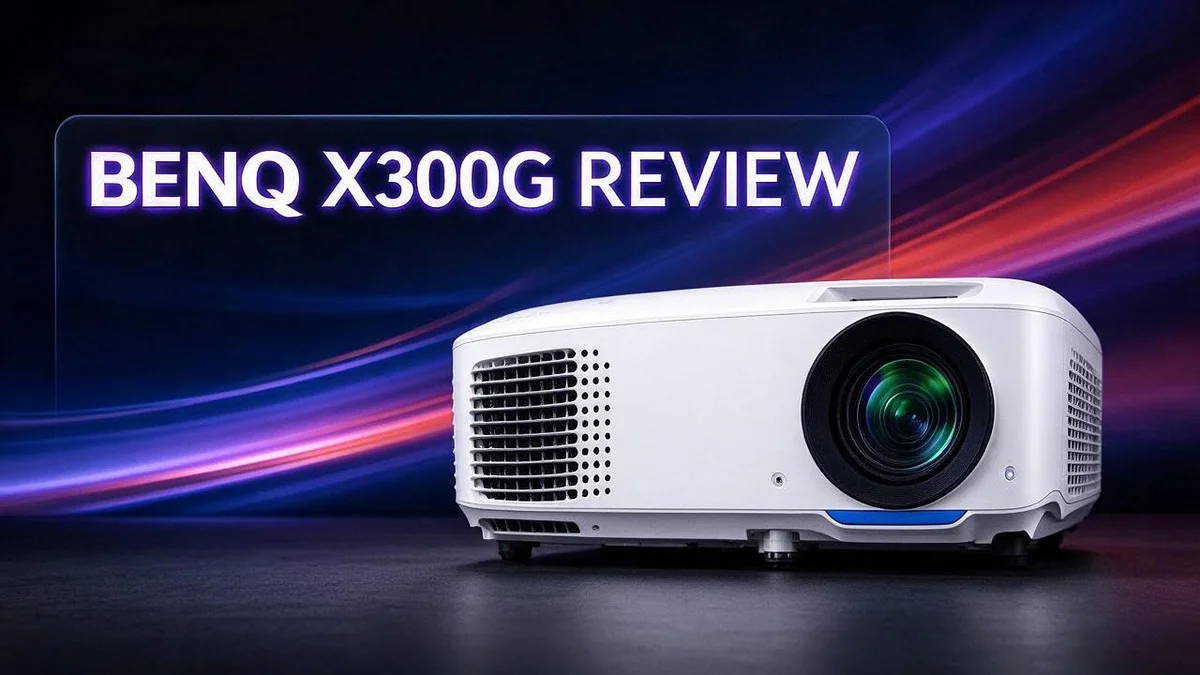
BenQ X300G Review: Is This 4K Portable Gaming Projector Worth It?
Want a big screen gaming setup that fits in a backpack? The BenQ X300G could become your next favorite gadget.
This 4K DLP projector packs a lot into a small body. It delivers 2000 ANSI lumens and can project an image up to 120 inches wide.
Gamers will notice the low input lag right away. The projector also sets up quickly, thanks to realtime auto keystone and a motorized zoom.
Colors look rich, with 84 percent DCI P3 coverage and HDR PRO support. The LED light engine also promises a long lifespan.
Still, some users say the image looks dim for its rated brightness. Few reviews exist so far, so this guide covers what matters most.
In a Nutshell
-
Setup takes minutes. Real time auto 3D keystone corrects tilted images for you. The optical motorized zoom lets you fit the picture to your wall.
-
Sound comes built in. Two 8W speakers handle casual play and streaming. You can skip extra speakers at first.
-
The light source lasts. The LED engine gives you a long life. You will not need to swap bulbs often.
-
The screen can grow large. The projector throws an image up to 120 inches. Your games feel like they fill the room.
-
Refresh rate has limits. The 4K panel runs at 60Hz. Players who want very fast motion may prefer a different model.
-
Compare the lineup first. The BenQ X3000i offers 1080p at 240Hz for fast shooters. The BenQ X500i and BenQ X3100i also deserve a look before you decide.
Picture Quality and Brightness

- True 4K UHD, HDR10 + HDR-PRO: Experience games in stunning clarity & detail, this 4K gaming projector...
- Ultra-Low Latency: Experience gaming with zero latency with response times as quick as 4ms (1080p@240Hz...
Last update on 2026-11-26 / Affiliate links / Images from Amazon Product Advertising API
Brightness shapes how the picture looks in your space. The X300G rates at 2000 ANSI lumens. That number shows raw light output. It does not guarantee a bright image on every wall.
Room light matters most. A dim room lets the image pop. Bright lamps or sunlight wash out colors fast. For the best results, close the curtains and turn off overhead lights.
Screen size changes brightness too. A bigger picture spreads the same light over more area. So a 120 inch image looks dimmer than a smaller one. Many people find a 100 inch size a sweet spot.
A gray or white surface can help. Pick a surface that reflects light evenly. Rough or uneven walls scatter light and soften the image.
Color stays natural in controlled light. Dim rooms keep skin tones natural. Greens and blues also look truer. Light control helps you see the palette the way makers intended.
Dark scenes look deeper when the room stays dim. HDR PRO support helps bright highlights stand out. Bright areas still need enough lumens to shine through.
The 4K panel packs many pixels into each image. Text and fine details look crisp at close range. Sit at a comfortable distance to enjoy that detail.
Small habits help too. Dim the lights before movie or game night. Test the image during the day and at night. Adjust zoom and focus until edges look sharp.
Shadows need care too. Dark game scenes can hide enemies. A dim room helps, but you should not go too dark. Keep a soft ambient glow behind the screen so your eyes stay relaxed.
Revisit your settings each season. Daylight shifts as months pass, so the best setup may change.
Image Setup and Placement
Placement starts with one simple question. Where will the projector sit? The X300G works well on a table, shelf, or stand close to the wall.
Measure the wall before you unpack. Check the width and height of the wall or screen area. Then measure the spot where the projector will sit. Short throw designs need less space than standard projectors, so you can place the unit close to the wall and still fill the area.
Think about how you will use the projector. A tabletop setup works well for quick movie nights. A ceiling mount looks cleaner, but it needs proper hardware and careful cable planning.
Use the zoom to fit your space. The optical motorized zoom lets you change the image size without moving the unit. Adjust the zoom until the picture sits inside your wall edges. Then fine tune the focus so text and edges look sharp.
Center the lens with your screen. Line up the lens with the middle of the wall or screen. Keep the body level on a flat surface. Auto correction handles small tilts, but a level base still gives the cleanest edges and the most even picture.
Leave room for airflow. Keep space behind and beside the vents. Do not place the projector inside a cabinet or near curtains. Good airflow keeps the unit running smoothly during long gaming sessions.
Plan your cable path. Route the power cable and HDMI cable away from foot traffic. Use cable clips or tape along the wall or table edge. A tidy setup looks better and avoids accidental tugs that can shift the projector.
Mark the spot for easy resets. Because the X300G is portable, you may move it often. Place a small strip of tape on the table or shelf to mark the position. Next time, the image will line up in seconds.
Check your seating distance. Sit where you can reach your controller comfortably and see the whole picture. Test a few seats before you settle in for a long game or film.
Run a quick test before you start. Play a bright test pattern or a familiar video. Walk around the room and check the corners, edges, and focus from your normal seat. Small adjustments now save frustration later.
Gaming Performance and Input Lag
Input lag decides how a game feels. It measures the delay between a button press and the action on screen. Lower delay helps players react faster.
The X300G earns strong marks for its low input lag. Shooters, racing titles, and fighting games feel more direct. Quick responses matter when every frame counts.
Why does this matter so much? A player often spots an enemy, then presses fire. Extra delay can make that shot feel late.
Test the feel yourself. Connect your console or PC and play a fast game for ten minutes. Watch how quickly crosshairs and characters respond.
Check the picture mode in the menu. Many projectors add processing that slows the signal. Choose a game mode if one exists.
Your source device matters too. A console or PC that sends a clean signal helps the projector perform well. Use a solid HDMI cable and avoid extra adapters when you can.
Watch for motion trails. Fast scenes can look soft on some projectors. Pan the camera in a few games and look for blur behind moving objects.
Long sessions can strain your eyes. Take a short break every hour. Keep your seat at a comfortable distance from the screen.
Wired headsets give the tightest audio timing. Wireless headphones can add their own delay. Pick the option that keeps sound in step with the action.
A good test uses a fast game you already know. Compare how the controls feel in that game. Your hands will notice small differences fast.
Save your favorite settings after you find the best feel. Write them down so you can return fast. Small changes can make a big difference in how the game plays.
Who gets the most from it. Casual players and action fans will enjoy the large, responsive picture. Competitive players who chase the highest refresh rates may compare other models first.
Top 3 Alternatives
Looking for a projector that delivers great picture quality? These three options each suit a different type of viewer. Let’s take a closer look.
BenQ X3100i
- True 4K UHD, HDR10 + HDR-PRO: Experience games in stunning clarity & detail, this 4K gaming projector...
- Ultra-Low Latency: Experience gaming with zero latency with response times as quick as 4ms (1080p@240Hz...
Last update on 2026-11-26 / Affiliate links / Images from Amazon Product Advertising API
The BenQ X3100i delivers sharp 4K UHD images. It supports HDR content, so colors look bright and lively. Gamers will appreciate its low input lag. The projector also handles rooms with some ambient light well. Setup stays simple, which makes it a good fit for movie nights and sports.
Optoma UHD38

- True 4K Ultra HD
- Lag-Free Gaming

Last update on 2026-11-26 / Affiliate links / Images from Amazon Product Advertising API
The Optoma UHD38 is another strong 4K choice. It produces vivid colors and deep contrast. Its low input lag keeps fast-paced games smooth. The projector also runs quietly, so it will not distract you during films. Many people use it in dedicated home theaters or cozy living rooms.
Epson Home Cinema 2350

- 4K PRO-UHD TECHNOLOGY — Advanced 4K PRO-UHD technology combines resolution enhancement with HDR10 and HLG...
- 2,800-LUMEN BRIGHTNESS — 2,800 lumens of color and white brightness deliver bright, vibrant images across a...
Last update on 2026-11-26 / Affiliate links / Images from Amazon Product Advertising API
The Epson Home Cinema 2350 uses 3LCD technology for bright, even images. It delivers Full HD 1080p resolution that looks great on most screen sizes. This model suits families who want an easy, everyday viewing experience. Its bright output also works well in rooms with some daylight.
Sound and Connectivity
The X300G has two 8W speakers built in. They fill a small room with clear sound. Casual movies and quick game sessions sound good through them.
Speaker power is modest, though. Large rooms or loud action scenes can sound thin. Many viewers add a soundbar for deeper bass and wider sound.
Room shape changes how audio feels too. Hard walls bounce sound back at you. Rugs, curtains, and sofas soften those echoes and make voices easier to hear.
Connecting your devices is simple. Plug your console, streaming stick, or laptop into the HDMI port. Check the port labels on the back panel before you start.
Next, open the sound settings on your source device. Pick the projector or your external speakers as the output. This quick step stops a silent screen.
Turn the volume up slowly. Start near the middle of the range. Listen to dialogue and explosions, then adjust the level. A favorite film makes the best test.
If your device lacks an HDMI port, use an adapter. Choose one that carries both video and audio. Test it before you travel.
Wireless audio adds more freedom. You can pair Bluetooth headphones or speakers with your device. Keep the distance short so the signal stays steady.
Wireless sound can add a small delay. Movies usually hide this well. Fast games may feel off, so test the audio before a long match.
Sound and picture should stay in sync. Watch a short clip and look for lip movement that does not match the voices. If the voices lag behind, change the audio mode or reduce wireless use.
Streaming apps also deserve a look. Sign in to your favorite service and check your wireless network strength. A stable connection keeps video smooth during long nights.
Plan your full setup before game night. Gather cables, adapters, and speakers in one spot. A tidy setup saves time and keeps frustration low.
Portability and Lamp Lifespan
The X300G is easy to carry from room to room. Many people use it in a living room one night and a bedroom the next.
Portability works best when you plan the move. Place the projector in a padded bag before you transport it. Let the unit cool down before you pack it away.
Choose a storage spot near where you watch. A closet or cabinet keeps dust away from the lens. Coil your cords loosely so they do not kink.
The X300G uses an LED light engine instead of a traditional lamp. This feature matters for long term use.
Many projectors need a new lamp after a few years. With LED, you can skip that chore for a long time.
Longer life means less time on maintenance. You spend more hours watching movies and fewer hours hunting for replacement parts.
Brightness needs a closer look, though. The unit is rated at 2000 ANSI lumens. Some users report that the picture looks dim for that rating.
Room light is often the real culprit. Close the curtains and dim the overhead lights before you start a movie.
Wall color also changes how bright the image feels. A smooth, light colored wall reflects more light back to your eyes. A dark or textured wall can make the picture look flat.
Simple care keeps the picture sharp. Wipe the lens gently with a soft, dry cloth. Dust on the lens can soften the image over time.
Plan your viewing around the brightness. Movies with dark scenes look best in a dim room. Bright cartoons and daytime shows look fine with some room light.
Test the picture with a favorite movie before you move it. Overall, the X300G suits people who move often. Its long-life LED makes everyday use simple and calm.
Pros and Cons
Pros
- Big screen: It projects up to 120 inches for a cinema feel.
- Sharp 4K detail makes text and textures look crisp.
- The motorized zoom helps you fit the image without moving the unit.
- Auto keystone corrects angled placement with little effort.
- Rich colors and HDR support make movies look lively.
Cons
- The 60Hz refresh rate trails rivals built for fast competitive play.
- Few independent reviews mean long-term data is still limited.
- The X3000i offers 240Hz if smooth motion matters most.
- It is worth comparing the X500i and X3100i before you decide.
Who Should Buy It
Movie fans who want a theater feel will enjoy this projector. Many people love watching films on a wall rather than a small screen. This model suits that goal well.
Renters often find it a smart pick. A TV bolted to the wall may not be allowed in a rental. A projector sits on a shelf or table and leaves no permanent marks.
Casual gamers who play on a couch make a good match. Story games and slower adventures look great on a big image. Low input lag keeps controls feeling responsive during those sessions. Sports titles and racing games also feel fun on a wall sized display.
Families who share one room can gain a lot. Everyone can gather around one large picture for movie nights. Kids and adults alike enjoy the shared experience.
Home theater beginners can start small. A projector lets you test movie nights before you plan a full setup. You can learn what you like without a big commitment.
Students and small apartment dwellers may like the compact design. Space often runs short in shared homes. A projector can sit on a shelf when you do not need it.
People with little setup time will appreciate the quick start. Quick placement tools help you save time. You can get a clean image in a few minutes.
Owners of dark rooms or flexible spaces fit the profile best. Basements, spare rooms, and garages with controlled light work well. A bright living room may wash out the picture.
Some buyers should look elsewhere. Competitive players who want fast motion need a higher refresh rate. Buyers who want a proven track record may compare other models first.
Overall, this projector fits people who value a big picture over a bright room. Think about your room light and your play style first. Take a moment to measure your wall and check your light. That choice will tell you if this model is right for you.
Final Verdict
The BenQ X300G earns a strong place in the portable projector market. It offers sharp 4K visuals, quick setup, and low input lag. Those traits make it a fun pick for gaming nights.
Think of it as a versatile choice. The LED light engine, 2000 ANSI lumens, and HDR support give you a solid base. You can enjoy a big screen without drilling holes or mounting hardware.
Setup feels quick and simple from the start. The built in speakers, rated at 2 x 8W, handle casual viewing well. A soundbar may still help in larger rooms.
Low input lag gives gamers a real edge. Story games, platformers, and slower action titles should feel responsive. Serious esports players, however, may want a faster display.
Check the return policy before you buy. Few reviews exist, so you need a seller who accepts returns. Easy returns protect you if the brightness does not match your room.
Some buyers should skip this model. People who want a very bright picture in a sunny living room may feel let down. Anyone who needs a long track record may prefer to wait.
Our bottom line is simple. The X300G is a capable 4K projector with a strong gaming focus. It suits buyers who plan their viewing space well and enjoy a cozy, dim-room picture.
Read a few fresh reviews and compare the specs before you decide. Your choice should match your room, your games, and your viewing habits.
Here is a quick checklist before you order. Measure your wall space first. Check how much light enters the room during movie time. Confirm the warranty terms and return window. Each step saves time and frustration.
Final thought for busy households. A projector suits people who want flexibility over a fixed TV. Enjoy a big picture today, and upgrade later if your needs grow.
Frequently Asked Questions
Is the BenQ X300G bright enough for daytime viewing?
The X300G is rated at 2000 ANSI lumens, but some users say it looks dimmer than that number suggests. For the best picture, close the curtains and dim the lights. Bright rooms can wash out the image.
Does the X300G have speakers?
Yes, it has two 8W speakers. They handle casual viewing and quiet game sessions well. For louder movie nights, many people add a separate speaker system.
Will the LED light engine need replacing soon?
Probably not. The LED light engine is designed to last a long time. You can enjoy years of use without swapping out a lamp. Regular dusting of the vents keeps the projector running cool.
Can I use this projector in a small room?
Yes. The projector creates a large image from a short distance, so you do not need much room behind the screen. A wall with plenty of open space works best. Measure your wall first to see how big the picture will be.

Dillip is the founder and editor of DillipWeb.com, where he simplifies the world of AI software, tech gadgets, and accessories through honest reviews, detailed comparisons, and easy-to-follow guides. With a deep passion for emerging technology, he helps everyday users make smarter, more informed tech decisions.